57
SyStem Setup (SyS Set up1 and SyS Set up2)
This menu allows for the setting of BOOST MODE and NIGHT
MODE. BOOST MODE enables the system to operate at a
higher compressor speed than maximum compressor speed.
NIGHT MODE enables the system to operate at decreased
compressor and fan speeds.
BOOST MODE temperature can be adjusted in “BOOST
TEMP” menu. When ambient temperature gets higher than
BOOST MODE temperature, the system will operate in
BOOST MODE.
CHARGE MODE, DEFROST HEAT can be enabled within
this menu.
equIpment teSt (equIp teSt)
The mandatory system verication test is enabled from this
menu, which enables a functional check of the equipment, in
addition to ensuring proper stop valve position.
cool Set-up
This menu allows for the adjustment of several cooling per-
formance variables. “Cool Airow Trim” (range from -15% to
+15% in 3% increments), “Cool Airow Proles”, “Cool Fan
ON Delay”, “Cool Fan OFF Delay” and “Dehumidication
Select” (enable or disable dehumidication) can be adjusted
in this menu. You can also reset this entire menu to factory
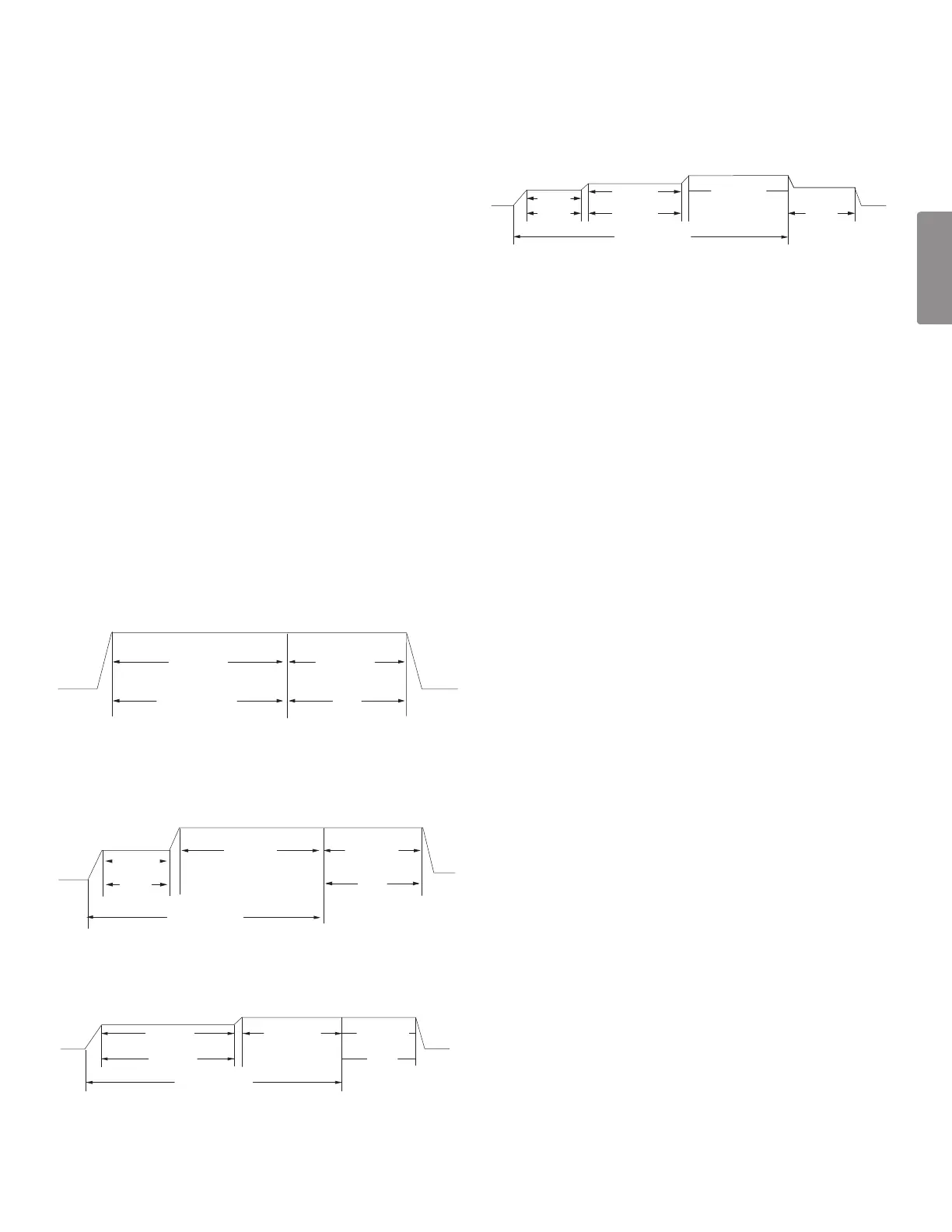
default settings. See the following images showing the four
cooling airow proles.
• Prole A provides only an OFF delay of one (1) minute
at 100% of the cooling demand airow.
OFF OFF
Cooling Demand
100% CFM 100% CFM
1 min
• Prole B ramps up to full cooling demand airow
by rst stepping up to 50% of the full demand for
30 seconds. The motor then ramps to 100% of the
required airow. A one (1) minute OFF delay at 100%
of the cooling airow.
Cooling Demand
50% CFM
100% CFM 100% CFM
OFF
OFF
1/2 min
1 min
•
Prole C ramps up to 82% of the full cooling demand
airow and operates there for approximately 7 1/2 minutes.
The motor then steps up to the full demand airow. Prole
C also has a one (1) minute 100% OFF delay.
OFF
82% CFM
7 1/2 min 1 min
Cooling Demand
100% CFM
OFF
100% CFM
• Prole D (default) ramps up to 50% of the demand
for 1/2 minute, then ramps to 82% of the full cooling
demand airow and operates there for approximately
7 1/2 minutes. The motor then steps up to the full
demand airow. Prole D has a 1/2 minute at 50%
airow OFF delay.
50% CFM
Cooling Demand
OFF
OFF
1/2 min 7 1/2 min 1/2 min
82% CFM
100% CFM
50% CFM
Airow Tables
See service manual for more detailed information.
cool run ValueS
Depending on the system conguration, adjusting the maxi-
mum compressor RPS (revolutions per second) may be re-
quired. Necessary adjustments to the maximum compressor
RPS are made through the following sub-menus.
cool rpS range
→maxImum compreSSor rpS range for coolIng
Select the range that your maximum compressor RPS
falls within.
cool rpS Select
→maxImum compreSSor rpS SelectIon for coolIng
Within the selected range, choose the specic maximum
compressor RPS for the system conguration.
NOTE: Under high ambient, the unit may ramp down com-
pressor RPS by protection, even max RPS is changed higher
by this menu.
It may be under Compressor Reduction Mode.



 To Next Page