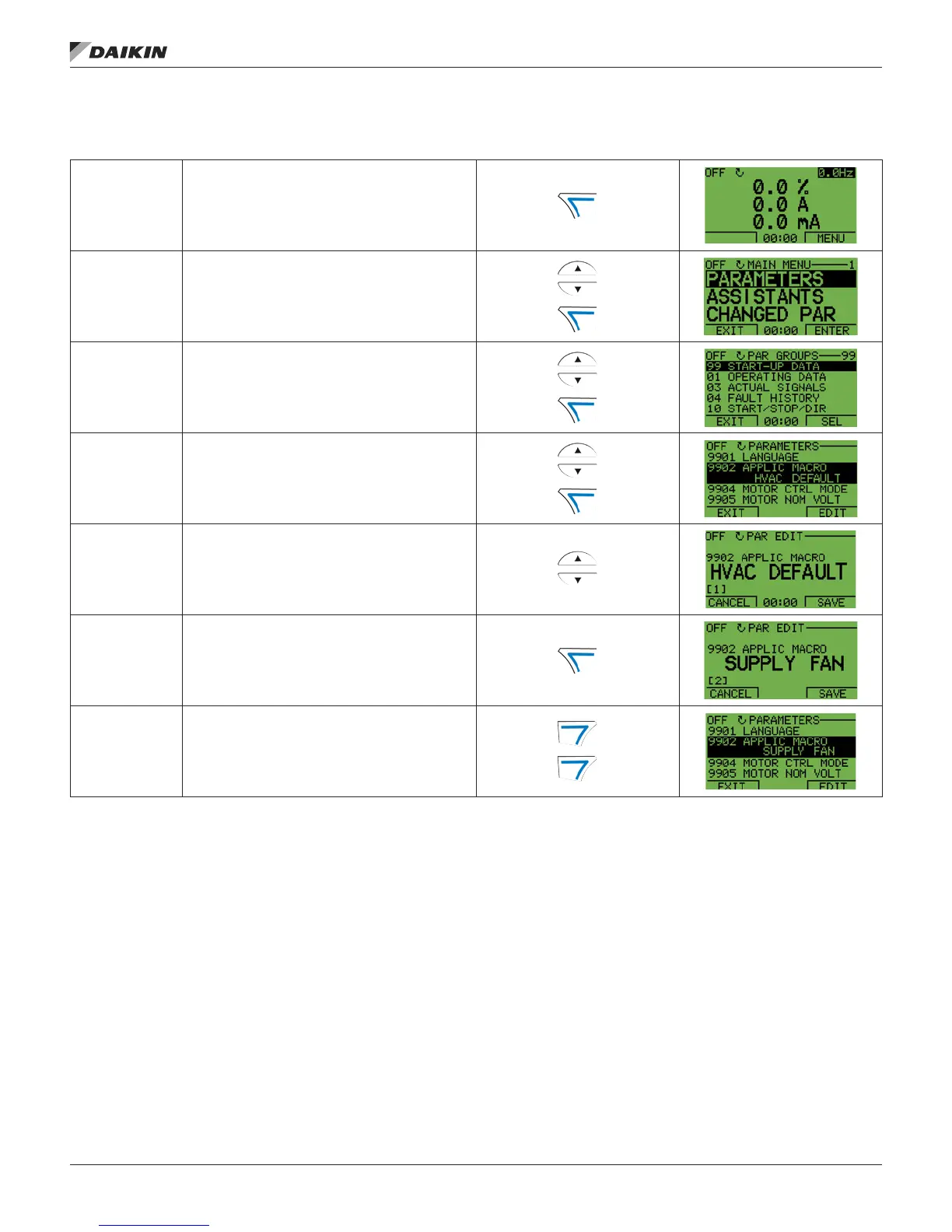
Figure 2: Parameters Mode
To change the parameters, follow these steps:
1 Select MENU to enter the main menu.
2
Select the Parameters mode with the UP/ DOWN buttons,
and select ENTER to select the Parameters Mode.
3
Select the appropriate parameter group with the UP/
DOWN buttons and select SEL.
4
Select the appropriate parameter in a group with the UP/
DOWN buttons. Select EDIT to change the parameter.
5
Press the UP/DOWN buttons to change the parameter
value.
6
Select SAVE to store the modied value or select
CANCEL to leave the set mode.
• Any modications not saved are cancelled.
• Each individual parameter setting is valid immediately
after pressing SAVE.
7
Select EXIT to return to the listing of parameter groups,
and again to return to the main menu.
For detailed hardware description, see the Appendix on page 88.
NOTE: The current parameter value appears below the
highlighted parameter.
To view the default parameter value, press the UP/
DOWN buttons simultaneously.
The most typical and necessary parameters to
change are parameter groups 99 Start-up data, 10
Start/Stop/Dir, 11 Reference Select, 20 Limits, 21
Start/Stop, 22 Accel/Decel, 26 Motor Control and 30
Fault Functions.
To restore the default factory settings, select the
application macro HVAC Default.
ConTrol Panel
www.DaikinApplied.com 7 OM 1191 • MD5 VFD













 To Next Page