Zone Management
42
4. Name each zone with a name that matches the zone name in the V-Net
®
control
panel. The smallest zone is listed at the top of the list with the full-screen and largest
zones at the bottom of the list. Refer to Figure 62.
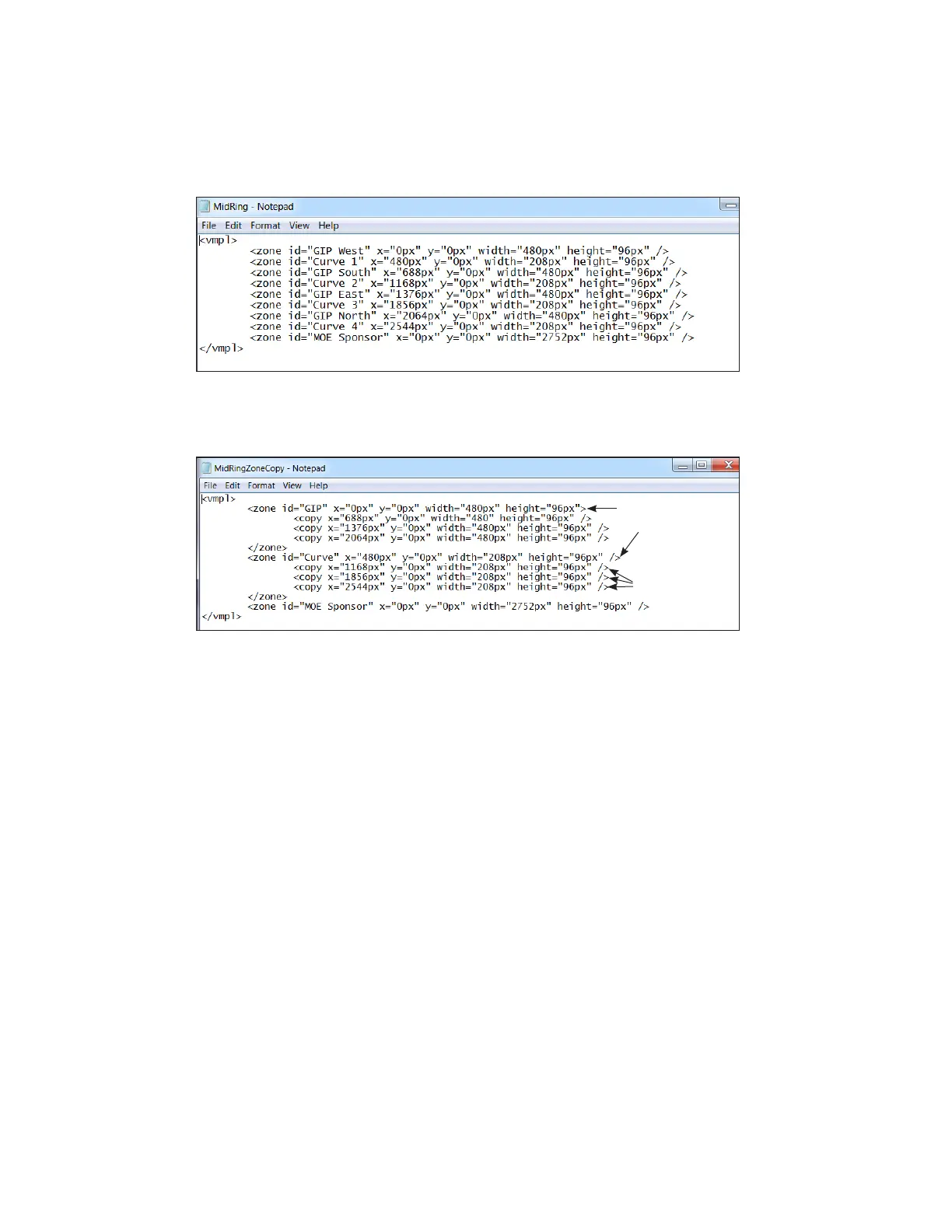
5. Check the zone id list and determine which zone ID to copy. This is the original (or
parent) zone ID. Refer to Figure 65.
Figure 65: Zones Before Using Copy Zone Feature
6. List the information for the copied zones on the lines below the original zone ID. Refer
to Figure 66.
Original (or parent)
zone ID
Copied (or child)
zone IDs
Figure 66: Zones After Using Copy Zone Feature
7. Identify the size of each zone using relative sizes or percentage sizes. Refer to
Figure 61.
8. Enter the x and y values to determine placement of the zones on the display.
9. Verify the LAYOUT le extension.
10. Save the le.
Starting the LAYOUT File
To start the LAYOUT le playing when the DMP-5000/8000 series player boots up, refer to
Default Content (p.25).



 To Next Page
 Loading...