DF4510HD | DF4910HD | DDF4510HDV-IM/-SM | DDF4910HDV-IM/-SM
www.dallmeier.com 15
5 Views and Connection Assignment
5.1 Box Cameras
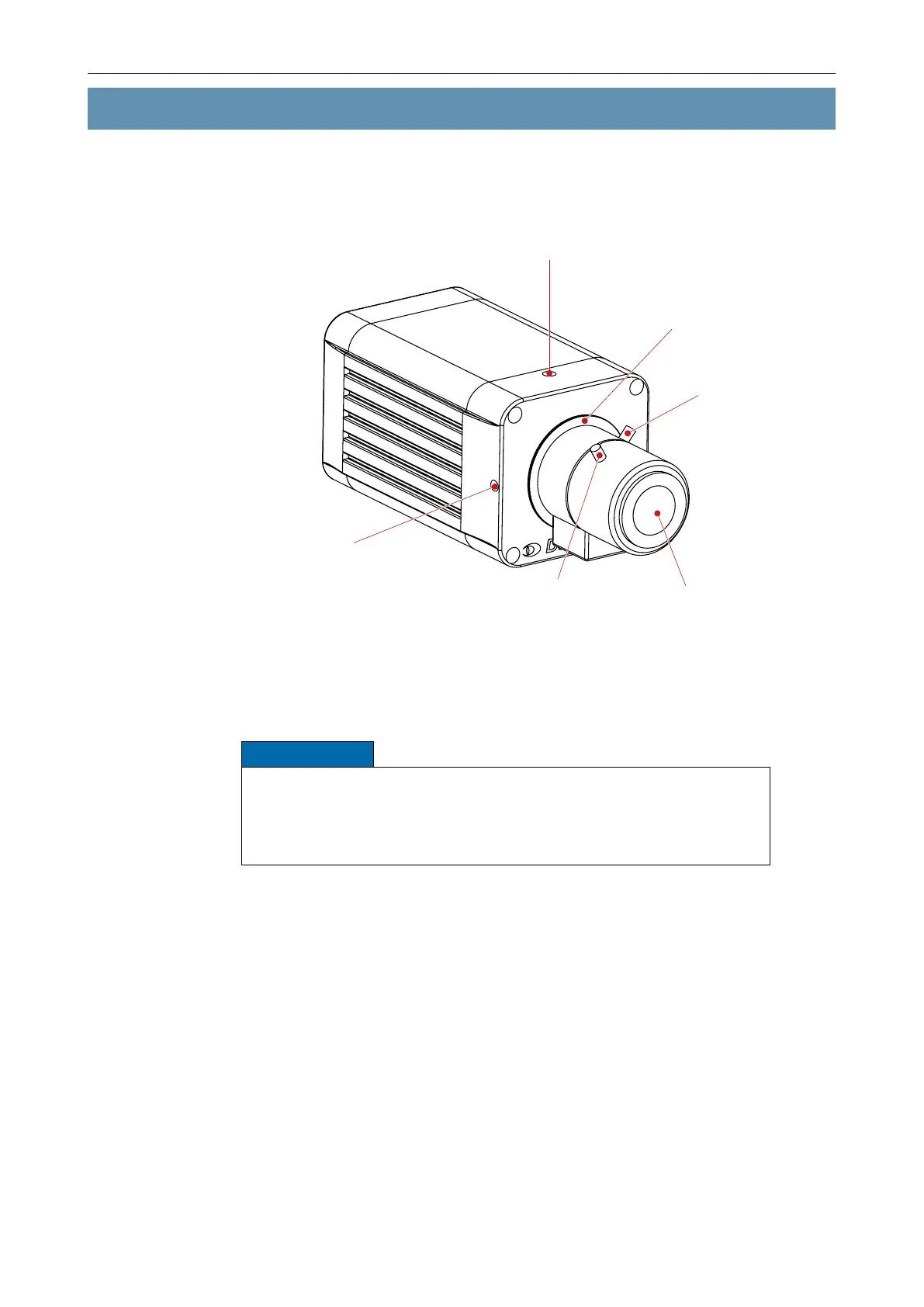
CS lens mount and
back focus adjustment ring
Locking screw for
back focus adjustment ring
(M4×4 hexagon socket screw,
wrench size 3)
¼" tripod socket (on top and bottom side)
for camera mounting
DC auto iris lens
Locking screw
(focal length)
Locking screw
(focus)
Fig. 5-1
The lens shown in Fig. 5-1 is illustrative only and may differ from the actual product.
NOTICE
In order to obtain a correctly adjusted image, install the camera up side
down when using the ultra wide-angle lens F1.8 / 1.8 – 3 mm.
Alternatively, you can ip the image in both directions (horizontally and
vertically) by using the ip function of the camera.



 To Next Page