A·X·U·M User Manual Version 2.5 - 2011-01-28
AXUM from D&R - Phone: +31 294 418014 - E-Mail: info@d-r.nl - 17 -
6.1.1 IP/Clock configuration
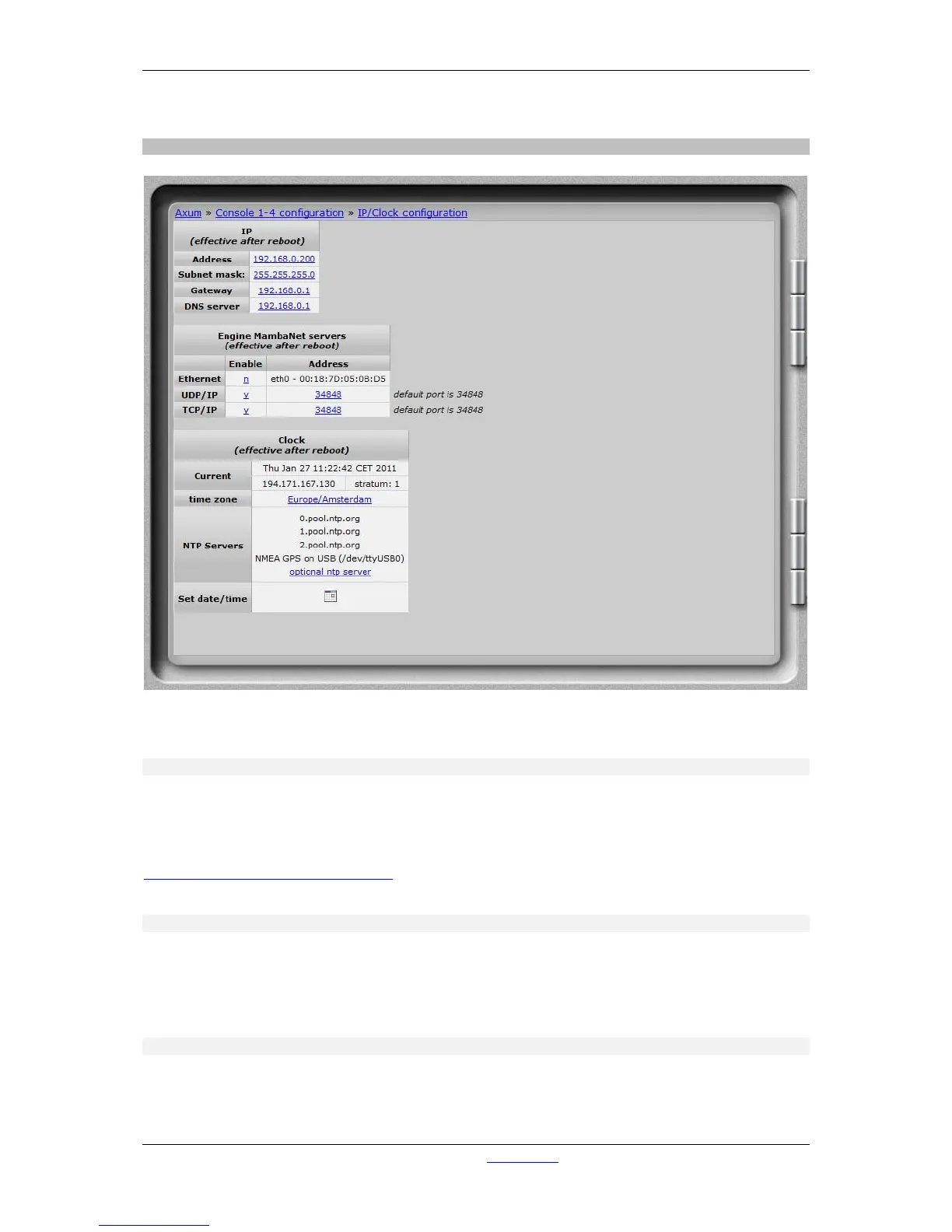
Figure 6: IP/Clock configuration
6.1.1.1 IP
Here you can setup the network settings to be compatible with the required settings in your situation
and you can set the time zone to where you are.
It’s possible to change the IP, subnet, gateway and DNS server address by clicking on the address.
For more information on IP addressing:
http://en.wikipedia.org/wiki/IP_address
WARNING: These setting become active after reboot.
6.1.1.2 Engine MambaNet servers
To enable and/or disable a specific server for Ethernet, UDP and/or TCP you can select here de y/n
field. Also the used UDP and TCP port can be changed to a non default value.
WARNING: These setting become active after reboot.
6.1.1.3 Clock
To change the time zone, click on the used time zone (in our example ‘Europe/Amsterdam’). You can
select the desired time zone in the list box.



 To Next Page