A·X·U·M User Manual Version 2.5 - 2011-01-28
AXUM from D&R - Phone: +31 294 418014 - E-Mail: info@d-r.nl - 25 -
6.1.7 Destination configuration
The 19” rack unit can accept various I/O cards. With these cards, you can send audio from the Axum
digital audio system to the audio format you require. Because the audio connected to the I/O cards
can have different channel relations (mono, stereo) a combination has to be made. A user readable
label has to be created to configure destinations. Such destination is the entity you can select to be
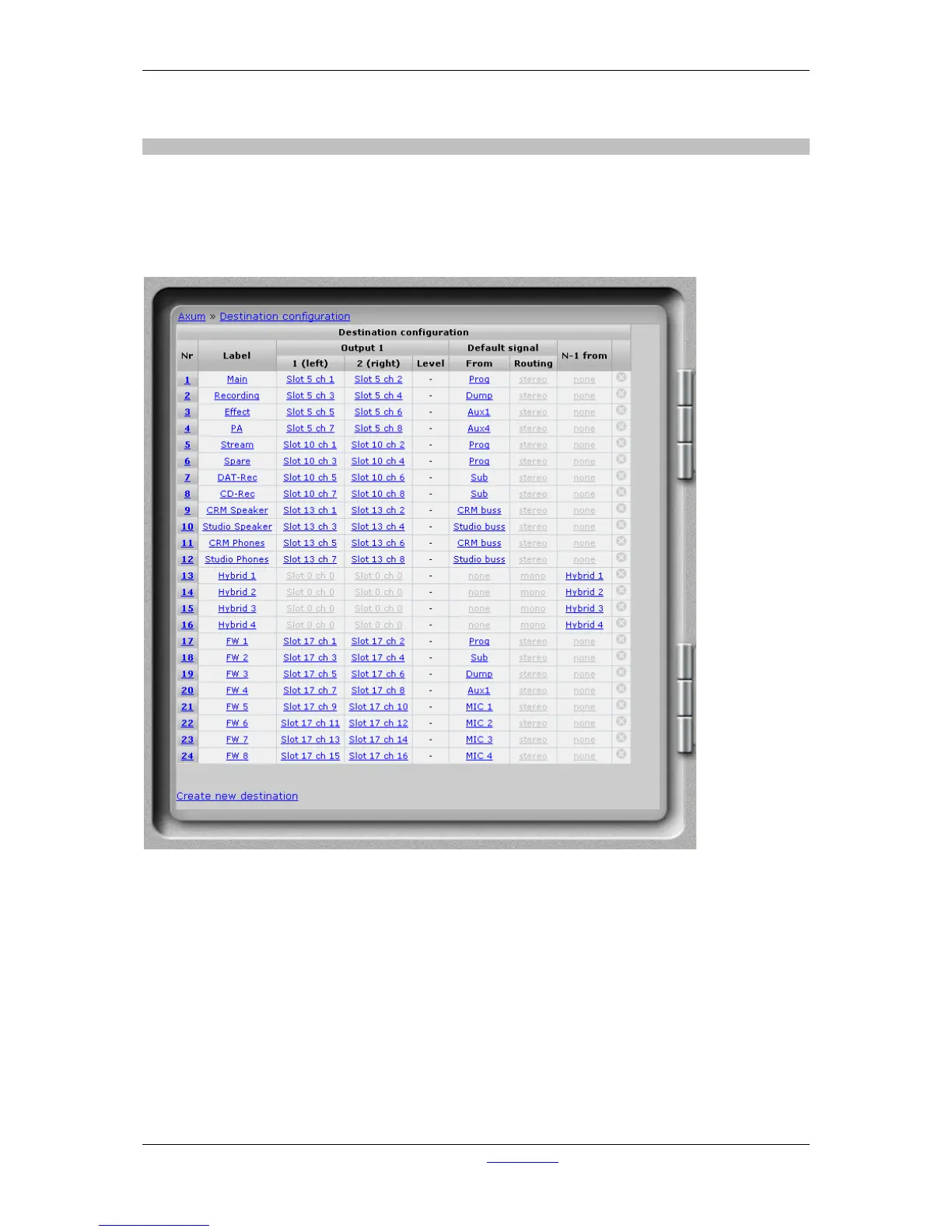
the output of a mixing buss of the mixing console. See an example destination list:
Figure 12: Destination configuration
• Nr
Here you can reposition the destination to make the list in a convenient order.
• Label
Name of the destination you are setting up.
• Output 1/2
Here you select the physical slot and output of the card you want to assign to this destination.
For a mono output you have to select only one of the left or right outputs to a physical slot/ch.
• Level
The destination level for this source is at startup set to this level; for example to adjust
headroom for a single output.



 To Next Page