AP20 Installation and Operating Guide Page 111
AP20 Installation & Operating Guide Document # 9301H39200 Ver. 1.25
8. Touch the center of the crosshair again. Repeat this process as each new crosshair appears.
9. The last crosshair will appear in the center of the screen. Once you have touched this one,
the process of repositioning your display is complete. The system will immediately
perform a “soft boot” to save the new position values.
NoLock
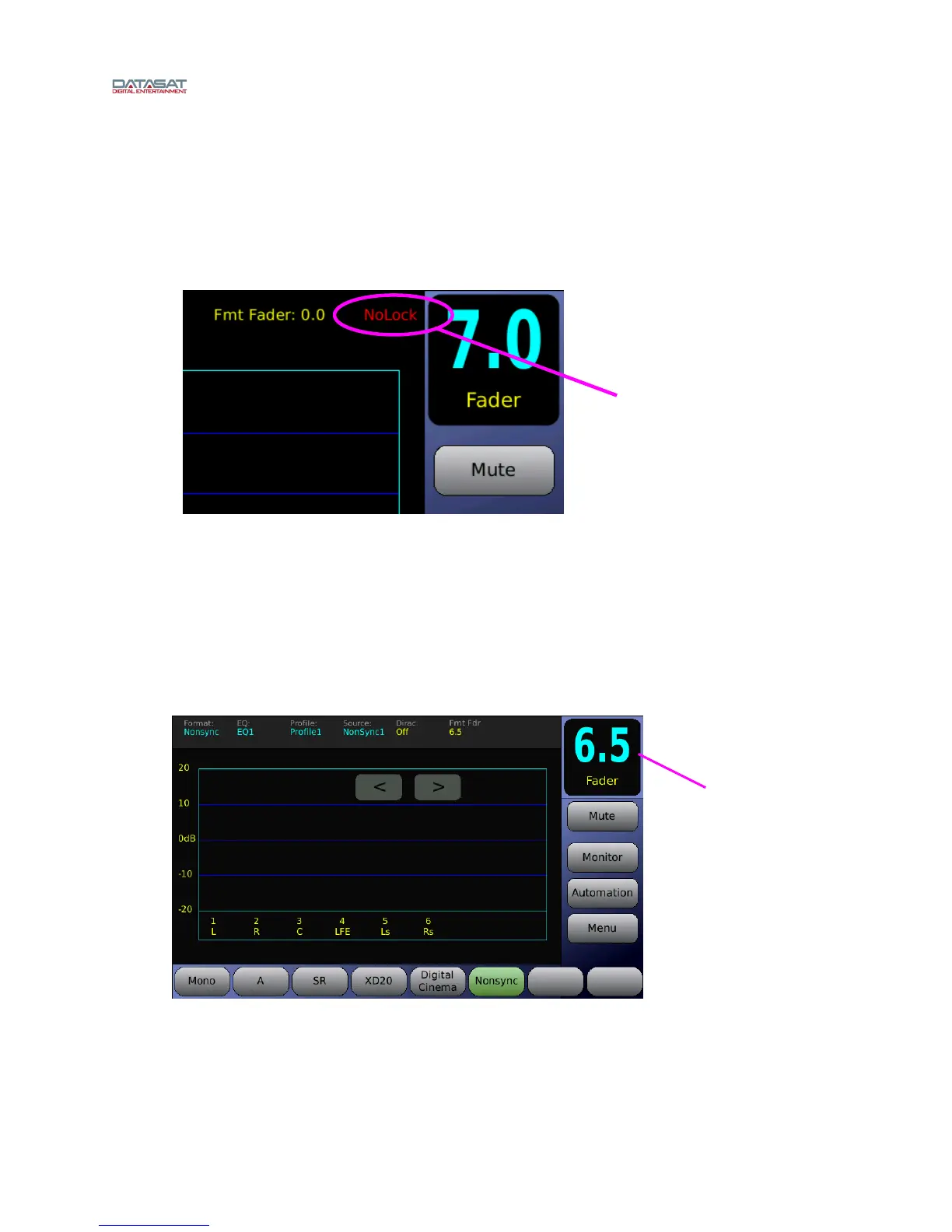
If the source is a digital input and there is no clock signal, then the display will show “No Lock” as
shown below.
Figure 91. NoLock
Fader Not Functioning
If the front panel fader becomes damaged, use the following work around until it can be replaced.
Using your finger, double-tap the fader level number displayed in the box at the top right corner on
AP20’s touch screen. Once you double-tap, a set of green arrows will appear that can be used to adjust
the main volume up or down. To increase volume, touch the up pointing arrow. To decrease volume,
touch the down pointing arrow. To make the green arrows disappear, simply double-tap the fader level
number again.
Figure 92. Fader Adjustment Work Around
Indicates no clock
signal for digital
source.
Fader level
number



 To Next Page