AP20 Installation and Operating Guide Page 70
AP20 Installation & Operating Guide Document # 9301H39200 Ver. 1.25
4.3.6 Format Options
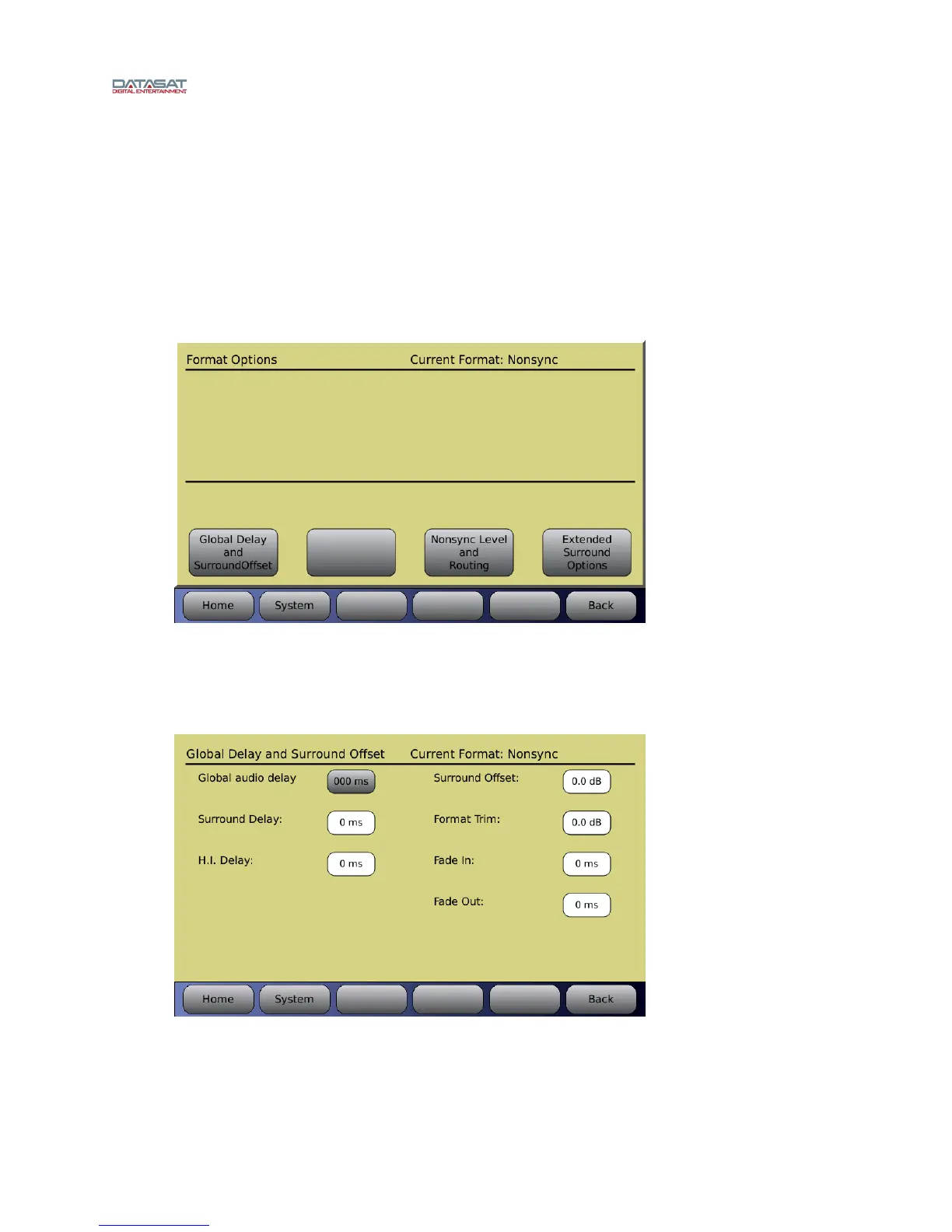
The Format Options screen allows changes to Global Delay, Extended Surround Options, Nonsync
Levels and Routing, Mic Level and Routing, Matrix and Routing, Digital Cinema Format Options,
Decoder Setup and Film Options (if the optional Optical Film card (H338) is installed – see appendix F).
It also provides feedback on the current Audio format.
The options on this screen will change according to the currently selected input source. Figure 44 below
shows the options available when the input source is Nons
ync.
Menu (System) > Formats > Format Options
Figure 44. Format Options Screen
4.3.6.1 Global Delay and Surround Offset
This screen is available for all input sources.
Menu (System) > Formats > Format Options > Global Delay and Surround Offset
Figure 45. Global Delay and Surround Offset
Global audio delay for current format: Audio can be delayed for a selected format, if
necessary, to synchronize with a digital video projector. Use the adjustment knob to adjust
the audio delay. Delay values increase by 1 ms increments up to a maximum of 1 second.



 To Next Page