AP20 Installation and Operating Guide Page 94
AP20 Installation & Operating Guide Document # 9301H39200 Ver. 1.25
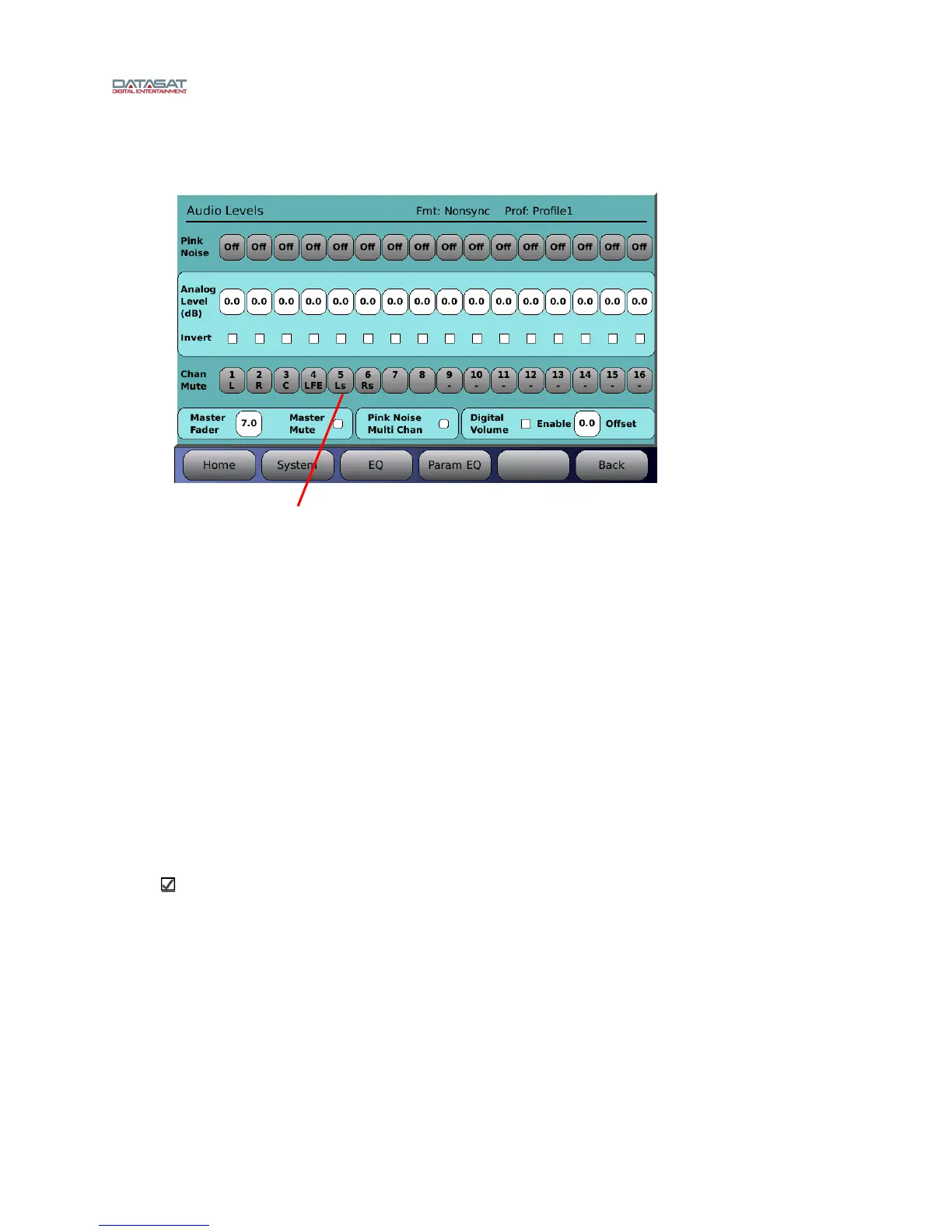
4.3.9 Audio Levels
Menu (System) > Formats > Audio Levels
Figure 73. Audio Levels
The Audio Levels screen is used for these functions:
Set the levels. You can turn on the pink noise on any single channel to check and adjust the
level. This assumes that you have a SPL meter. The adjustment is usually made when the
Master Fader is set to 7.0.
Set surround delays. This is usually a known quantity based on the room size or speaker
locations. Surround delays set in this screen become part of the profile, and will affect all
formats associated with that profile. To set a delay that is specific to a format only, not
Profile, use the Global Delay and Surround Offset screen. See section 4.3.6.1 for more
inform
ation.
Check channel phase. This is done by enabling the pink noise on more than one channel and
checking the difference in sound level with an SPL meter or RTA.
General testing or troubleshooting. The technician may diagnose a problem by muting
selected channels while playing content, or playing pink noise on selected channels.
Setting digital volume level.
Note: The lighter blue areas contain settings that are saved in the configuration file. The darker
areas contain settings that are not saved.
At the top right of the screen, the current Format and current Profile are displayed.
Pink Noise – Select to turn pink noise on for a selected channel (1-16). Pink noise is
cleared when exiting the screen.
When operating with Pink Noise Multi Chan selected you can enable pink noise on
multiple channels.
When operating with Pink Noise Multi Chan unselected, only one channel may be selected
for pink noise, and any previous selection is cleared. Also, the analog level button for the
pink noise channel is automatically selected to simplify adjusting the gain after selecting
the pink noise.
Select channel(s)



 To Next Page