AP20 Installation and Operating Guide Page 59
AP20 Installation & Operating Guide Document # 9301H39200 Ver. 1.25
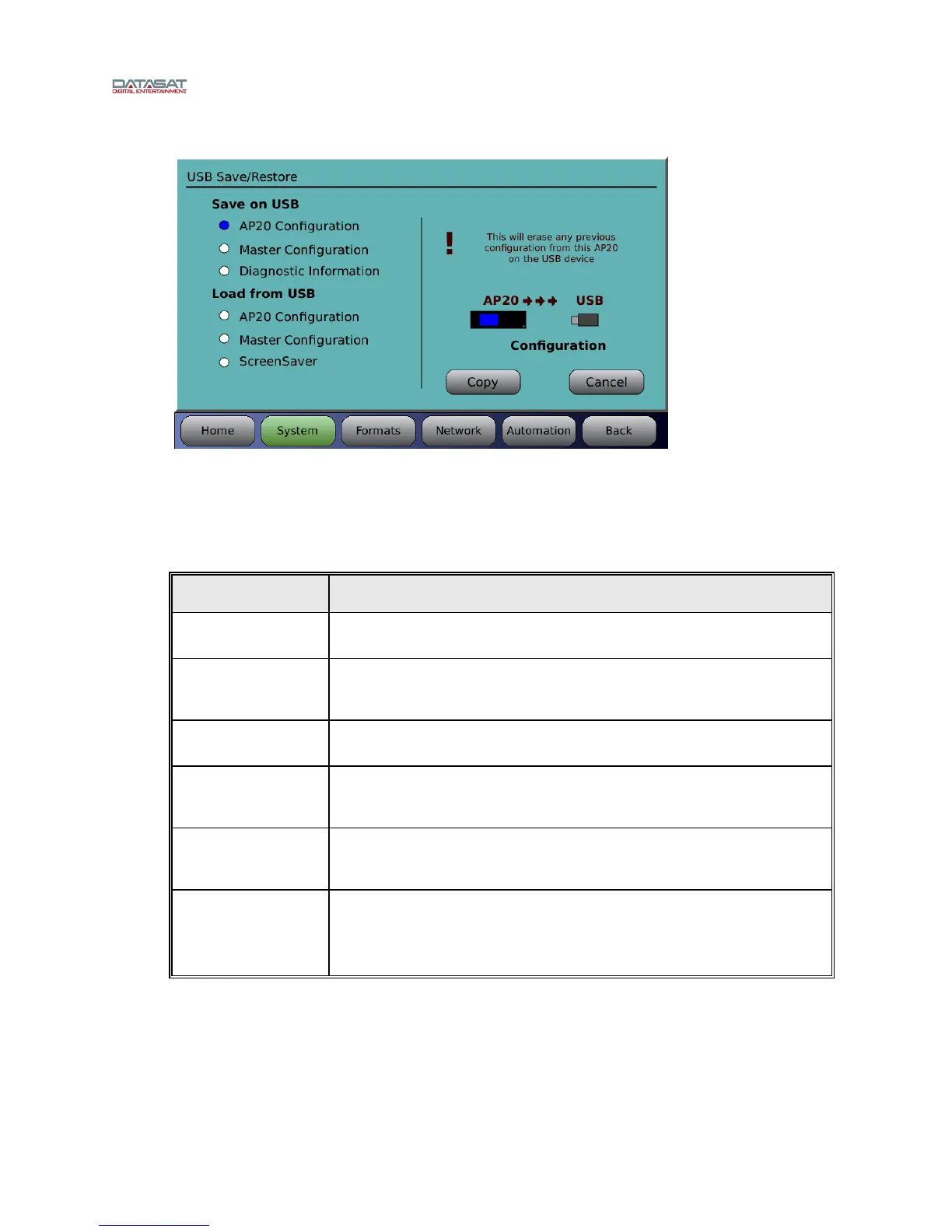
Menu (System) > USB Save/Restore
Figure 30. USB Save/Restore Screen
Select an activity on the left, then touch Copy on the right.
The following options are available when using a USB Flash drive:
Table 11. USB Flash Drive Options
OPTION RESULT
Save AP20 Config Save AP20 configuration to USB device. This will erase from the USB device
any previous configuration stored for this unit.
Save Master Config Save AP20 configuration to USB device as MASTER configuration, which
may be loaded onto other AP20 units. This will erase from the USB device
any existing MASTER configuration.
Save Diagnostic Info Save AP20 Diagnostic information to the USB device to facilitate
troubleshooting.
Load AP20 Config Copy AP20 configuration from USB device to system. This will ERASE the
existing configuration on the AP20 and cause a system restart after loading
the new configuration.
Load Master Config Copy AP20 MASTER configuration from USB device to system. This will
ERASE the existing configuration and cause a system restart after loading
the new configuration.
Load ScreenSaver Load a graphic image (ap20.jpg) from the USB device and use it as the
ScreenSaver.
The screensaver image is a 800 wide x 480 high jpeg image. The file must
be named “ap20.jpg" and placed in the root directory of the USB device.



 To Next Page