AP20 Installation and Operating Guide Page 76
AP20 Installation & Operating Guide Document # 9301H39200 Ver. 1.25
4.3.6.5 Digital Cinema Format Options
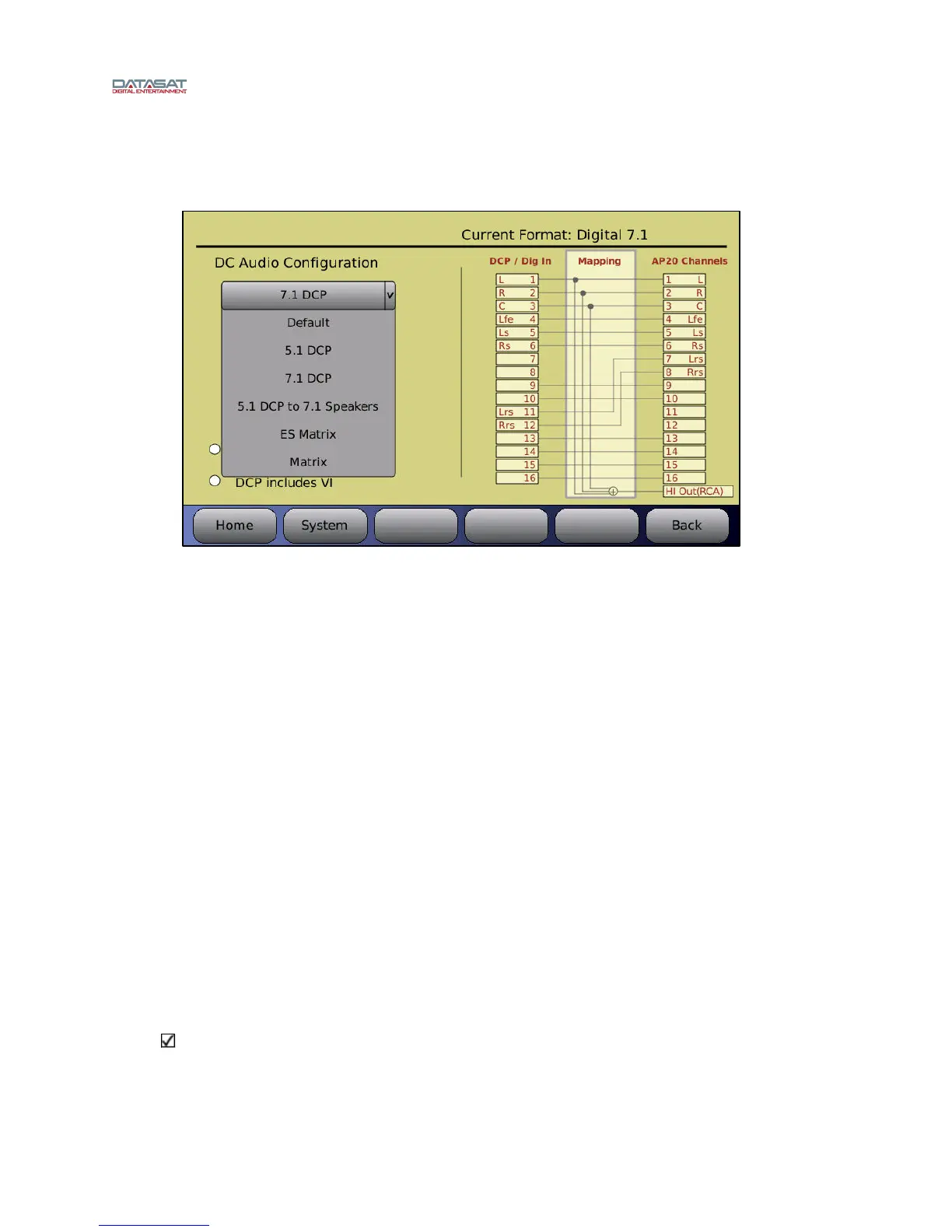
This screen is available for Digital ch 1-8, Digital ch 1-16 and Digital 9-16 input sources only.
Menu (System) > Formats > Format Options > Digital Cinema Format Options
Figure 52. Digital Cinema Format Options
Default - Digital In mapping is straight through to the AP20 channels. The HI Out on the AP20
RCA jack is mixed from L, R, C inputs.
5.1 DCP – Digital In mapping is straight through to the AP20 channels Out.
DCP includes HI – Select to route DCP HI In on pin 7 to the AP20 RCA jack. If
disabled, HI Out is mixed from DCP In L, R, C..
DCP includes VI - Select the DCP VI-N on pin 8 to AP20 channel 16. This channel
becomes a fixed level, not affected by fader value. Channel 15 becomes unavailable.
7.1 – Select when playing a 7.1 DS DCP in which the left/right back surround channels come in
on channels 11 and 12. When selected the back surround channels are routed to the AP20
channels 7 and 8. The AP20 channels 11 and 12 are not available with this option. Input
channels 7 and 8 are not routed unless one of the following options is selected:
DCP includes HI – Select to route DCP HI In on pin 7 to the AP20 RCA jack. If
disabled, HI Out is mixed from DCP In L, R, C.
DCP includes VI – Select to route DCP VI-N on pin 8 to AP20 channel 16. This channel
becomes a fixed level, not affected by the fader value. Channel 15 becomes unavailable.
5.1 DCP to 7.1 Speakers – Select to play 5.1 DCP in a theater set for 7.1 playback. The side
surround channels (5 and 6) are copied to the back surround channels (7 and 8). The undefined
channels 9-16 are mapped directly to the AP20 channels 9-16.
Note: In this mode the surround Offset should be adjusted down by typically 2dB to achieve
proper surround level.



 To Next Page