Troubleshooting (Problem Isolation) Repair Information
3 - 6 0070-10-0691 Accutorr Plus Service Manual
3.5.1 Isolating the Problem, System Level
1. Determine if the problem is in the main NIBP unit or in one of the add-on accessories.
2. If the problem is in the accessory, check the recorder unit for correct paper, correct
installation, and paper jams.
3. If the problem is in the main NIBP and/or SpO
2
section, rule out these simple
problems first:
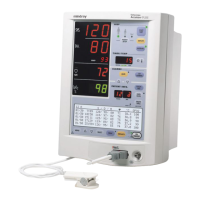
If AC power is available, then the green LED adjacent to the front panel
ON/STANDBY keys should be illuminated. If not, connect the power cord to a live
power outlet. If the green LED fails to illuminate, there is a probable power supply
malfunction.
Check the battery operation LED. Steady ON indicates battery operation. A flashing
LED indicates a near depleted battery. If the green LED is NOT illuminated, then the
battery or power supply/charger may be suspect.
Confirm correct operating parameters selection (i.e., correct patient size selection,
(Adult, Neonate, Ped.) and NIBP cuffs to match. In units with SpO
2
, verify that a
sensor is connected to the unit and it is of the proper type/size.
SYSTEM 984* NIBP Hardware Failure NIBP A/D failure detected.
985* NIBP Overpressure
Circuit not Programmed
The overpressure circuit is not set
to the current patient size.
986* NIBP Overpressure
Circuit not Tracking
The two pressure transducers are
not tracking each other.
987* Stop - Hardware
Overpressure
Excessive cuff pressure detected
by hardware overpressure sensor.
A triple beep tone is generated.
988* TEMP Bad Calibration Thermometer needs calibration.
990* TEMP Illegal Mode Thermometer switch is set wrong.
991* TEMP Module Failed Thermometer internal failure.
995*
SpO
2
Uncalibrated SpO
2
fails calibration check.
996*
SpO
2
Failure SpO
2
failed self-test.
TYPE CODE DESCRIPTION REASON


 To Next Page