Service Diagnostics Calibration
5 - 6 0070-10-0691 Accutorr Plus Service Manual
5.5.2 Software Version Test (0a, 0b)
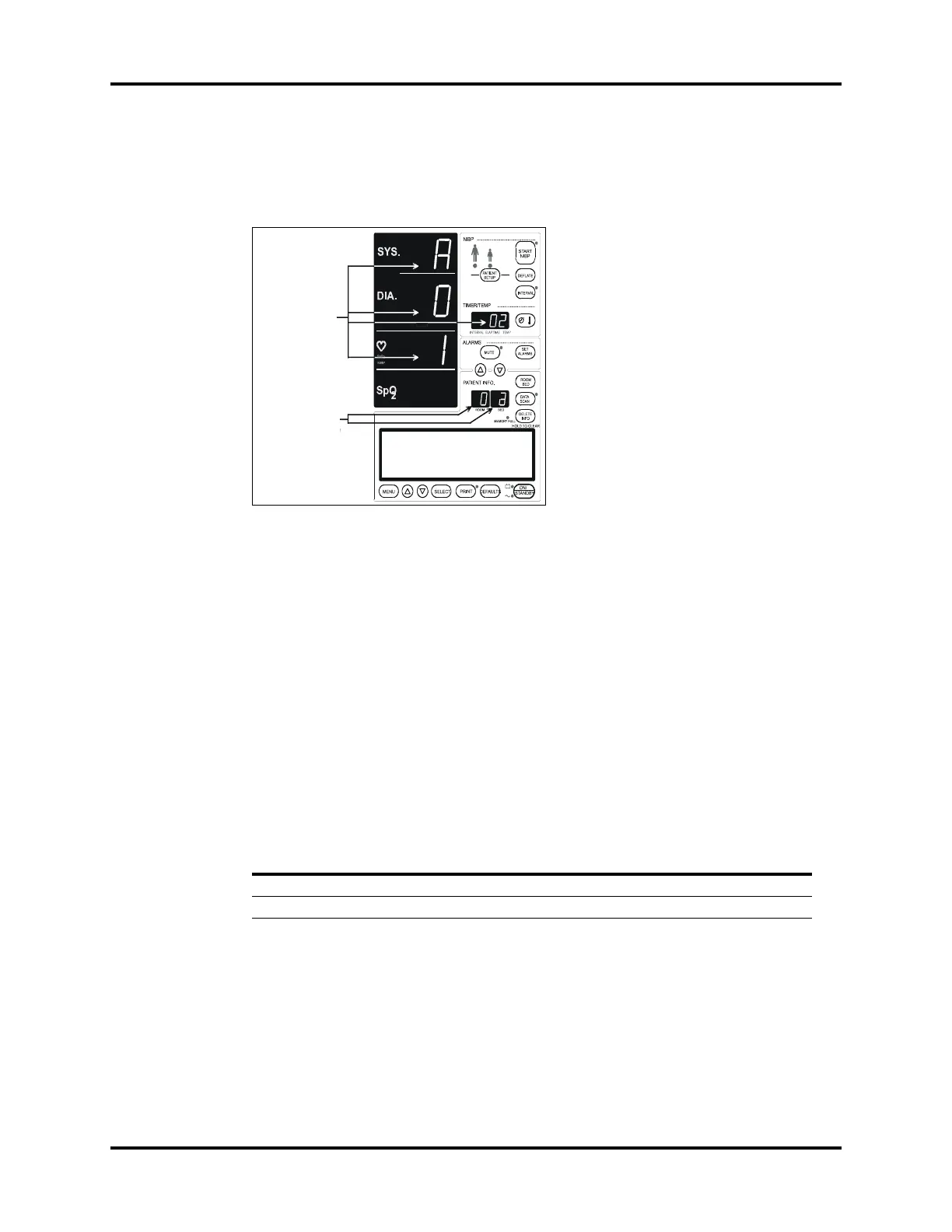
This test displays the installed software version (s) in the monitor. The results are
displayed in the read outs illustrated in Figure 5-1 on page 5-6.
FIGURE 5-1 - Software Version Test
Confirm that the ROOM number is at “0”; otherwise use the “ROOM/BED” key to select
the “ROOM”, and the UP/DOWN keys to set Room number to “0”.
Press ROOM/BED key to select BED. Use the UP/DOWN ARROW keys to select test
“a” or “b”. Monitors without SpO
2
option may not display results for tests “0c” and “0d”.
Press ROOM/BED again to lock in selection.
Press the START NIBP key.
Press the DEFLATE key until a beep is heard. This allows a selection of the next test.
Repeat process for test “b”.
Table 5-2
DESCRIPTION OF SOFTWARE MODULE
TEST ROOM
NUMBER
SUB TEST
PATIENT BED
LETTER
ACM Runtime Software Version 0 a
ACM Boot Software Version 0 b
Installed Software
Example: AO1.02
Software Module
Selection
Example: ACM
Runtime
software identifier


 To Next Page