Key Shift Up Primary Function Shift Down
FLAGS OP/A/C MODE/
SAFE
(FLAGS OP) Toggles the
display of clip flags on
SDI output
(A/C MODE) Toggles
between A‑sort and
C‑sort mode in the
Thumbnail Timeline;
in C‑sort mode, clips
are sorted by source
timecode so similar
clips appear together,
in A‑sort mode clips
are sorted by record
timecode so they
appear in program order.
(SAFE) Toggles title safe
on and off in the Viewer;
options for title safe
appear in the soft menu
of the trackball panel
–/HANDLES/CODEC
– (HANDLES) Turns
“Show current clip
with handles” on and
off; this lets you see
the currently specified
handles for the current
clip in the Timeline, so
you can track windows
and other effects into
the handles of media
being rendered for
round‑trip workflows.
(CODEC) Cycles among
clips in the Thumbnail
Timeline, showing the
File Name, the Codec,
and the Version number
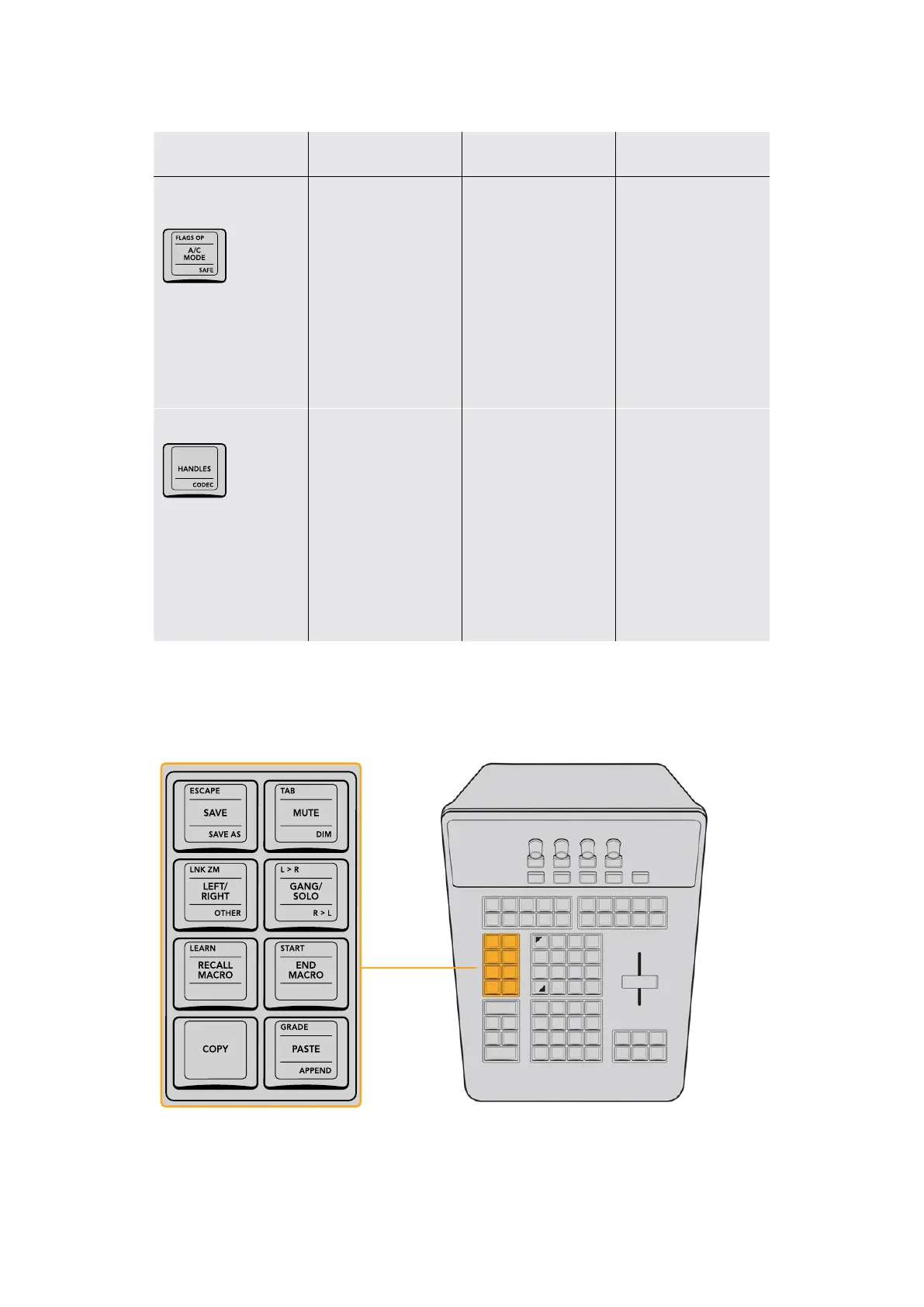
Utility Functions Group
This group of keys offers quick access to commonly used commands for saving,
3D functionality, Macros, and copy/paste functions for grading.
The Utility Functions keys provide access to a variety of frequently
used utilitarian grading, Stereo 3D, and Macro commands.
22The T-bar Panel



 To Next Page