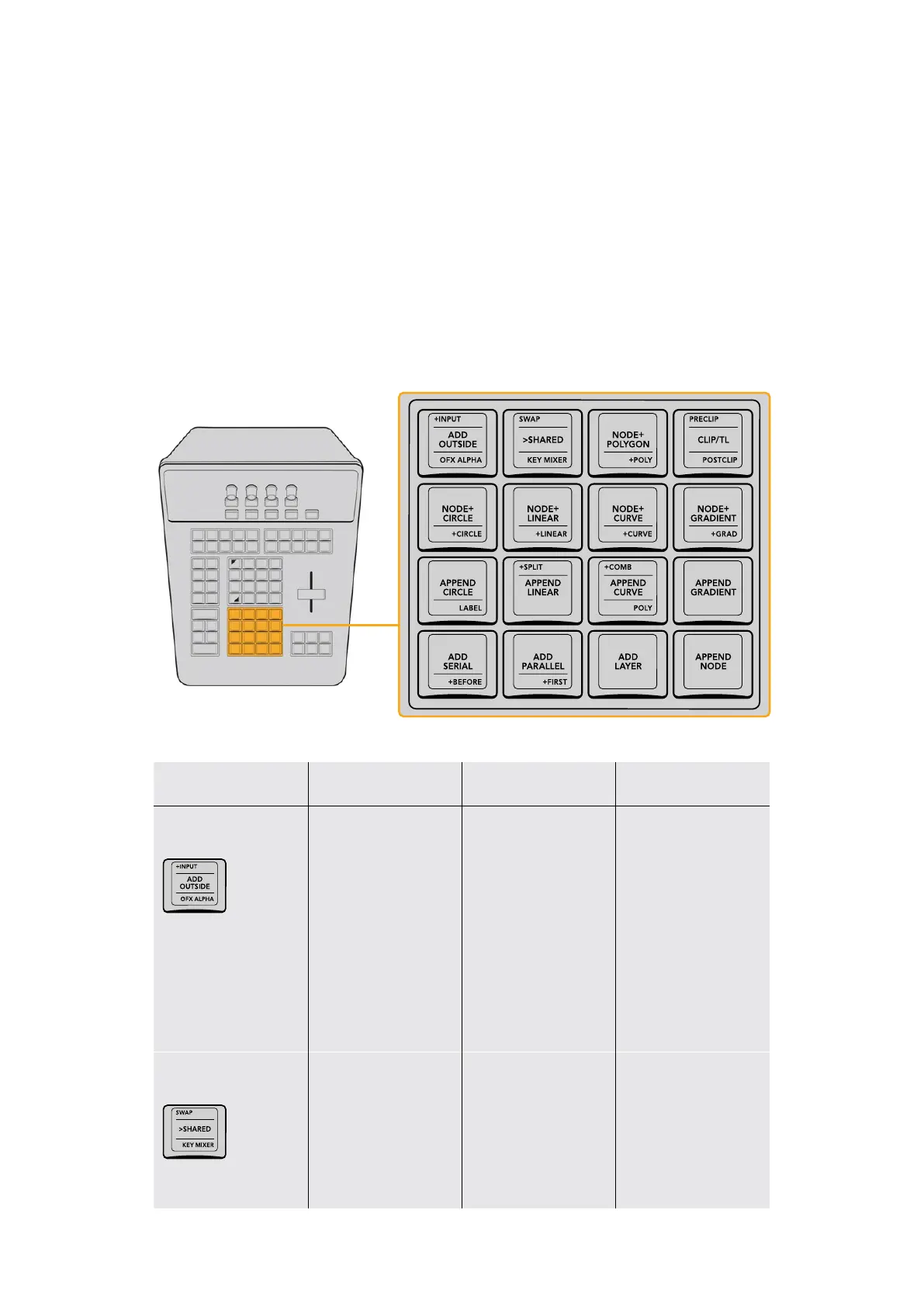
Node Control Group
This group of keys, at the bottom center of the T‑bar panel, lets you quickly create the many
different kinds of nodes that are available with which to organize your grades in the Node Editor
of the Color page.
The DaVinci Resolve Color page is a node‑based grading system, where the adjustments you
make appear as nodes in the Node Editor. Each node contains one or more adjustments that
work together. This is similar to the layers that appear in other applications, however nodes
provide the flexibility to route image data nonlinearly within a grade, connecting the output
of one node to the input of any other node farther down the tree of nodes, branching image
processing operations or recombining them via parallel or serial layer nodes to combine Color
page functions in creative ways to create sophisticated operations.
The Node Control keys let you create a wide variety of nodes for grading.
Key Shift Up Primary Function Shift Down
+INPUT/ADD OUTSIDE/
OFXALPHA
(+INPUT) Lets you add
inputs to any mixer
node, including the
Parallel Mixer, the Layer
Mixer, and the Key Mixer
(ADD OUTSIDE) Adds
a Corrector node in
serial that connects
both its RGB and KEY
inputs to the outputs of
the node before it, with
the KEY input inverted,
so you can make
adjustments to parts
of an image that are
outside the preceding
node’s qualified or
windowed area.
(OFX ALPHA) Turns
on “Use OFX Alpha”
to enable the selected
node to output whatever
SWAP/>SHARED
/KEY MIXER
(SWAP) Does “Morph
into Layer Mixer Node”
or “Morph into Parallel
Mixer Node” if a relevant
Mixer node is selected;
Changes a Parallel Mixer
into a Layer Mixer and
vice versa
(>SHARED) Turns the
currently selected
node into a Shared
node; Shared nodes
automatically ripple
adjustments other
grades that use the
same Shared node.
(KEY MIXER) Adds a Key
Mixer node with its first
KEY input attached to
the currently selected
node’s KEY output; Key
Mixer nodes let you
combine multiple keys.
29The T-bar Panel



 To Next Page