15
Selecting a Drum Kit
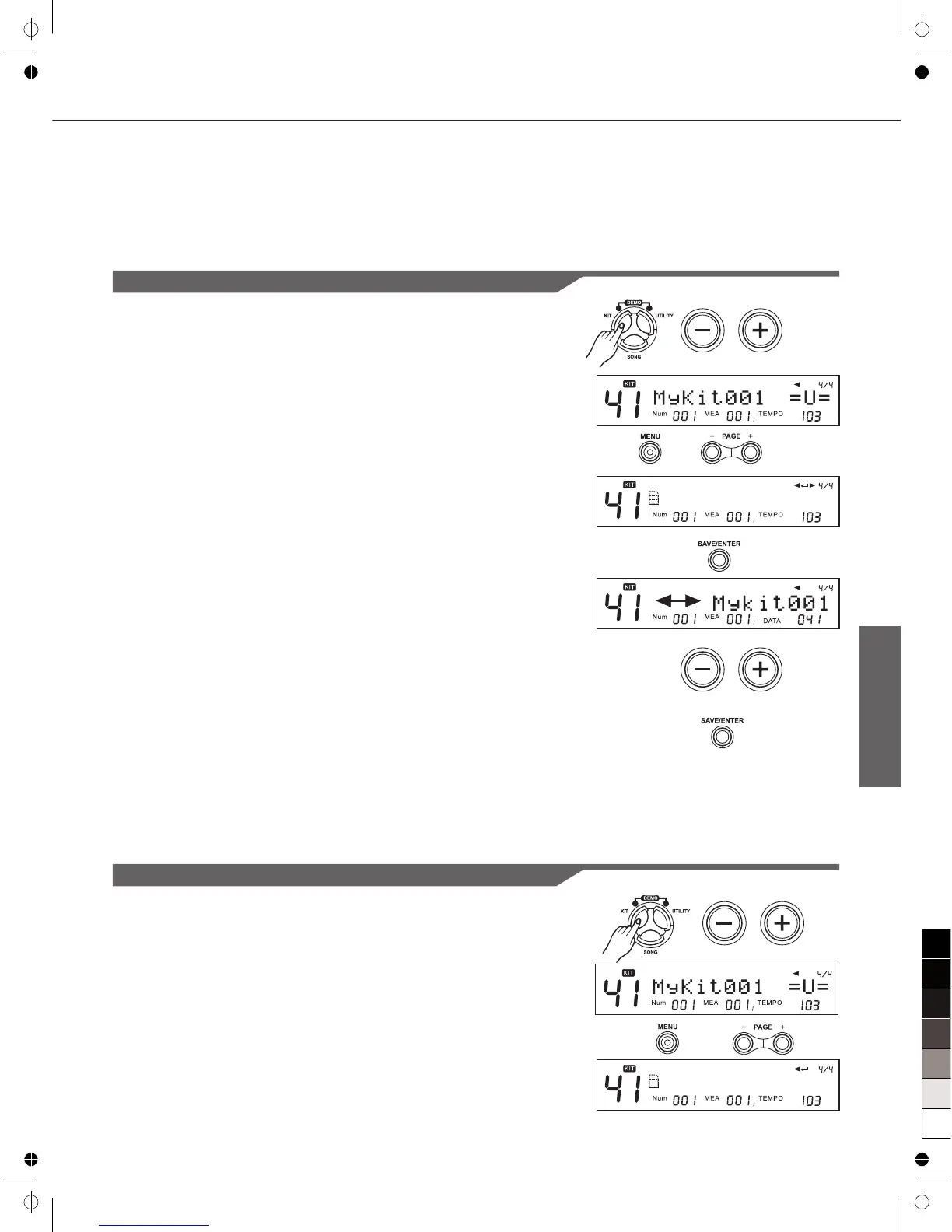
Exchange Kit Order
1. Press [KIT], then press [+]/[-] button or use the DIAL to select
a source user kit.
2. Press [MENU], and then press [PAGE+] [PAGE-] to select the
Exchange menu.
3. Press [SAVE/ENTER] to set exchange position.
4. Press [+]/[-] button or use the DIAL to select an destination
user kit.
5. Press [SAVE/ENTER] again to finish this setting.
Note:
When exchange operation is done, LCD displays “EXCHANGE
OK!” temporarily, 2 seconds later, LCD shows the KIT mode
automatically, and original Kit is selected.(as “MyKit001” in this
example).
EXCHANGE
DrumVoc:
This is used to define whether to sound drum voice when you
strike a pad to trigger/play a song.
ON: Default setting. When striking the pad, playback the
song also with drum voice;
OFF: When you strike a pad to trigger a song play, it just
playback the song without pad triggering sound.
Rename Kit
1. Press [KIT], then press [+]/[-] button or use the DIAL to select
an user kit.
2. Press [MENU], then press [PAGE+]/[PAGE-] to select the
Rename menu.
RENAME



 To Next Page