Connections
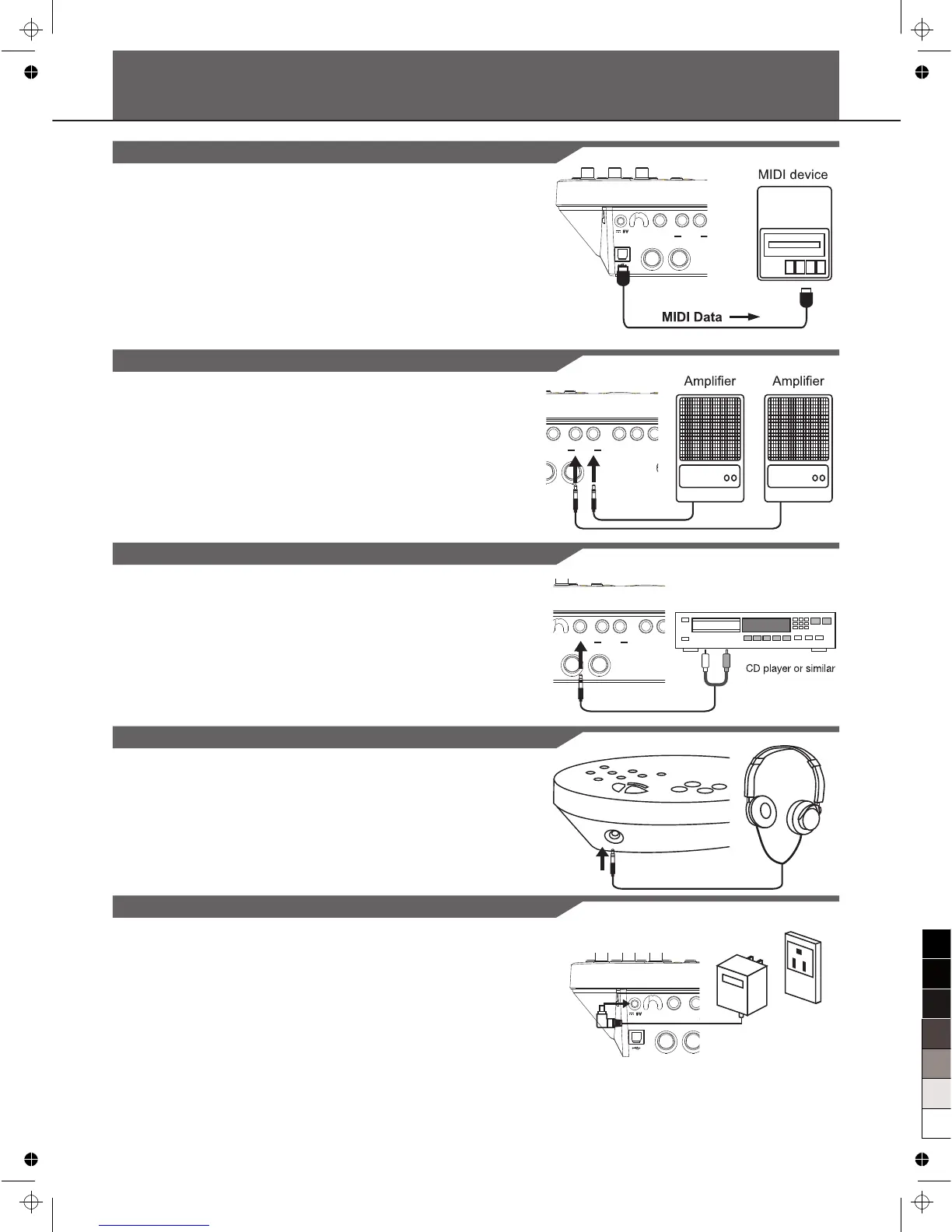
Connect a MIDI and USB Device
1. This is for you want to use an external sound module or MIDI
sequencer.
2. The drum will output all the MIDI codes generated by hitting
pads or stepping pedal via the MIDI output or USB port. But
clicking and the MIDI codes in songs are excluded.
3. The USB Port is used only for MIDI messages.
4. MIDI clocks will be sent automatically after power-on.
Connect Audio Equipment
Connect a CD Player, etc. (Aux. In Jack)
Connect Headphones
Connect the Power Supply Jack
Make sure the power is switched OFF and connect the power
adaptor with the DC IN jack on the rear panel.
Note:
1. To protect the speakers, amplifier and the drum module from
damage, rotate the volume knob to the minimum volume level
before switching the power ON.
2. Make sure the power is switched OFF when connecting drum
module with external devices.
3. In the IDLE mode, the drum module will automatically
shutdown in 30 minutes later if you do not take any action on
the drum module or hit pad. For more information, see the
menu: Automatic Shutdown.
7
1. When you want to listen to the voices with an amplifier,
connect amplifiers with the Output L/MONO and R jacks on
the rear panel. (For monaural playback, use the L/MONO jack,
for stereo playback; connect both L/MONO and R jacks.)
2. The volume is adjusted with the MASTER VOLUME knob.
1. The audio output of a CD player, or other audio source, to
connect with the AUX IN jack on the rear panel can be mixed
with the sound of the drum. This function is convenient that
lets you play along with a favorite song.
2. The volume of the external signal is adjusted with the
AUX IN VOLUME knob.
1. An optional set of stereo headphones can be connected with.
The PHONES jack located on the side of the drum module.
2. Adjust the PHONES volume to a comfortable level.



 To Next Page