Save Data(SAVE)
ALL User Kits, user Songs and Global Setup (including click,
pad, and mixer setting .etc) can be saved in SD Card.
See the default saving path:
File Type
user Kit
All user Kits
user Song
All user Song
Global Setup
Format
*.KIT
*.KIT
*.MID
*.SNG
*.SET
Saving Path
..Root\ MY_EDRUM \
..Root\ MY_EDRUM \
..Root\ MY_EDRUM \
..Root\ MY_EDRUM \
..Root\ MY_EDRUM \
Saving User Kit
Refer to “Saving Kit”
Saving User Song
Refer to “Saving Song”
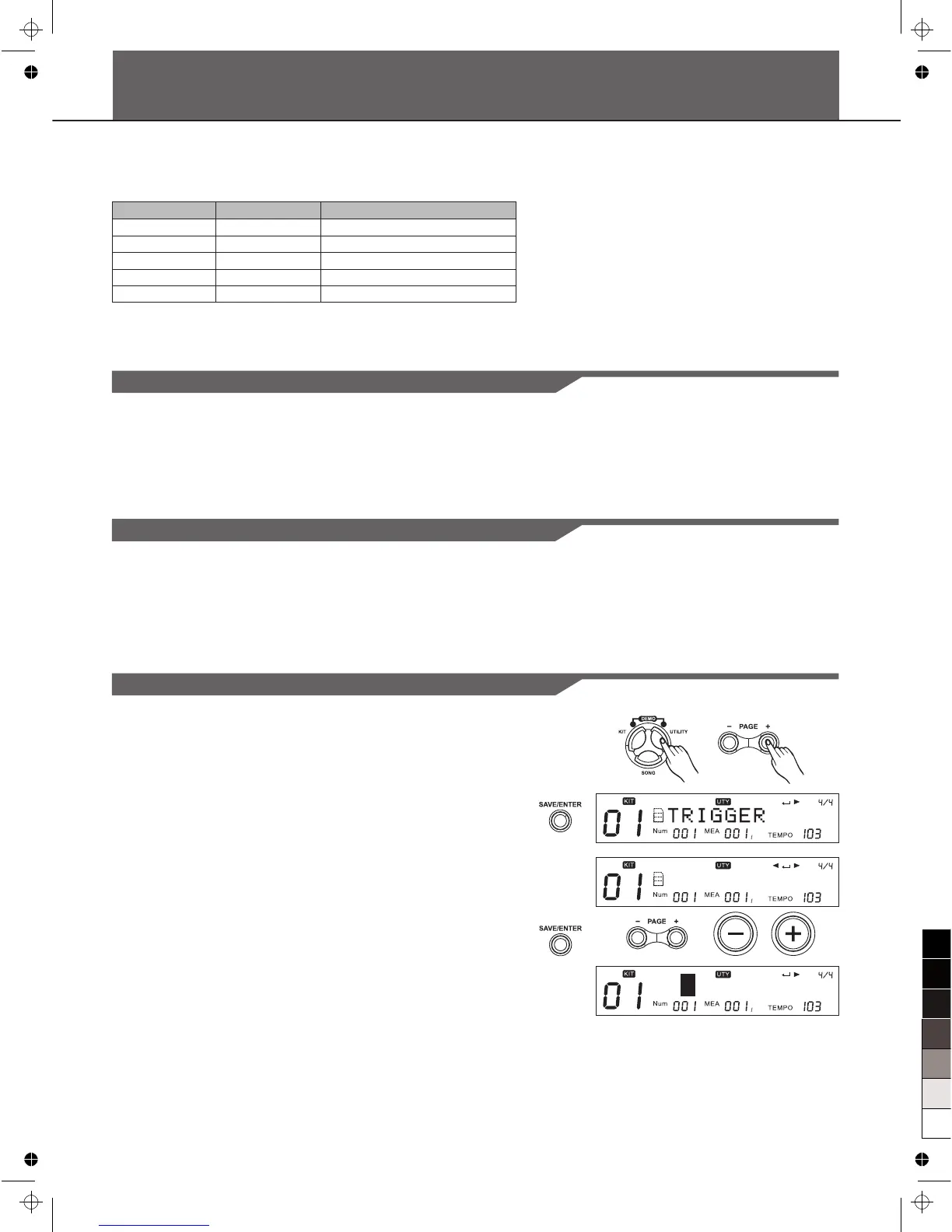
Saving Global Setup
1. Be sure that your SD Card is inserted and valid.
2. Press [UTILITY] button, then Press [Page+] to select the
“SAVE GLOBAL” screen.
3. Press [SAVE/ENTER] to enter rename screen. You can press
[PAGE+]/ [PAGE-] or [+]/[-] button and DIAL to change the file
name.
4. Keep pressing [SAVE/ENTER] till you finish the save
operation.
S A V E G L O B A L
30
M y _ S e t u p



 To Next Page