DLS / DLS-C Series
63
Cod.: 240.010.0042
6 CONTROL PANEL
6.1 General Information
1
2
3
4
5
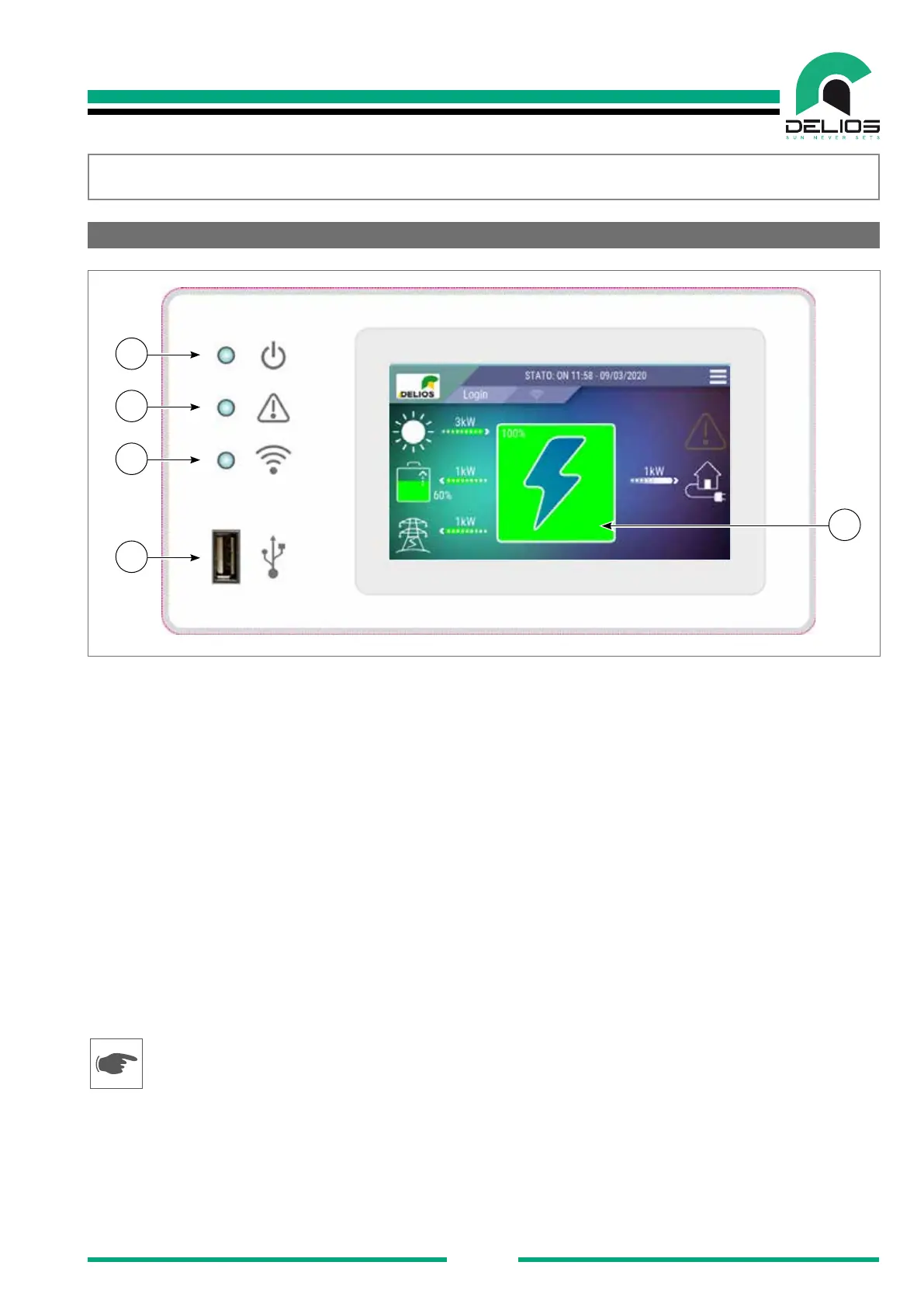
1 - Power supply
• LED on: the DLS is powered and is operating regularly.
• LED blinking: the DLS is in the start-up and self-test phase.
• LED off: the DLS is not powered.
2 - General alarm
• LED on: the DLS has detected a fault. The LCD display activates the corresponding alarm icon and
shows the information related to the alarm occurred on the status bar (see the "Troubleshooting"
section).
• LED off: the DLS has not detected any fault.
3 - Communication
• LED on: communication with external devices is enabled.
• LED off: communication with external devices is disabled.
4 - USB port
• USB port available for data download, rmware update, Wi-Fi dongle connection
Do not connect portable hard disks, MP3 players, computers and any other device other than a ash USB
memory or Wi-Fi dongle to the USB port. The system is compatible with most of the ash USB memories
on the market. However, the system may not recognize some types of USB memory, in this case it is re-
commended to try again replacing it with another model.
5 - Graphic touch-screen display
• Graphic touch screen graphic display which displays the system status and user / installer settings.


 To Next Page