64
Cod.: 240.010.0042
DLS / DLS-C Series
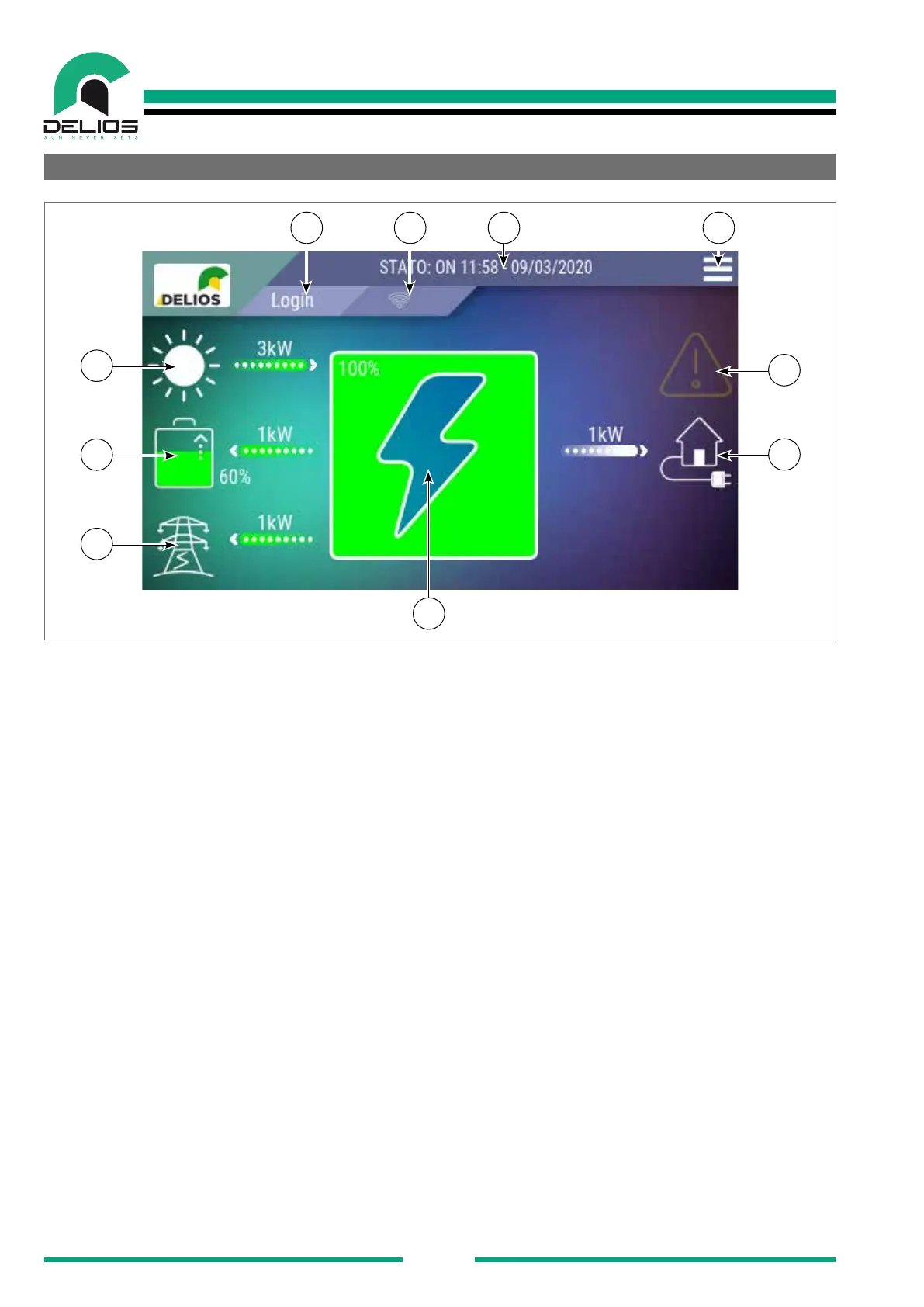
6.2 "HOME" Page
3 10
4
1 2
9
5
8
6
7
The "HOME" screen displays and analyzes in real time all parts of the DLS system. All the power sources
supplied to meet the demands of the domestic needs and their operating parameters are constantly moni-
tored and displayed in real time. Similarly, the central indicator will display in real time the system energy
balance.
1. System status bar: The system indicator bar shows the DLS operating status, the current date and time.
If faults are detected, the alarm codes detected by the system are displayed (see the section "Troublesho-
oting).
2. Access to the "MENU" page: This key allows the operator to access the built-in datalogger (graphics,
data and statistical data), system conguration and programming menus.
3. Access to the "LOGIN": This key allows the operator to view the login page to access the different
programming level of the system by entering the access password.
4. "ENERGY BALANCE" icon: This dynamic icon shows the system energy balance in real time: the
green colour shows the percentage of energy produced by renewable sources (PV and batteries), the pur-
ple colour shows the energy drawn from the grid in order to meet the demands of the residential sys-tem
connected to the DLS.
5. "SUN" icon: The "SUN icon shows if a PV solar system is connected to the system. The ow of en-ergy
coming from that source is displayed on the bar located next to the icon. The numbers shown above the bar,
which can be scrolled by simply pressing the bar itself, display in real time the voltage, current and power
values related to the PV generator.
6. "BATTERY" icon: The "BATTERY" icon shows if a battery is connected to the system. The icon also
shows the battery charge / discharge status and the percentage of energy available to the system. The ow
and the direction of energy coming from that source is displayed on the bar located next to the icon. The
numbers shown above the bar, which can be scrolled by simply pressing the bar itself, display in real time
the voltage, current and power values related to the battery.


 To Next Page