68
Cod.: 240.010.0042
DLS / DLS-C Series
7.3 "LOGIN/LOGOUT" Menu
The "LOGIN / LOGOUT" menu allows the operator to access the system programming menu reserved to
INSTALLERS.
Identication takes place by entering a PASSWORD which must be previously and compulsorily
requested from DELIOS srl.
WARNING: The parameters at INSTALLER level can be accessed only by qualied staff. Changing
the parameters at the installer level by unqualied staff can affect the correct functioning of the sys-
tem and relieves the manufacturer from all liabilities and invalidates the warranty.
Once the settings have been made in the INSTALLER mode, make sure that you have LOGOUTED from
this mode in order to prevent unqualied personnel from accessing settings that can compromise the cor-
rect functioning of the system.
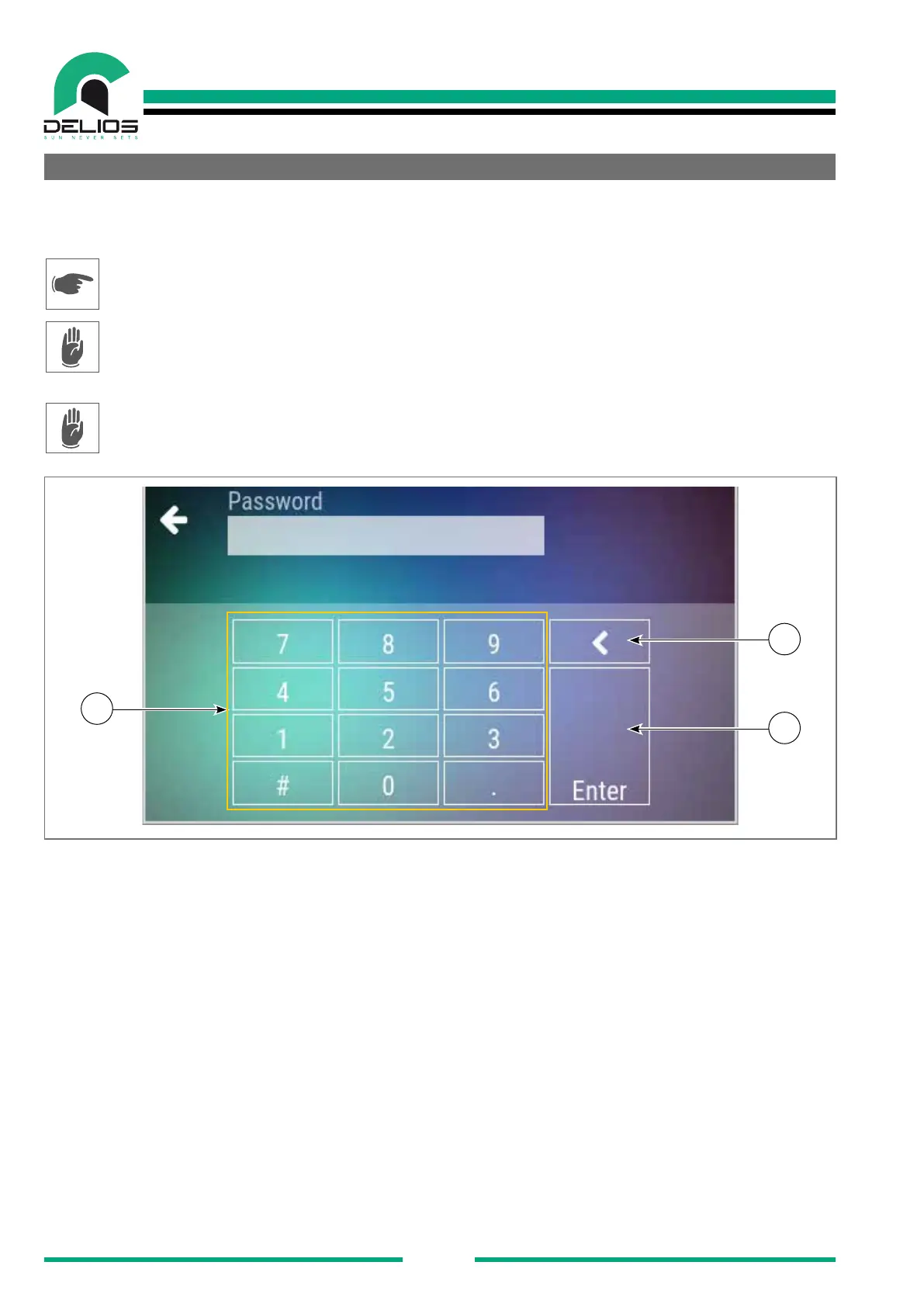
2
3
1
1. Numeric keypad to enter the ID password.
2. "BACKSPACE" Key - Press this key to delete the last digit entered.
3. "ENTER" Key - Enter / Submit key.


 To Next Page