84
Cod.: 240.010.0042
DLS / DLS-C Series
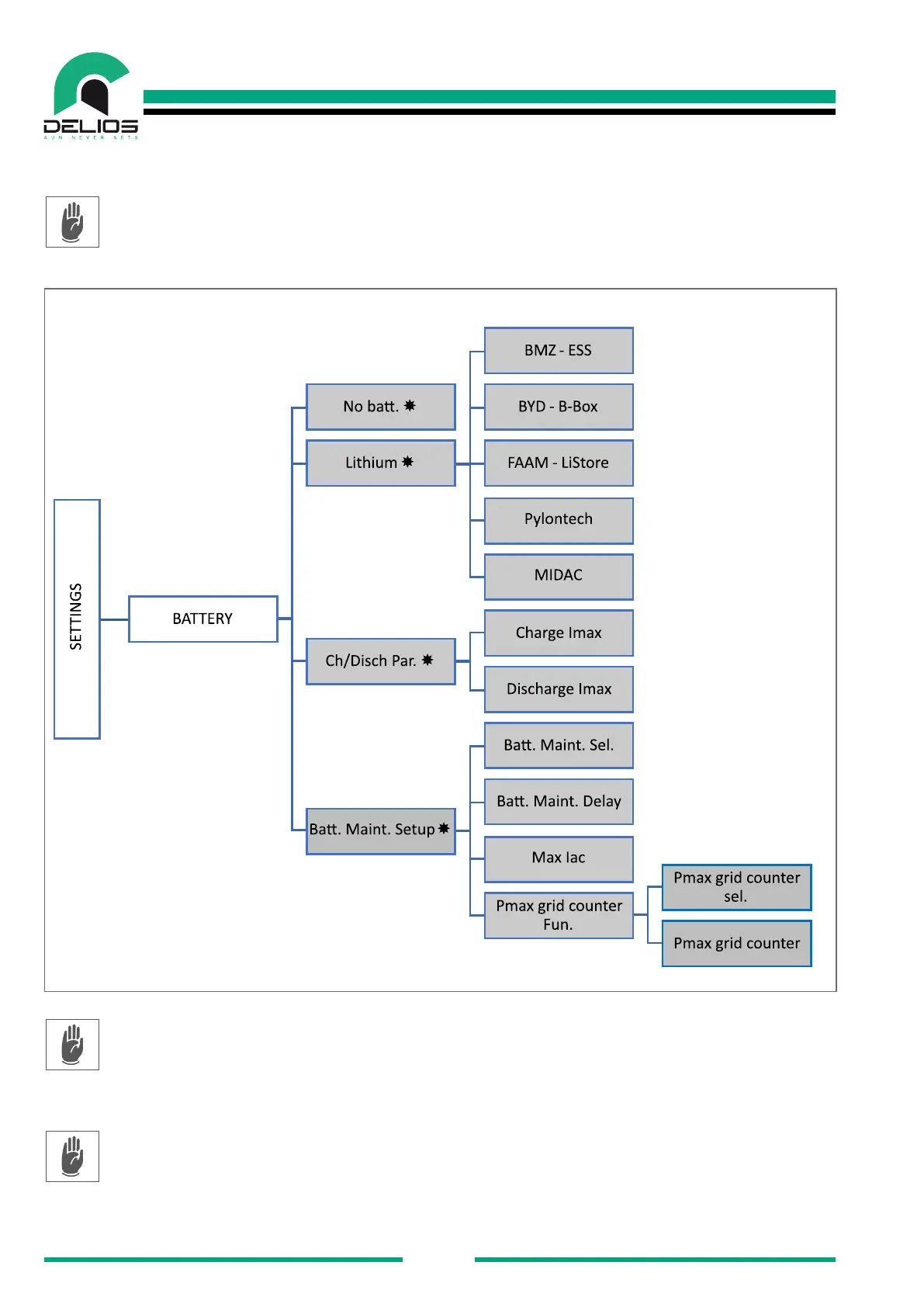
7.7.4 "BATTERY" Menu
Access to the "BATTERY" menu allows to congure the type, brand and the model of the lithium battery
among those supported by the DLS system and perform further settings of the usage parameters. The
settings are accessible only in the INSTALLER mode which require a password to be logged in (see the
"LOGIN menu" section).
1. "NO BATT" - The page allows to set the operating mode without a battery connected to the system.
The DLS in-verter acts like an on-grid inverter and the advanced features of SELF-CONSUMPTION,
BATTERY MANAGEMENT, EPS and BATTERY MANAGEMENT are not available. The settings are
accessible only in the INSTALLER mode which require a password to be logged in (see the "LOGIN
menu" sec-tion).
2. "LITHIUM" - The page allows to select the type, brand and model of the lithium battery among those
supported by the DLS system. The selection of a lithium battery congures the DLS system to interact
exclu-sively with the type, brand and model of battery selected. The settings are accessible only in
the INSTALLER mode which require a password to be logged in (see the "LOGIN menu" section).
WARNING - The type, brand and model of the approved and listed batteries may be subject to


 To Next Page