Back to Contents Page
Memory
Dell™Latitude™E4200ServiceManual
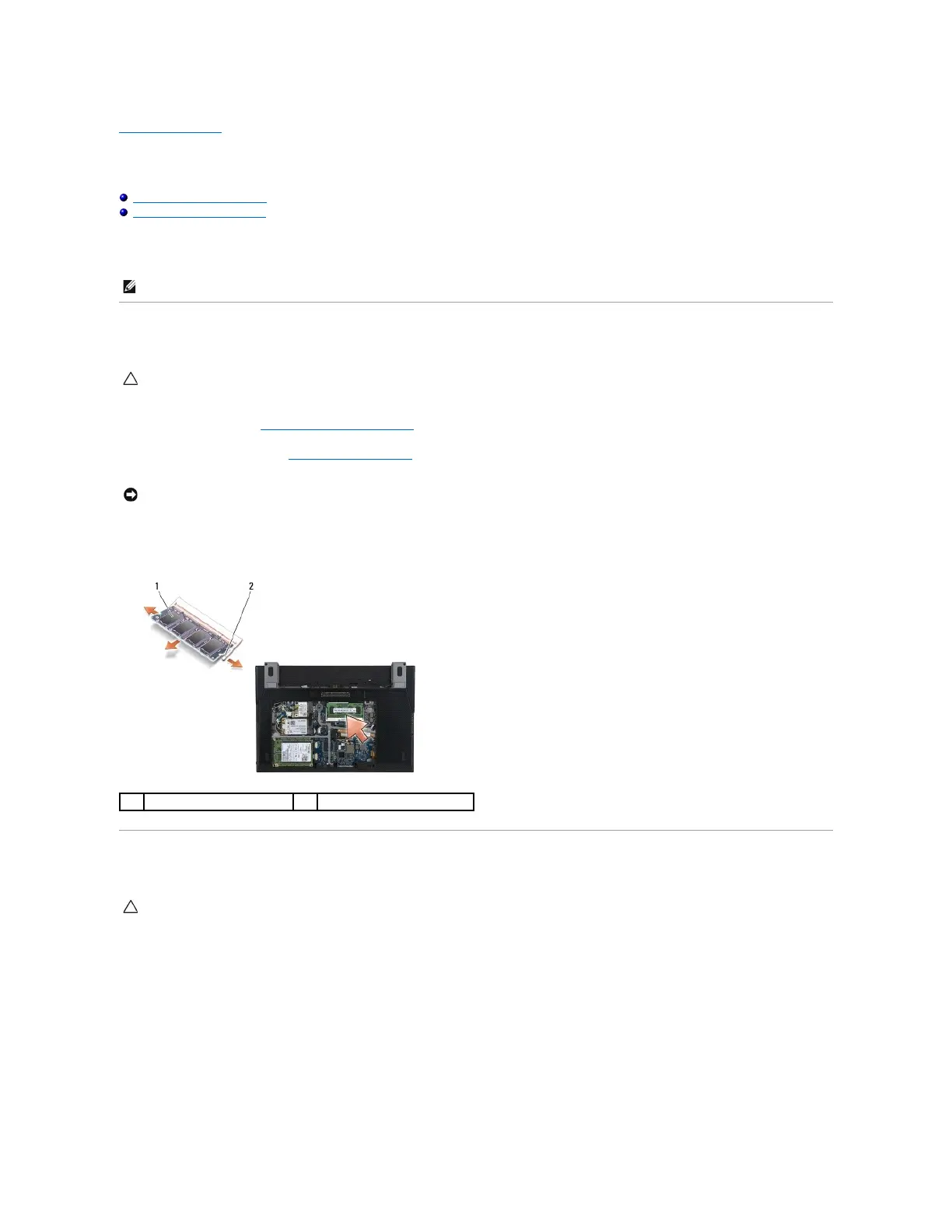
Removing the Memory Module
Replacing the Memory Module
Your computer has 1 GB of onboard memory and one user-accessible SODIMM socket. You can increase your computer memory by installing a memory module
on the system board. See "Specifications" in your Setup and Quick Reference Guide for information on the memory supported by your computer. Install only
memory modules that are intended for your computer.
Removing the Memory Module
1. Follow the procedures in Before Working on Your Computer.
2. Remove the service panel (see Removing the Service Panel).
3. Use your fingertips to carefully spread apart the securing clips on each end of the memory module connector until the memory module pops up.
4. Remove the memory module from the connector.
Replacing the Memory Module
1. Place the module at a 45-degree angle, and align the notch in the module with the tab on the connector.
2. Press down on the module until it clicks into place. If the module does not click into place, remove the module and reinstall it.
CAUTION: Before working inside your computer, read the safety information that shipped with your computer. For additional safety best
practices information, see the Regulatory Compliance Homepage on www.dell.com at: www.dell.com/regulatory_compliance.
CAUTION: Before working inside your computer, read the safety information that shipped with your computer. For additional safety best
practices information, see the Regulatory Compliance Homepage on www.dell.com at: www.dell.com/regulatory_compliance.

















 To Next Page