DVW Series Industrial IEEE 802.11 a/b/g/n Wireless AP/WDS/Client/Gateway User Manual
3-50
Description Factory Default
WPA2-PSK. Broadcast packets use TKIP. For unicast (point-to-point)
transmissions, WPA-PSK clients use TKIP, and WPA2-PSK clients use
AES.
Passphrase
The passphrase requires 8 to 63 ASCII characters or 64 hex digits. None
Notice:
The security mode WPA-PSK (TKIP) does not support 802.11n. When the W PA-PSK (TKIP) is
selected in the Web interface, the list of wireless modes only shows the traditional modes
802.11 a/b/g.
WPA/WPA2 Enterprise (For AP/Master mode)
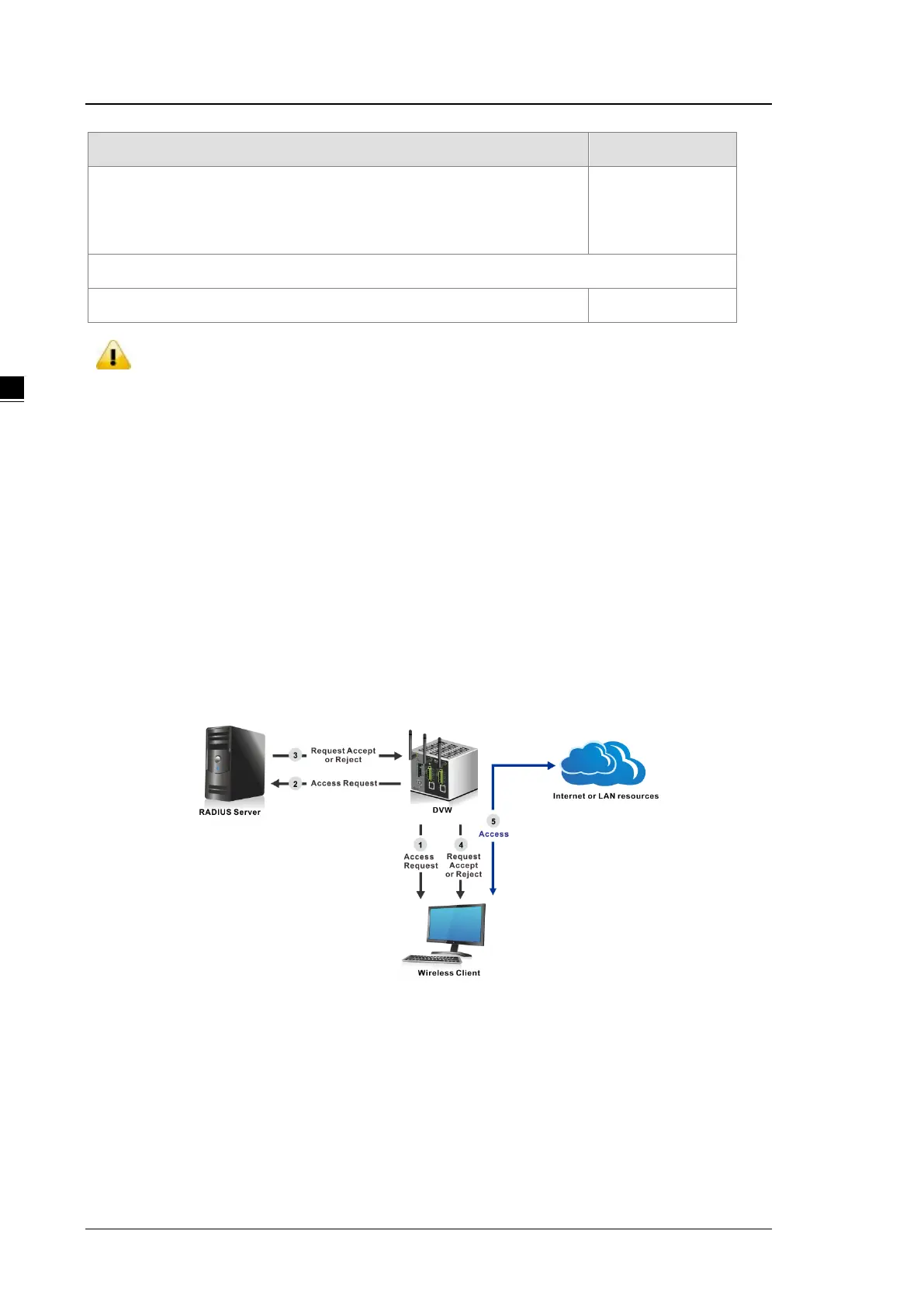
Enterprise security mode provides the security needed for wireless networks in business environments. If you
select this security mode, there must have a RADIUS server in your network. It offers individualized and
centralized control over access to your Wi-Fi network.
If the wireless client wants to access the network resource, it will send the request to DVW series. And DVW
series will forward the request to RADIUS server and forward the response to wireless client. If the wireless
client passes the authentication of RADIUS, then it can access the network resource; otherwise it can’t access
the network resource.



 To Next Page