ENGLISH
to switch.)
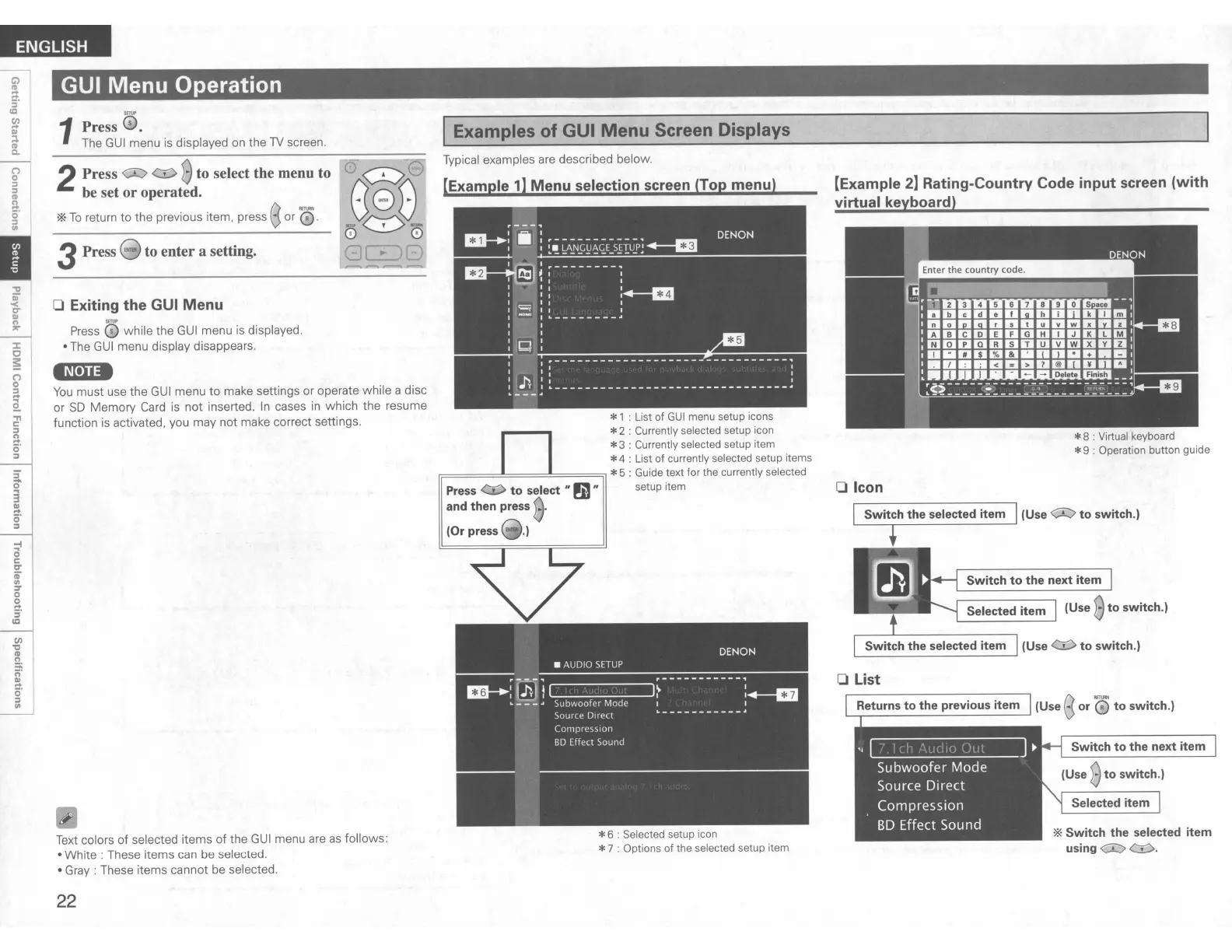
*8 : Virtual keyboard
*9 : Operation button guide
Switch to the next item
(Use
Bto switch.)
Selected item
*Switch the selected item
using
0:::>
<::I>.
Selected item
(Use
<::J:>
to switch.)
'------.---------'
(Use
<:r:>
to switch.)
'-------------'
[Example
2]
Rating-Country Code input screen (with
virtual keyboard)
o List
o Icon
*6 : Selected setup icon
*7 : Options
of
the selected setup item
Press
to select
II
~
II
and then
press
Typical examples
are
described below.
lExample
1]
Menu selection screen (Top menu)
I Examples of GUI
Menu
Screen Displays
*1 : List of
GUI
menu setup icons
*2 : Currently selected setup icon
*3 : Currently selected setup item
*4 : List of currently selected setup items
r;:====::::!::::==~======il
*5 : Guide text for the currently selected
setup item
GUI Menu Operation
3Press !HlIII to enter a setting.
1
Press
0.
The
GUI
menu is displayed
on
the
TV
screen.
2Press
<:;:J:::;>
<::I>
Bto select the menu to
be set or operated.
*
To
return to the previous item, press 8or
'0.
o Exiting the GUI Menu
Press
0 while the
GUI
menu
is
displayed.
• The
GUI
menu display disappears.
'M·na
You
must use the
GUI
menu to make settings or operate while a disc
or
SO
Memory
Card
is not inserted.
In
cases
in
which the resume
function
is
activated, you may not make correct settings.
~
o
C
tT
c;-
UI
:r
o
la
5'
Ie
Text
colors of selected items of the
GUI
menu
are
as
follows:
•
White:
These items can be selected.
• Gray: These items cannot be selected.
22


 To Next Page