EasyManua.ls Logo

Denon LA-3500 - To Watch Side a; Last Memory Function; Basic Operation; Regular Playback

Denon LA-3500
92 pages
Print Icon
To Next Page IconTo Next Page
To Previous Page IconTo Previous Page
Loading...
ID)
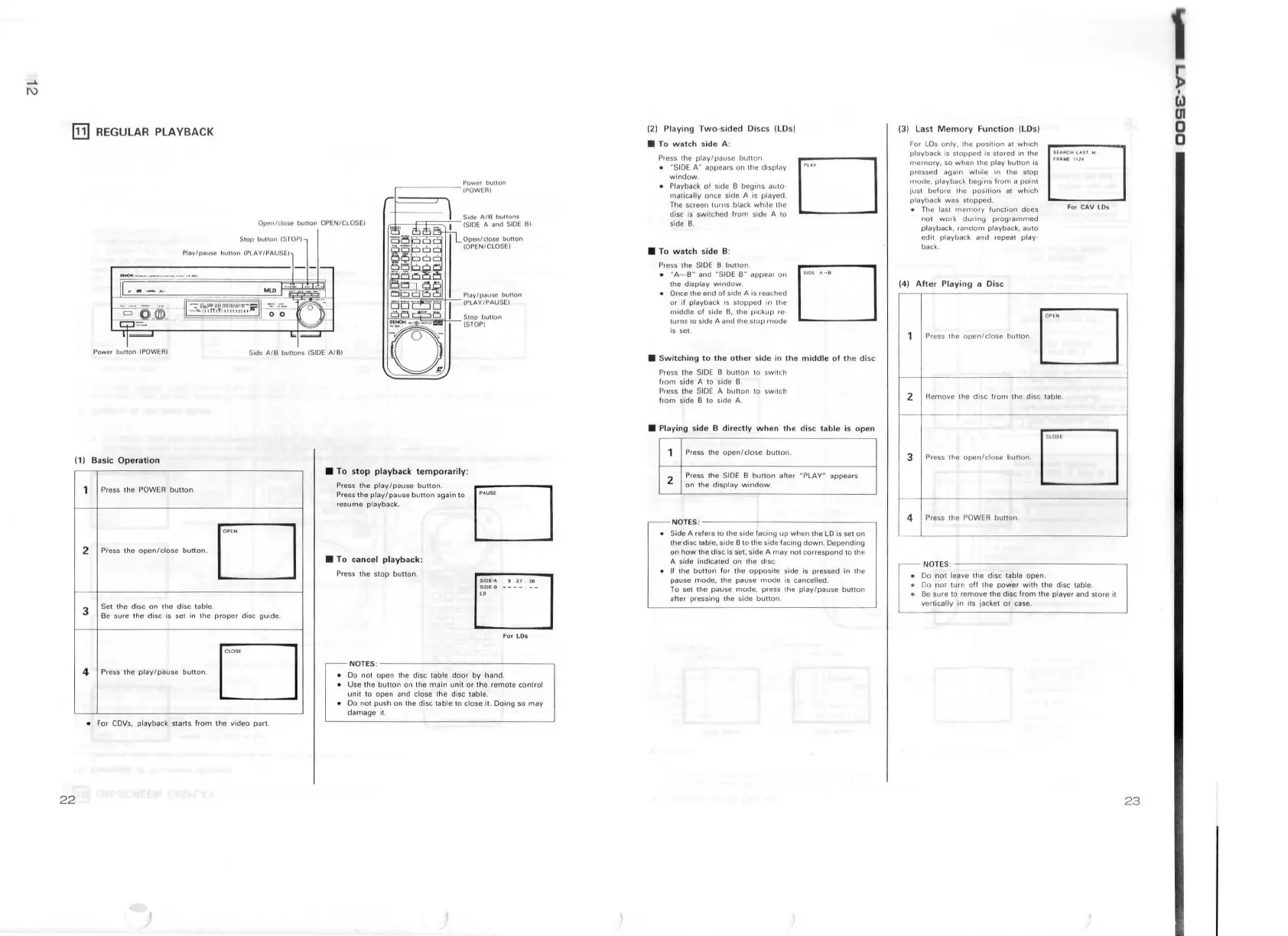
REGULAR PLAYBACK
Power
button
(POWER)
Open/
close
bu11on
OPEN/ClOSEI
I
r,.t;;--==----'
L_
Si
de
AIB
bull
ons
!SI
DE
A
and
S
IDE
Bl
Pia I
Stop
but1on (S
TO
P)
y pause hu1ton /PLAY /PAU
SE)
~;~~~~t~s~~
11
on
Pow
er
bunon
!POWER I
Side AI B buttons (SIDE AI
B)
(1)
Basic Oper
ation
Press the POWER
button.
•T
o
stop
playback
te
Press the
pla
/
mporarily
:
~re
ss
the
p!ay~p~:
~:e
b
button
.
es
um
e
playba
ck.
utton
again to
D
2
Press th e
open/close
button
.
• To
cancel
playback
.
Press
the st
op
button
. .
3
Set
the
disc
on
th
.
Be
sure
the
disc
i:
sd~ls~
table.
in
th
e
proper
disc guide.
F
or
LD
s
D
'°"
Press
th
e
play/pause
button
.
NOTES :
• Do
not
open
the d.
Use
th
e
bu
tto isc table
doo
r b h
unit
to o p en
:no
dn
th e
main
uni
t
or
ih
e and.
Do
not
push
on
th
ee
!
;."
th e disc table
'°m
ote co
ntr
ol
damage
it. isc !
able
to clos : .
e it. D
omg
so
may
• For CDVs, playback start s f
rom
the v i
deo
pa
r!.
22
)
121
Pl
a
ying
Two
-si
ded
• T
Di
scs
(LD
s)
o
watch
sid e A:
Pre
ss
the 1
•
-~
IDE
:.a:~~=~:e
bu u
on
window
. s
on
the
disp
lay
• Play.back
of
side B .
ma
t1
ca
lly once sid begins auio·
T~e
screen
turn
s
b~
A is
played
.
disc
is
sw
it
ch d ack
while
the
side B. e f
rom
sid e A
10
• To
watch
side B:
D
Press the
SIDE
B
•
~
A
---
B H and
··s
1
~~n~~
·
• the
display
wind
ow . appear
on
D
10E
..
~a
Once t
he
end o f
or
if
playba
ck
side A is r
ea
ched
midd
le
of
side
1
~
s
:~~
p~d
in
lh
e
~urn
s
to s
id
e A
an'
pickup
re
-
1s set. d
1h
e s
top
mode
• S
witching
to th
Pre
ss
th e S
ID
E e o
th
er
side in
th
e
middl
fr
om
side A to
~idl~uuon
to s
witch
e
of
th
e
disc
Press
th
e SI
DE
B.
from
side B to
~d~u~~n
10
switch
NOTES
:---
• Side A refers
to
the .
the disc
table, si d e
Bs
1de
f
ac
i~
g
up
when
th .
on
h
ow
th e disc i to •.he side facing d e
LO
"
se
t
on
A sid e
indi
ca
ted s set. side A
may
not
/wn
.
Depending
If
the
buuon
f
o•
~~
th e
dis
~.
o•,.spond
to
th
e
pause
mode
lh
e
oppos
ite side .
To
se
t the
~aus:
~use
mode
is
ca~s,:,:essed
in the
atte1 pressi
ng
l he
s
·
~de.
press the pl
ay/
ped.
____
_..:__
' ::e . .
button
. ause
button
(3)
Last
M
emor
For
y
Function
(LDs)
LDs
only
the .
playback is
s;o
p
pe~o
.
s111on
at
which
memory,
so
when
th
ts
stored
in the
~
esse
d
again
wlul:
pil~y
butlon
is
.
ode
,
playba
ck b . the
stop
JUSI
before
1h e
eg1~~
from
a
poinl
~l
aybac
k
was
sto~~~~o
n
at
which
The
la
s!
mem
.
no1
w ork
du~~y
function
does
pl
aybac
k,
r
ando~
prog
ra
mmed
edit
playback
playba
ck,
auto
back.
and
repeat
play
·
Di
sc
D
Remov
e
the
disc
from
th
e d.
ISC table.
Press
the
ope
n
/close
bun
on .
D
• Do
not
leave
th
.
Do
not
turn
off
~h~1sc
table open .
Be
sure
to
remo
power
w ith
the
.
ve1
ticalfy in
11
~e
th e
disc
fr
om
th
1'sc
table.
s 1acket
or
case. e
payer
and
store
it
23
~
CJ
UI
0
0

Table of Contents