~
FINDING
SPECIFIC
SECTIONS
Skip bu
ll
ons
t
l+c
and
..
11
Play/pause
button
IPLA't'IPAUSEI
.....
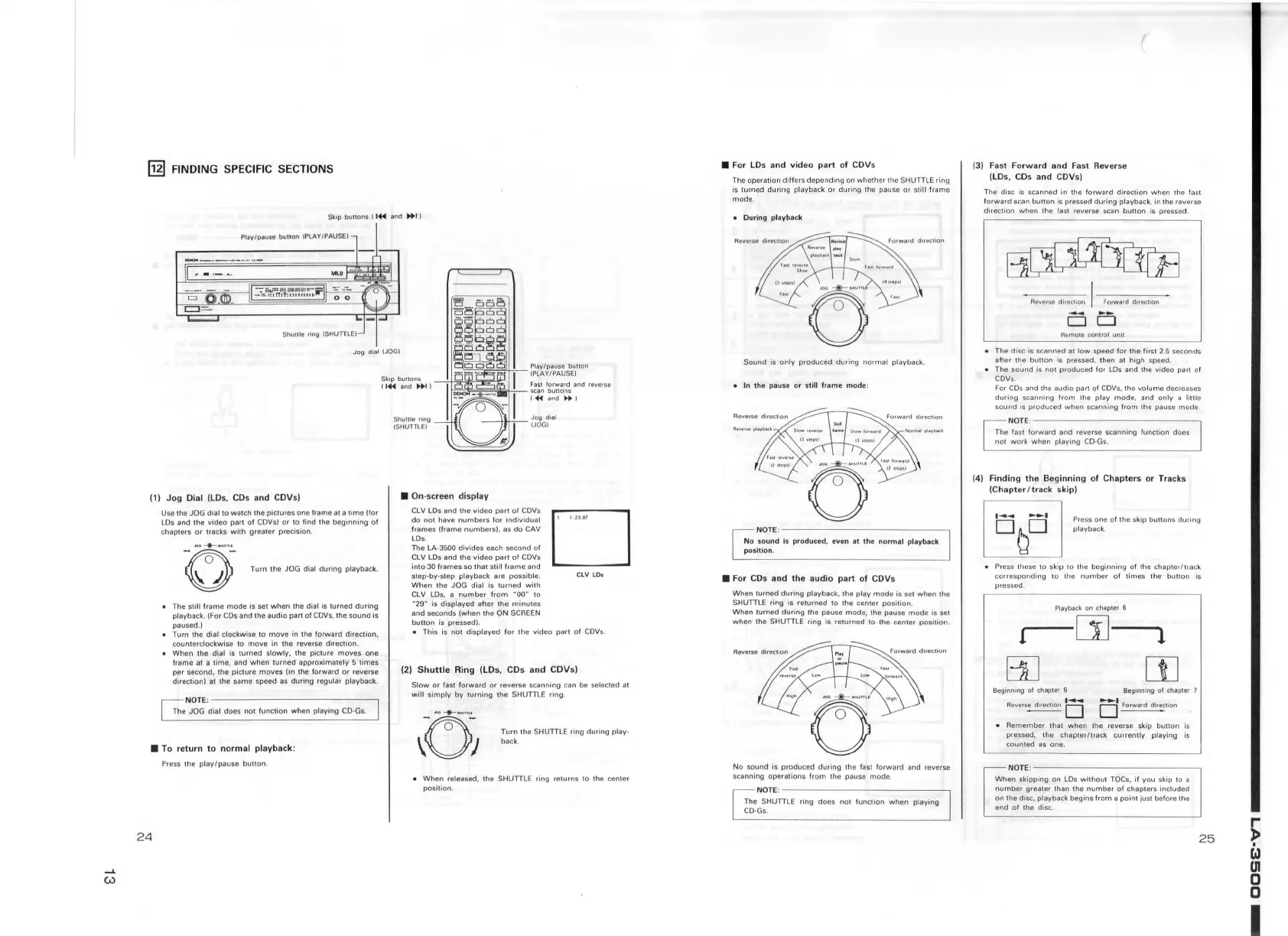
( 1)
Jog
Dial (LD
s,
CDs
and
CD
Vs)
Use
1he
JOG dial to wa1ch
1h
e
piclures
one frame at a t
ime
(for
LDs and the
video
part
of
CDVsl
or
10
find
lh
e
beginning
of
chapters
or
tracks
with
grea1er precision.
~
~
Tum
the JOG dial
dudng
playback.
The
s1i
ll
frame
mode
is set
when
1he
dial is turned
during
playback. (For
CDs
and the
audio
part of
COVs,
the
sou
nd
is
paused.)
•
Turn
the dial clockwise to
move
in the forward direction,
cou
nt
erclockwise
10
move
in the reverse direction.
•
When
the dial
is
turned
slowly,
the picture
moves
one
frame at a time, and
when
t
urned
approximately
5
times
per second, the picture
moves
(in the
forward
or
reverse
direc1ion) at the same speed
as
during
regular playback.
NOTE
:-------------
--
The JOG
dial
does
nol
function
wh
en playing
CD
·Gs.
• To
return
to
normal
playback
:
Press
lhe
play/pause
button
.
24
• On-screen
di
s
play
CLV LDs and the
video
parl
of
CDVs
do
nol
have
numb
ers
for
individual
frames
(frame
numbers),
as
do
CAV
LDs .
The
LA-3500
divides
each
second
of
CLV LD s and the
video
part
of
CDVs
into
30 frames so
that
st
ill
frame
and
sl ep-by-step
playback are
possib
le.
When
1he
JOG
dial
is
turned
with
CLV LDs. a
number
from
MOON
to
M29"
is
displayed
after
the
minutes
and seco
nds
{when
the
ON
SCREEN
button
is pressed).
D
CLV
LD
s
•
This
is
not
displayed for the video part
of
COVs
.
(2)
Shuttle
Ring
(LD
s, CDs
and
CDVs)
Slow
or
fast
forward
or
reverse scanning can be selected at
will
simply
by
turning
the SHUTTLE ring .
Turn
the SHUTT
LE
ring
during
play-
back.
•
When
released,
1he
SHUTTLE ring
relurns
10 the cen1er
position.
• For
LD
s
and
video
part
of
CDVs
The operation
differs
depending
on whe1her th e
SH
UTILE
ring
is
turn
ed
durin
g playback
or
during
the pa u
se
or
still
frame
mode.
• During pla
yba
ck
Sound is
only
produced
during
normal
playback.
• In
th
e pause or
st
ill
frame
mod
e:
NOTE
:---------------
No sou
nd
is produced, eve n at
the
normal
playback
position
.
• For CDs
and
th
e
audio
part
of
CDVs
When
turned
during
playbac
k.
the
play
mode
is se t
when
1he
SHUTTLE ring is
returned
to the center po
si
tion.
When
turn
ed
during
lh
e pause mode. the pause
mode
is set
when
the S
HUTILE
ring is
returned
to th e cente r
position
.
No sound is
produced
during
the fast
forward
and reverse
scanning
operations
from
the pause
mode
.
NOTE
:---------------
The SHUTTLE ring does
not
func1ion
when
playing
CD
-Gs.
(3) Fast
Forward
and
Fast Reverse
(LDs, CDs
and
CDVs)
Th e disc
is
scanned
in
the
forward
direction when !he fast
forward
scan
button
is pressed
during
playback, in the reverse
direction
when
!he fast reverse scan
button
is pressed.
Aemo1e
control unit
• The disc is scanned al l
ow
speed f
or
the first 2.5 seconds
after
t~e
bu\\on
is pressed, then at
high
speed.
• The
sound
is
not
produced
f
or
LDs
and the video part of
CDVs.
For
CDs
and the
audio
part
Qf
CDVs. the
vo
lum
e decreases
during
scanning
from
the play
mode,
and
only
a
litlle
so
und
ts
p1oduced
when
scanning
from
lhe
pause
mode
NOTE
:--------------~
The fast
forward
and
1evcrse scanning function does
not w o
rk
when
playing
CD
·Gs.
(4)
Finding
the
Beginning
of
Chapte
rs
or
Tracks
(Chapt
er / track skip)
Press one
of
the skip
buttons
during
M
.
playback.
• Press th
ese
to skip to the
beginning
of the
chapter/track
corres
ponding
to the
number
of
times
the
bul\on
is
presse d .
Playback
on
chapte1
6
i--[j]--1
rn
rn
Beginning
ol
chapter 6
Beginning
ol
chapter 7
..
...............
Aevers~
o o
~l
ion
• Remember
thal
when
the reverse skip
button
is
pressed,
lhe
chapter/track
currently
playing
is
coun1ed
as
one.
N
OTE:---
-----------
When
skipping on LDs
without
TOCs ,
if
you
skip
10
a
numbe1 greater lhan the
number
of chapters
included
on the disc. playback
begins
from
a
point
jus1before 1
he
end
of
the disc.
25
~
w
UI
0
0
I


 To Next Page