EasyManua.ls Logo

Denon LA-3500 - Part Names and Functions; Front Panel; Rear Panel

Denon LA-3500
92 pages
Print Icon
To Next Page IconTo Next Page
To Previous Page IconTo Previous Page
Loading...
[II
PART
NAMES
AND
FUNCTIONS
I
Front
Panel I
08
l=-
··
•"""
--i-
t~=~
(;)
0
~
4D4D
@
41)
~
0
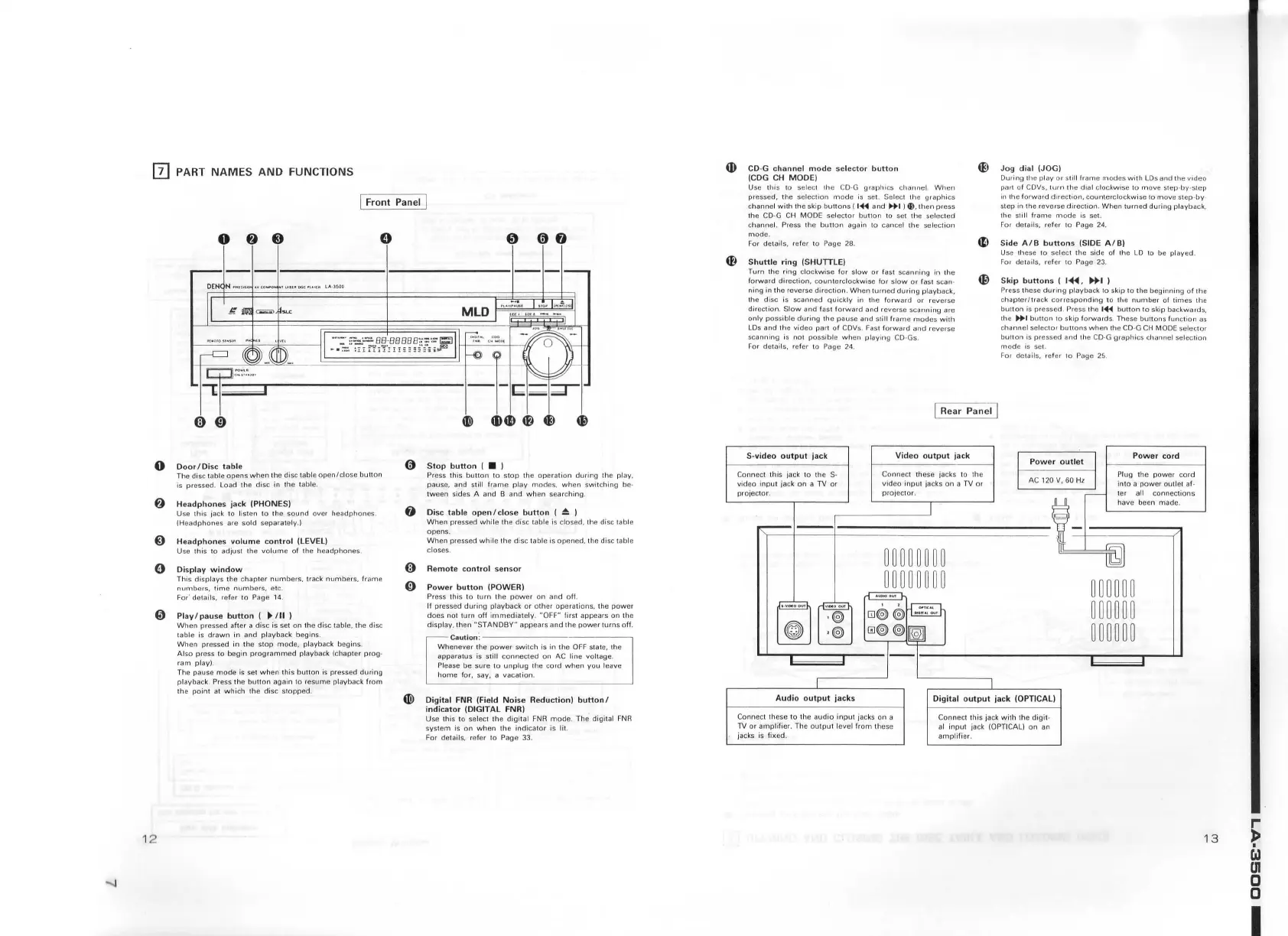
Door
I
Di
sc
tabl
e
The disc tab le
opens
when
th
e disc table
open/close
button
is pressed.
Load
the
disc
in the table.
f)
Headphones
ja
ck !PHONES)
Use
this
jack
to
listen to th e
sound
over
headphones
.
(Headphones
are sold separately.)
@
Headphones
volume
co
n
tro
l (LEVEL)
Use
this
to
adjust the
volume
of
the
headphones.
0
Di
sp
l
ay
window
This
displays
the chap
ter
numbers,
track
numbers.
frame
numbers,
time
numbers.
etc.
For· details, refer 10 Page 14.
0 Play / pause
button
(
~/II
)
12
When
pressed after a
disc
is set
on
the disc table.
th
e disc
table
is
d
rawn
in and playback
begins
.
When
pressed in th e
stop
mode,
playback
begins
.
Also press
to
begin
prog
r
ammed
playback (chapter
prog
·
ram
play).
Th e pause
mode
is set
when
this
button
is
pressed
during
playback. Press the
button
again 10 r
esume
playback
fr
om
the
po
int
at
which
th e
disc
stopped.
(}
Stop
button
I )
Press th is
button
to
st
op
the
operation
during
the play,
pause, and s
till
frame
play
modes,
when
switching
be·
tween
sides A and B and
when
searching
.
f)
Ois
e
table
open
I
close
button
(
~
)
When
pressed
while
1he
disc table is closed. the disc table
opens
.
When
pressed
while
th e
disc
table is
opened,
the disc table
closes.
@ Re
mot
e
co
ntr
ol
sensor
0
Power
button
(POWER)
Press
this
to
turn
the
power
on
and
off.
If pressed
during
playback
or
other
operations,
the
power
does
not
turn
off
immediate
ly. "OFF" first appears
on
lh
e
display, then
"S
T
ANDBY"
appears
and
th
e
power
turns
off
.
Caution
:--------------
Whenever
the
power
switch
is in the
OFF
state, the
apparatus
is
stilt
con
nect ed
on
AC line volt age.
Please
be su re
to
unplug
the
cord
when
you
leave
home
fo r, say, a
vacation
.
fl!)
Digital
FNR (Field
Noi
se Re
duction)
button/
indicator
(DIGIT
AL
FNR)
U
se
this to select the
digital
FNA
mode.
The digital
FNR
system
is
on
when
the
indicator
is lit.
For details.
refer
to Page
33
.
ti)
CO-G
channel
mode
se
lector
button
ICDG CH
MOD
Ei
4E)
Jog
dial
(JOG)
During
th e play
or
s
li1
1 fram e
modes
with
LD
s and
th
e
video
part of CDVs,
turn
the
dia
l c
lockwise
to
mov
e s
tep
-
by
-
step
in the
forward
d 1rect1on,
counterc
l
ockwise
to
move
step -
by
·
step in the r
everse
direction
.
When
tu
med
during
playback,
th e still
frame
mode
is sel.
For details.
refer
to
Page 24.
Use
this
to selecl the CD-G
graphics
channel.
When
pressed,
the
se
lection
mode
is set.
Selec1
1h
e
graphics
channe
l with
the
skip
buttons
(
1'411
and
11+1
)
~
,
th
en
press
th
e
CD
-G CH MODE selector
bu11on
to
se1
the selected
channel.
Press
th
e
button
again
to
cancel the
selection
mode.
For
details, refer to Page
28
.
4tl
Side
A
/B
buttons
!SIDE A /
B)
Shuttl
e
ring
ISHUITLE)
Turn
the ring clockwise
for
sl
ow
or
fast
scanning
In the
forward
direction,
counterclockwise
for
slow
or
fast scan -
~
ning in
the
reverse
direction.
When
turned
during
playback,
the
disc
is scanned
quickly
in
th~
forward
or
reverse
direclion
.
Slow
and
fast
forward
and reverse
scanning
are
o
nly
possible
during
the
pause
and
sti ll
frame
modes
wi1h
LDs and the
video
part
of
CDVs. Fast forwa1d
and
reverse
scanning
is
not
possible
when
playing
CD
-Gs .
For details.
re
f
er
to
Pag
e 24 .
S-video
output
jack
Connect
this
ja
ck
to
th
e
video
input
jack
on
a
TV
or
projector
.
I Rear Panel J
Vid
eo
o
utput
j
ac
k
Co
nn
ect these jacks t o
1he
video
input
jacks
on
a TV
or
projec
t
or
.
Use
1he
se
to
select the side of the
LO
to be
played
.
Fo1
details.
ref
er
to
Page
23
.
Skip
buttons
I I~
,
~I
)
Press these
during
playback
to skip
to
the
beginning
of
1he
chapter/track
co
rresponding
t o the
number
of
times
the
button
is pressed. Press the
1'+41
button
to
skip
backwards.
the
...
I bu11on to
skip
forwards
. These
buttons
fun
ct
ion
as
channel
selector
buuons
when
!he
CO
·G
CH
MODE selec
tor
bunon
is pressed
and
the
CO
-G
graphics
channel
se
l
ec
r
ion
mode
is set.
For
details. refer
to
Pag
e 25.
Po w e r
outlet
Power
cord
Pl
ug
the
power
cord
into a
power
outle
t af-
ter all conn
ections
have
been
made
.
Audio o
utput
jacks
Digit
al
output
jack !OPTICAL)
Connect these
to
the
audio
input
jacks
on
a
TV
or
amp
lifier. The
outpu
1 level
from
th
ese
jacks is
fixed.
Connec
t
thi
s jack
with
the digit -
al
input
jack (OPTICAL)
on
an
amp
lifi
er.
13
~
{J
en
0
0
I

Table of Contents