CXl
14
I
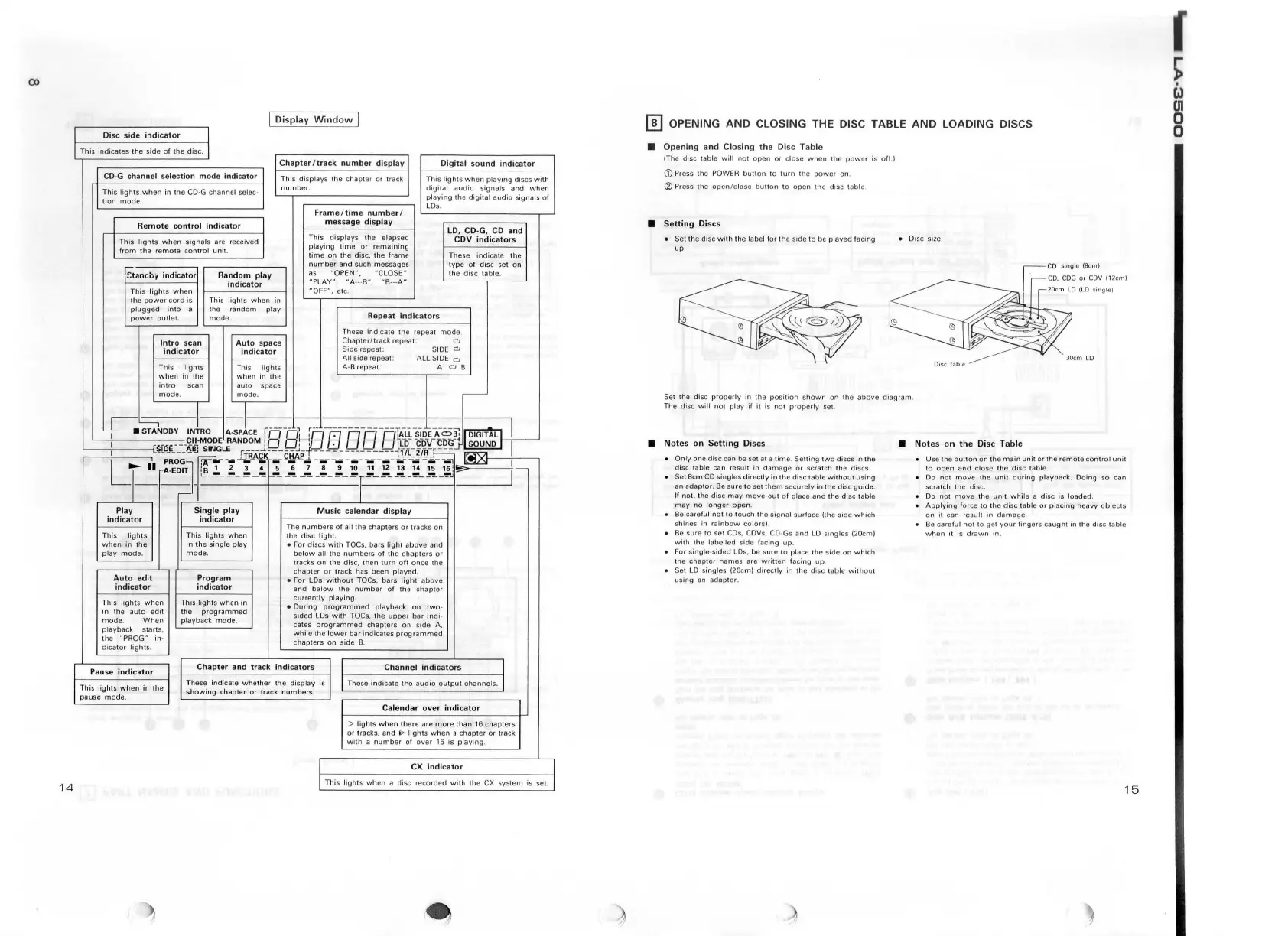
Display
Wind
ow I
Disc side
indic
ator
This indicates
lh
e side
of
the disc.
Chapter
/
tr
ack
numb
er
display
Digital
so
und
indicator
CD·G
channel
se
lection
mode
indicator
This l
ights
when
in
!he
CO-G
channel selec-
tion
mode
.
Th
is
displays the chapter
or
track
number
.
Thi
s li
ghts
when
playing discs
with
digital
audio signals and
when
playing
The
dig ital
audio
signals
of
LDs.
Remote
control
indicator
This
li
ghts
when
sig nals are received
from
the
remote
con
ir
ol unit.
~tandby
indicator R
andom
play
indicator
This
li
gh
ts
when
the
power
cord
is This
lights
when
in
plugged
into a
the
random
play
power
outlet.
mode
.
~--------'
Intro scan
indicator
Th is
lights
when
in
!he
intro
scan
mode.
Auto
space
ind
ica
tor
This
lights
when
in the
auto space
mode.
Frame/time
numb
er /
m
essa
ge
display
Thi s
displays
the elapsed
playing
time
or
rema
ining
time
on the disc, the
fram
e
number
and such messages
as
"OPEN", "CLOSE",
"PLAY''.
HA··
·
BH.
"B
···
A",
"OFF",
etc.
R
epeat
ind
icators
LO
, CD-G,
CD
an
d
COV
indicator
s
These indicate the
type
of disc
se
t on
the disc
table.
These indicate the repeat
mode
Chapterftrack
repeat : O
Side repeat: SIDE o
All
side
repea1
:
ALL
SIDE
c:.i
A·B repeat : A o B
Play
indicator
Single
play
indicator
Music
calendar
di
s
play
1-
---
This
lights
when
in the
play
mode.
Auto
edit
indicator
Thi s lights
when
in the au
to
e
dit
mode.
When
playback starts,
the
"PROGH
in·
dicator
lights.
This lights
when
in the single play
mode.
Program
indicator
This
lights
when
in
the
programmed
playback mode.
The
numbers
of
all the chapters
or
tracks
on
the disc
light.
• For discs
with
TOCs, bars
light
above and
below
all the
numbers
of the
chapters
or
!racks on the disc, then turn
ofl
once
the
chapter
or
track has been
played
.
• For
LDs
without
TO
Cs,
bars
tight
above
and
below
the
number
of
the
chapter
currently
playing
.
•
During
programmed
' playback on
two
·
sided LOs
with
TOCs, the
upper
bar
ind
i·
ca
t
es
programmed
chapters on side A
while
the l
ower
bar indicates
programmed
chapters on side
8.
Pau
se
indicator
Chapter
and
track
indicators
I
Channel
indicators
I
This ligh t s
when
in th e
pause mode.
Th ese indicate
whether
the display is I These indicate the
audio
output
c
hann
els. I
show
ing chapter
or
track
numbers
.
-
Calendar
over
indi
cato
r
> lights
when
there are
more
than
16
chapt ers
or
tra
cks,
and P
ligh
ts
when
a c
hapter
or
track
with
a
number
of
over
16
is
playing
ex
indicator
I
I This lights
when
a disc
recorded
with
the
CX
system is set . I
[I) OPENING
AND
CLOSING THE DISC TABLE
AND
LOADING
DISCS
•
Opening
and
Closing
the
Disc
Table
(The disc table
will
no!
open
or close
wh
en
the
power
is
off.I
(])Press
the
POWER
button
to
turn
the
power
on
.
Ci)
Press the
open/close
button
to open the disc table
•
Setting
Di
scs
• Set the disc
with
the label
for
the side
to
be
played
facing
up
.
• Disc
sile
Set
the disc
properly
in the
position
shown
on the
above
diagram
.
The disc
will
not play
if it
is
not
properly
set.
• N
otes
on
Setting
Disc
s
• Only one disc
ca
n be
se
t a l a t
ime
. Setting
tw
o discs in the
disc
tab
le
can resu lt
in
damage
or
scra tch the discs.
• Set Bern
CD
singles
directly
in the disc table
wi
t
ho:.Jt
using
an
adaptor
.
Be
sure to
se
t
them
securely in the disc guide.
If not, th e disc
may
move
out
o f place and th e disc table
may
no
longer
open.
•
Be
carefu l
no!
to touch the signal surface (the side
which
shines in
rainbow
colors).
•
Be
sure to set CDs. CDVs.
CD
·Gs and
LO
singles (20cm)
with
the labelled side facing up.
• For single·sided LDs, be sure to place the side on
which
the chapter names are
written
facing
up
• Set
LD
singles 120cm)
directly
in the disc table
without
using
an
adaptor
.
•
Note
s
on
the
Di
sc
Table
Use the
button
on the
main
unit
or
the remote
contro
l
uni1
to open
and
clo
se
the disc table.
Do not
move
the
unit
during
playback. D
oing
so can
scratch
lh
e disc.
• Do not
move
the
unit
while
a disc i s loaded.
•
Applying
force
to
th e disc tabl e or placing heavy objects
on
it
can result in
damage
.
•
Be
carelul not 10 get
your
fingers caught in
The
disc
1abl
e
when
it
is
drawn
in.
15
r
~
I
[aJ
m
0
0


 To Next Page