EasyManua.ls Logo

Denon LA-3500 - Programmed Playback

Denon LA-3500
92 pages
Print Icon
To Next Page IconTo Next Page
To Previous Page IconTo Previous Page
Loading...
~
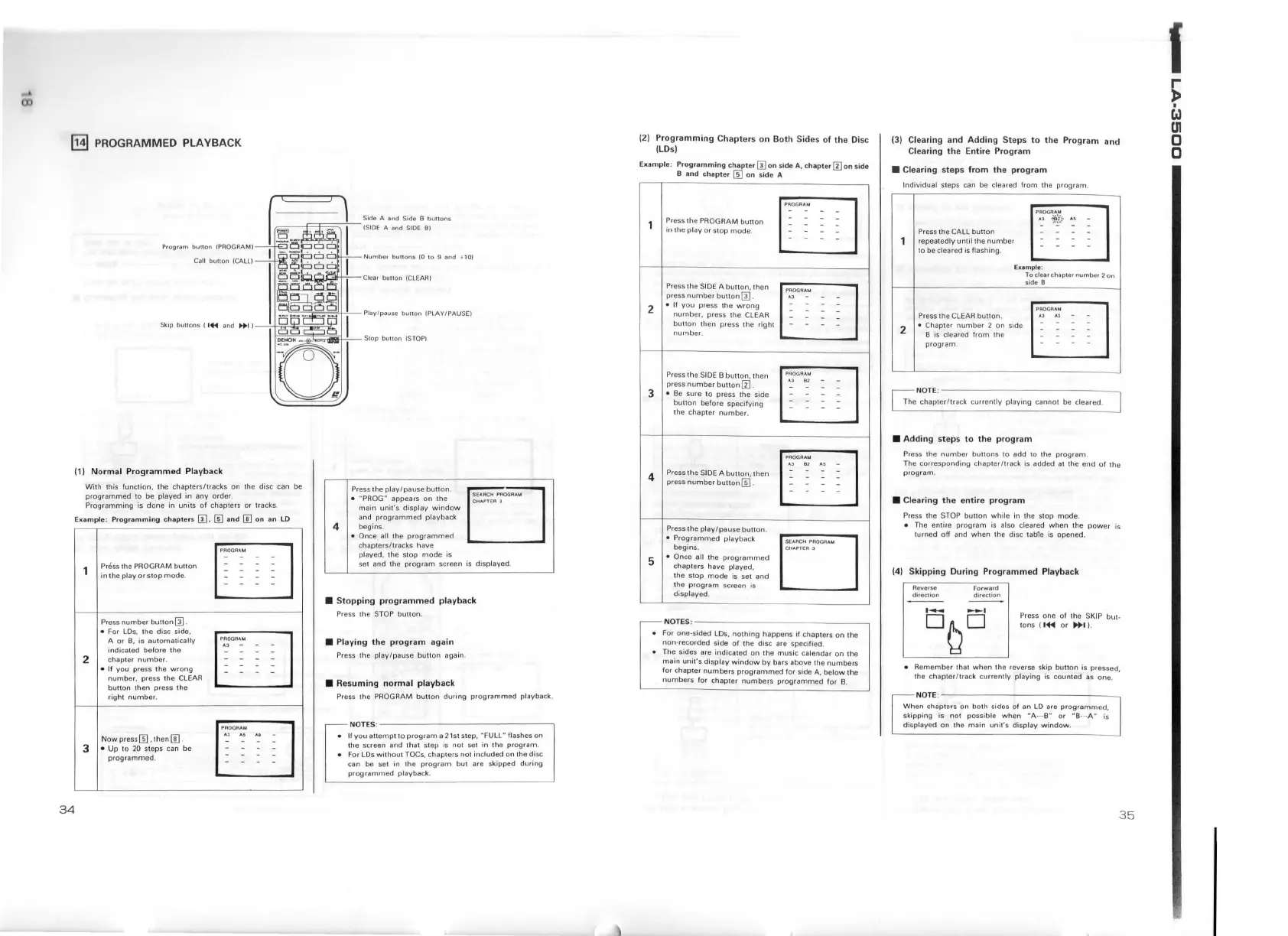
PROGRAMMED
PLAYBACK
Program
bullon
IPROGAAMI
Ca
ll
button
/CALLI
(1)
Normal
Programmed
Playback
With
this
funct
ion ,
the
chapte
r
s/tracks
on
lhe
disc
can
be
prog
r
ammed
to
be p l
ayed
in
any
order
.
Pr
og
r
amming
is
done
in
u
nits
o f
chapte
rs
or
tracks
.
Example
:
Programming
chapters
III,
[i]
and
[!]
on
an
LO
Press th e PROGRAM butt
on
in
the
play
or
sto
p
mode
.
Press
number
bu
non
[fil.
• For
lDs.
t
he
disc side,
A
or
B.
is automatically
indi
cated be fo re the
2 chapter
number
.
•
If
you press the
wrong
numb
er, press the
CLEAR
button
1h
en press the
right
number.
Now press[]] ,
then[])
.
3 • Up
to
20
st
eps
ca n be
programmed
.
[[]
-
-
-
-
-
4
Side A and Side 8
bu!lons
(SIDE A
and
SIDE
8)
Number
bunons
(0
10 9
and
+ 1
0)
Press the pl
ay/pause
butt
on.
•
~
PROG
"
appears
on
the
main
unit
's
display
window
and
programmed
playback
begins.
• Once all the pr
ogrammed
chapters/ tracks have
played, the stop
mode
is
se
t and th e
program
screen is displayed.
•
Stopping
programmed
playback
Press the STOP button.
• Playing
the
program
again
Pr
ess the pl
ay/pause
bu
tt
on again .
•
Resuming
normal
playback
Press the PROGRAM
button
during
programmed
playbac k.
NOTES
o~
~~~~~~~~~~~~~~
• II
you
attempt
10
program
a 21st step,
~FU
LL
~
flashes
on
the screen and that step
is
not
se
t in the
program
.
• For LDs
with
out
TOCs, c
hapt
ers not included on the disc
can be
se
t
in
1he
program
but
are skipped
during
programmed
playback.
(2)
Programming
Chapter
s
on
Both
Sid
es
of
the
Oi
se
(LDs)
Example:
Programming
chapter
m
on
s
id
e A,
chapte
r III on side
B
and ch
apter
[[]
on side A
2
3
4
5
Press the PROGRAM
buno
n
in the
play
or
stop
mode
.
Press
1h
e SI
DE
A
butlon,
I hen
press
number
bunon
m.
•
11
you
press the
wrong
number,
press the CLEAR
button
then
press the
right
number
.
Press the
SIDE
B
button,
then
press
number
button
ill
•
Be
sure to
pr
ess the side
buuon
before
specify
ing
the chap
ter
number.
Press the
SIDE
A button,
then
press
number
bu
tton
[fil .
Press the
play/pause
button
.
•
Programmed
playback
begins.
• Once all the
programmed
chapters have played.
the
stop
mode
is set
and
the
program
screen is
displayed
.
[[]
-
-
-
-
-
PROGRAM
~3
62
PROGRAM
A3
81
SE4ACH PnOOAAM
NOTES
o~~~~~~
~~~~~~~~
~
For one
-s
ided
LO
s,
nothing
happens
ii
chapters
on
the
non-recorded side
of
the disc are specified.
• The sides are indicated on the music calendar
on
th e
main
unit's
disp
lay
window
by
bars above !he
numbers
for
chapter
numbers
programmed
for side A,
below
the
numbers
f
or
chapter
numbers
programmed
for
B.
(3) Clearing
and
Adding
St
eps
to
the
Progr
am
a
nd
Clearing
the
Entire
Program
• Clearing
steps
from
the
program
Individual steps can be cleared
from
the
program
.
2
Press the CALL
button
repeatedly
until
the
number
lo
be cleared is flashing.
Eicample:
Press the CLEAR
buuon
.
• Chapter
number
2
on
side
B is cleared
from
the
program
.
To cl
ear
chapter number 2
on
side
B
NOTE
o
--------------~
The chapt
er/track
curren1ly pl
aying
canno
t be cleared.
• Adding
steps
to
the
program
P1ess
the numbe1
buttons
to add to the progr
am
.
The
corresponding
chapter/track
is added
al
the
end
of
the
program
.
• Clearing
the
entire
program
Press the STOP
button
white
in the stop
mode
.
• The entire
program
is also cleared
when
l he
power
is
turned
off
and
when
the disc
tab1
e is opened.
(4)
Skipping
During
Programmed
Playback
Reverse
direc1ion
Forward
direction
Press one of the SKIP
but
·
tons ( l+t
or
111+1
).
• Remember that
when
the reverse skip bu tt on is pressed,
the chapter
/track
currently
playing
is counted
as
one.
NOTE
o--
---
---------
--
When
chapters on
both
sides
of
an
LD
are
programmed,
skipping is
not
possible
when
NA-
·-B"
or
"B·
··
A"
is
di
sp layed on the
main
unil's
display
window
.
35
1
~
w
UI
0
0

Table of Contents