0 CONNECTIONS
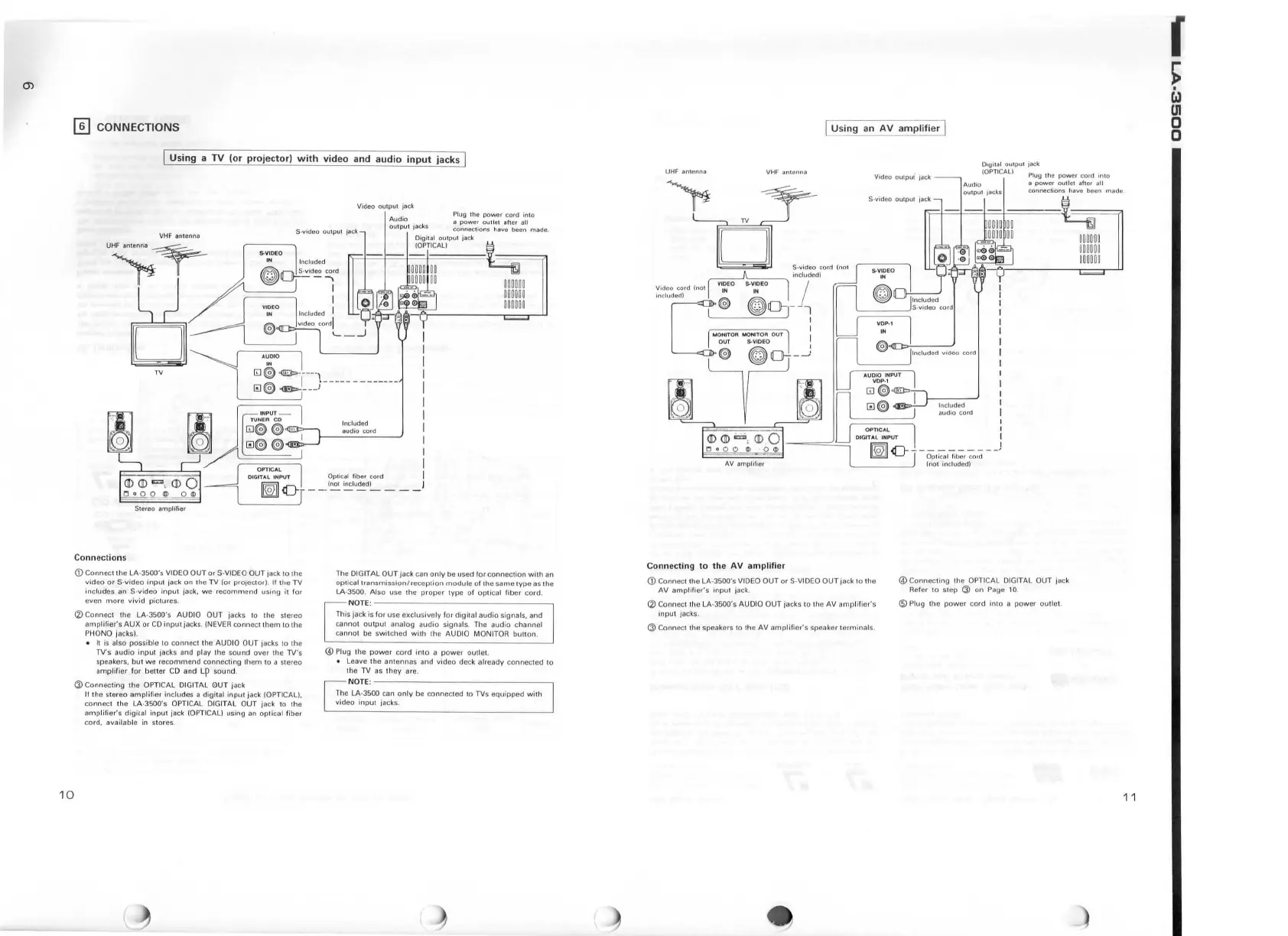
Using
a
TV
(or
projector)
with
video
and
audio
input
jacks
10
VHF an1
enna
UHFantonoa~
~
TV
Video
outpu
l jack
Plug the
power
cord
in
to
S·vtdeo
ou
tput jack
Audio
output
jacks
a
power
out
let aher a
lt
connections have been made.
S-VlOEO
IN
Included
o~"~~d
I
I
I
Digilal
OU
IPUI
ja
ck
(OP
TI
CAL)
~-
i=l=J=J.==J=G
In
c
lud
ed
audio
co1d
I
I
I
I
I
I
I
I
I
I
I
DIGITA
L
IN
PUT
Optic;al
fiber
cord
I
~
<[}-
__
_
(~
~u~d~
_
__
J
Connection
s
©Connect
th
e LA-
JSOO's
VIDEO
OUT
or
S-VIOEO OUT jack
10
the
video
or
S·
video
inpu
t jack
on
the
TV
(or
projector)
.
If
the
TV
includes
an S-video i
nput
jack,
we
r
ecommend
using
ii
for
even
more
vivid
pic
1
ures.
<2)
Co
nn
ect the LA·3500's AUDIO OUT jacks 10 the slereo
amptilier's
AUX
or
CO
inpul ;acks. !NEVER connect
them
10
the
PHONO jacks).
•
It
is
also possible to connect the AUDIO
OUT
jacks
to
the
TV's
audio
input
1a
cks and play
1h
e
sound
over
the TV's
speakers, but
we
reco
mm
end connecting them to a stereo
amp
lifi
er
for
bett
er CD and
Lp
sound.
(J) Connecti ng the OPTICAL
DI
GIT
AL
0UT
jack
II the s
tereo
amp
lif
ie1
include
s a digital
input
jack !OPTICAL
),
connect the LA-3500's
OP
TI
CAL DIGITAL OUT jack to !he
amp
lifier's
digilal
input
jack (OPTICAL) using
an
optical f iber
cord.
available in stores.
The
DIG IT
AL
OUT
jack can
only
be used
for
co
nn
ection
with
an
optica
l 1ransmis
sion/
r
eccption
module
of th e same
type
as the
LA-3500. Also use !
he
prope
r type of optical fiber cord.
NOTE
o
~~~~~~~~~~~~~~~
This jack is for use
exclus
ively fo 1
digi
1al
audio
signal
s,
and
cannot ou
tput
analog
audio
signals, The aud io c
hann
el
cannot be swi tched
with
the AUDIO MONITOR
button
.
@P
l
ug
the
power
cord
in
lo a powe1 outlet.
• Leave
the
antennas
a
nd
video
deck
al
ready
connected
to
the TV as they ar
e.
NOTE
:
~~~~
~~~~~~~~~~~
The LA-3500 can
only
be connecled 10 TVs
equipped
with
video
input jacks.
[
Using
an
AV
amplifi
er [
01gi1
al
output jack
Video
outpui
Jack
UHF anlcnna
!OPTICAL)
Plug the powc1 cord
mto
Aurlio a
power
outlc• alter all
VHF
antenna
ou
1pu1
jacks connections have been made .
AV
amplifier
Connecting
to
the
AV
amplifier
(D Connecl the LA-3500's VI
DEO
OUT
or S-VI
DEO
OUT
jack
to
the
AV a
mplif
ier's
inp
ut
jack.
(2:)
Connect lhe LA·3500's AUDIO OUT jacks to
th
e
AV
amp
li fier's
inpu
t jacks.
(j) Con n
ec
1 1
he
speakers to th e AV
amplifier's
speaker 1
ermina
ls.
r>=l=l=l-==l-=~
Included
audio
co rd
@Connec
ting the OPTICAL OlGITAL OUT jack
Refer
to
step
Ci)
on
Page 10.
@Pll
19
th e
power
cord
into
a
power
outl e
t.
11
r
~
Ll
m
0
0


 To Next Page