EasyManua.ls Logo

Denon LA-3500 - Caution on Handling; Handling Discs; About Discs; Before Using

Denon LA-3500
92 pages
Print Icon
To Next Page IconTo Next Page
To Previous Page IconTo Previous Page
Loading...
6
(!]
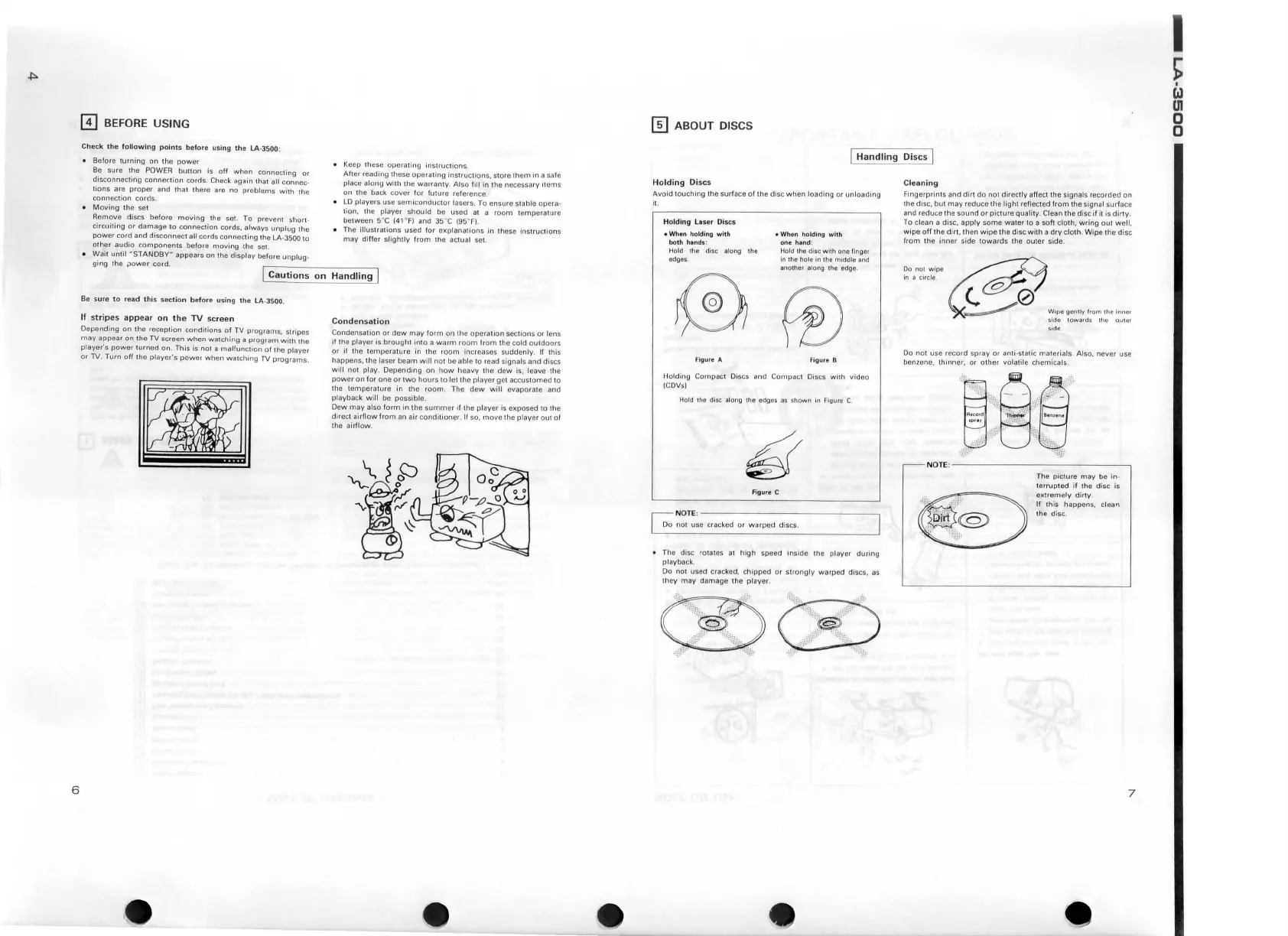
BEFORE
USING
Check
the
following
point
s b
efo
re
u
sing
th
e
LA
-3500:
Before
turning
on
th
e
power
Be
sure
the
POWER
button
is
off
when
connecting
or
disconnec
t
ing
con
n
ection
co rd
s.
Check again
th
at all
connec
-
lions
are
proper
and
that
!her
e are
no
problems
with
the
co
nnecti
on
co
rd
s.
M
ov
ing
th e set
Remov
e discs
before
moving
the
set
To prevent
shor
t -
ci rcu
iting
or
damage
to
connection
cords,
always
unplug
the
power
cord
and
di
sconnect
all
cords
co
nn
ec
tin
g
th
e LA-3500
to
other
audio
componen
t s
before
moving
the set.
Keep these opera
ting
instructions
After
reading these operating in
structions,
store th
em
in
a safe
place along
with
the
warranty
. A lso fill in
1h
e necessary
11
ems
on
the b ack
cove
r
fo
r
future
reference.
LO
players u
se
sem i
conductor
lasers. To ensure stable opera-
tion, !he pl
ayer
should
be used at a
room
temperature
between
5"C
(41
°
F)
and
35"C (95
"'
F)
.
T
he
illus
tr
ations
used
f
or
ex
planati
ons
in
1h
ese i
nstruc
t
io
ns
may
differ
sl
ightly
from
the actual set.
Wa
it
until
"S
TANDBY
"
appears
on the
disp
lay befo re
unplug-
ging
the
power
cord.
.----
-----~
[
Cautions
on
Handling
[
Be
sure
to
r
ea
d
thi
s
se
ction
before
using
the
LA
-35
00
.
If
stripes
appear
on
the
TV
scree
n
Depending
on
the
reception
condi
tions
of
TV
programs,
stripes
may
appea
r
on
the
TV
screen
when
watching
a
pr
og
r
am
wi
th 1
he
player's
power
turned
on. This is
not
a
ma
lfun
ct
ion
of
lh
e
player
or
TV.
Tu rn
off
the
player's
powe1
when
watching
TV
programs
.
Condensa
tion
Condensation
or
dew
may
form
on
the oper
ation
sections
or
len s
if
the
player
is
brought
into
a
warm
room
from
the
co
ld
ou
t
doors
or
if the
temperature
in the
room
Increases
sudden
ly. If
1hi
s
happens
, the laser
beam
w i
ll
not
be
able
to
read signals
and
di
scs
will
not
play
.
Depending
on
how
heavy
the
dew
is, leave the
powe
r
on
for
one
or
t
wo
hours
to
let
the
player
get
accustom
ed
to
th
e t
emperature
in
the
room
. The
dew
will
evaporate
and
playback
wi
ll
be
possible
.
Dew
may
also
form
in
the
summe
r
if
the pl
ayer
is
exposed
to
th e
direc
t ai rfl
ow
fr
om
an
air
condi
ti
oner
.
If
so, move
the
player
out
o f
the
airflow
.
m ABOUT DISCS
I
Handling
Discs I
Holding
Di
scs
Avoid
1
ouching
the surface
of
the
disc
when
l
oading
or
unloading
it.
Holding
La
ser
Di
scs
Wh
en
holding
with
both
h•nd
s:
Ho ld the disc along the
edges.
Wh
en
holding
with
one
h•nd
:
Hold the
disc with
one
!Inger
in
the
hole
In
lhe
middle
and
another
along
the
edge
.
®®
Figure
A
F
igur
e B
Ho
lding
Compac
t Discs and
Compac
t Discs
with
video
iCDVs)
Hold
th
e disc al
ong
!he edges
as
s
hown
111
Figure C.
Figure C
~
NOTE
:
~not use cracked
or
warped
discs.
The disc
ro
1ates
at
high
speed
inside
the player
during
playback.
Do
not
used
crack ed,
chipped
or s
trongly
warped
di
scs.
they
may
damage
the
player.
Cleaning
Fi
ngerprin
ts
and
dirt
do
not
direc
tly
affect the signals
recorded
on
the d isc,
bu
l
may
reduce
the
ligh
t reflected
from
the
signal
sur
face
and reduce
the sou
nd
or
pictu
re
quality
. Clean the disc
if
it is
dirty
.
To
clean a disc.
apply
some
water
to a
soh
clot
h,
wring
out
well
,
wipe
of
f the dirt, then
wipe
the disc
with
a dry clo
th
.
Wipe
th e
disc
from
t
he
inner
si
de
towards
the
outer
side.
:;",";
"~po
~
~~0'
W•pogonttv hom
th
em
ne<
side
towards
the
outer
si
d e
Do
not
use re c
ord
spray
or anti-static
materials
Also.
never
use
benzene,
thinner,
or
other
volati le
chemicals
.
The pict
ure
may
be
in
-
te
rrupt
ed if
th
e disc is
extremely
dirty.
lf this
happens
,
clean
th
e
dis
c.
7
I
~
t.J
en
0
0

Table of Contents

Related product manuals