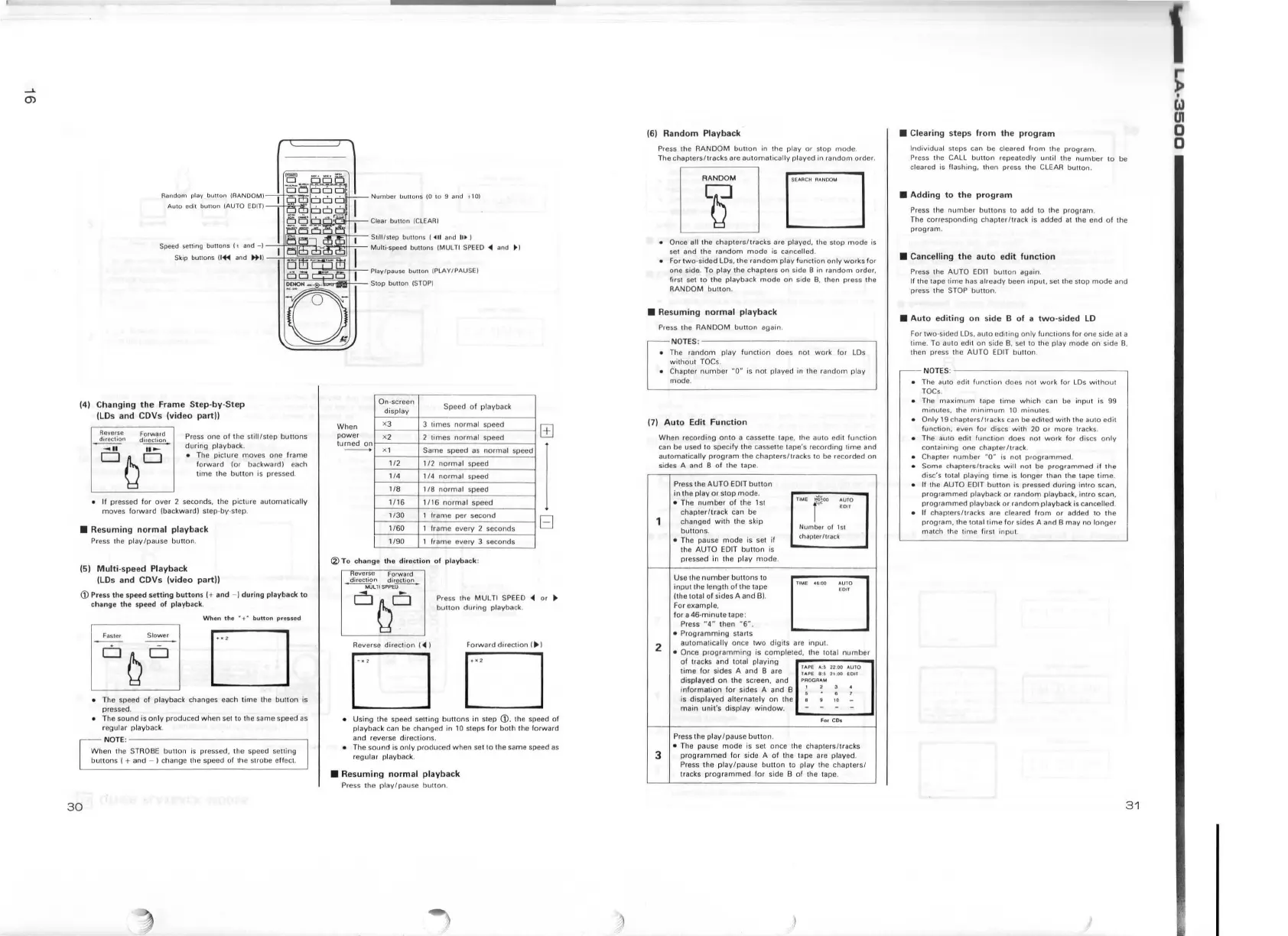
Random play
bul!on
!AANDQM)-o+-~-1
•
Auto edit buuon (AUTO
EDITf-rlia..-:11'.
L.-'-.
N u
mber
liuHons
(0 t o 9
and
~
10)
/:.::1-.l-LJ-JJ.,:IJ;,i!,j....''--
S111l/s1ep
but1ons j
•II
and
IU•
I
Speed
sening
bunons
It
and
-1-
!.jlld,\
,.l..
.. L Multi·speed
buttons
!MULTI
SPEED
-41
and • )
Skip buttons O
+il
and
.+
II-.;+;~~§~~
(4) Ch a
nging
th
e Frame
St
ep-
by
-S
te
p
(LDs and
CDVs (video part))
Reverse
Fo1wa1d
d1re
c
tio11
d~
~
··-
DQD
Press one
of
the sl i
lll
step
buttons
during
playback.
•
The
piclure
moves
one
fr
ame
forward
(or
backward)
each
t
ime
the
button
is
pre
ssed
.
If
pre
sse
d
for
over
2 seconds, the p ic
tur
e
automatically
moves
forward !backward) step· b\'
·S
tep.
• R
es
uming
no
rm
al pla yback
Pre
ss
the
play/pause
buuon
.
(5)
Mul
t i-s
pe
ed
Pl
a
yback
(LDs a
nd
CDVs (video partJI
(i)
Press
the
speed
sett
ing
bu
tto
ns I+ and - l d
ur
ing playback
to
ch ange t he speed
of
playback.
30
W
hen
t h e
•+·
bunon
pressed
Fast<?r
Slower
D
• The speed
of
playback changes each t
ime
the
button
is
pressed.
• The
sound
is
on
ly
produced
when
se1
to the same speed as
regu l
ar
playback.
NOTE
:
W hen 1
he
STROBE bu tton
is
pressed, the speed setting
buttons
l + and - ) change the speed
of
!he strobe effect.
'-;:
!="-
~
~-Play
/pause
bunon
(PLAY
/
PAUSE)
Stop
bull
on
(STOP!
On-screen
Speed of
playback
display
When
XJ
3
tim
es
normal
speed
power
X2
2 ti
me
s
normal
speed
turned
on
X l
Same speed
as
norma
l speed
112
1
/2
normal
speed
114
1 / 4
normal
speed
118
1
18
normal
speed
1/
16
1/
16
norma
l speed
1'30
1 frame
per
seco
nd
1160 1 frame every 2 seconds
1/90
1 frame every 3 seconds
(2)
To
chan
ge
th
e
dir
ect
ion
of p layback:
Hever
se
Forward
direction direction
--MULTI
SPPE-U
--
El
Pre
ss
the
MUL
Tl SPEED
'4
or
..
button
during
playback.
Rever
se
dir
ec
tion
(
'4
l
Forward
dire
ct
io
n I
...
I
DD
• Using the speed setting
buttons
in step (j), the speed
of
playback can be changed
in
10
steps
for
both
the forward
and reverse
directions
.
• T
he
sound
is
only
produced
when
set to the same speed
as
regul
ar
playback.
• Res
uming
no
rm al pl
ayb
a
ck
Press the
play/pau
se
button
.
(6
) Ra
nd
om Playba
ck
Press the RANDOM
button
in the play
or
st
op
mode
.
The
chapters/tracks
are
automatically
played in
random
order.
• Once all the
chapters/tracks
are played. the
stop
mode
is
set and the
random
mode
is cancelled .
•
For
two
-s
ided
LDs, the
random
play
fun
ction only
works
for
one side.
To
play
the
chapters
on
s
id
e B
in
random
order,
first set to the
playback
mode
on
side
B,
then p1ess the
RANDOM
button
.
• Res
um
i
ng
n
or
m al
pl
a
yb
ack
Pr
ess the RANDOM
buuon
again.
N
OTES
:-------
---------,
• The
random
play
function
does not work for LDs
wi
thout TOC s.
• Chapter
numb
er "O" is
not
played in th e random play
mode
,
(7
)
Auto
Edit
Function
When
recording
onto
a cassette tape, the
auto
edit fu
nction
can be u
se
d l o s
pecify
the casselte tape 's recordi
ng
time
and
automatically
prog
r
am
the
chap
ter
s/
tracks to be recorded o n
sides
A
and
B
of
1
he
tape
.
2
3
Press the AUTO EDIT
button
in
the
play
or
stop
mode
.
• The
number
of
the 1st
chapl
er/track
can be
changed
with
the skip
buttons
.
• The pause mode
is
set
if
the
AUTO
EDIT
button
is
pressed
in the play
mode
.
Use the
number
bu
tt
ons to
input
the
length
of
the tape
ft
he
total
of
sides A and
Bl
.
For example,
for
a 46-
minute
tape :
Press
" 4 " then
"6M.
•
Programming
star
ts
""'
f1"
:~:?
Numb
e1
o f
1s
t
chapt
er/
tr
ac
k
au t
oma
l
ically
once
two
digils
are
inpu
t.
• Once p r
ogramming
is
completed
, the
to
tal
number
of
tracks and 101al
play
i
ng
lime
for
sides A and B are
:::~
: ::
!!
::
:~:,
0
disp
l
ayed
on
t
he
screen, and
PAOOA"
"'
information
fo
r sides A
and
B
~
2
is displayed alternately
on
1he
main
un
i
t's
display
window
.
For
C01
Press the pl
ay/pause
button
.
• The pause
mode
is set once the
chapters/t
racks
prog rammed fo r side A
of
the tape
ar
e played.
Press
the
play/pause
button
to play the
chapters/
tracks
programmed
for
side B
of
the tape.
• Clearing st
eps
from
th
e
prog
ram
Individual steps can be cleared
from
the
program
.
P1ess
the CALL
button
repeatedly until the
number
to be
cleared is flashing, then press the CLEAR
bunon.
• Ad
ding
to
th
e p
ro
gr
am
Press the
number
buttons
to add
10
the
program
.
The
corresponding
c
hapter/
1rack is added at the end
of
lhe
program
.
• Cance
lling
the
auto
e
dit
function
Press the AUTO
EOll
button
again.
If the tape 1ime has already been
inpu
t, set 1he stop
mode
and
press the
STOP
button
.
• Auto editing
on
si
de
B of a
tw
o-sided
LD
For
two
-sided LDs, au to
editing only
functions for one side a t a
time
. To auto edl\
on
side B.
se
t to
th
e play mode
on
side B,
then press
th
e AUTO EDIT
bun
on.
N
O
T
ES
:
--------------~
• Th e auto edit
flinction
doe
s
not
wo
rk
for
LO
s
without
TOC
s.
• The
maximum
tape
tim
e
whi
ch
ca
n be
input
is 99
minutes, the
minimum
10
minutes
.
•
Only
19 chap t
ers/trac
ks can be edi1ed
with
the
auto
ed
it
func1ion, even f
or
discs
with
20
or
more
!racks .
• Th e
au
to ed
il
function does not
work
for
discs
only
containing one c
hap
t
er/track
.
• Chapter
number
HO"
is no1
programmed
.
•
Some
chapt
ers/
tr
acks
will
no1
be pr
og
rammed
if
lhe
disc's 10
1at
playing
t
ime
is
longer
than the tape t i
me
.
•
II
the AUTO EDIT bu1ton i s pressed during Int ro sca n.
programmed
playback
or
random
playback,
intro
scan,
programmed
playback 01 random playback is cancelled.
• If chapters/tracks are cleared
from
or
added to the
program,
the total
tim
e f
or
sides A and B
may
no
long
er
match
the ti
me
first
input
3 1
~
i.>
UI
0
0


 To Next Page