Chapter 4 Configuring the Joint Parameters
78
4.8.6 Programmed Operation in SMT7 (Description of arm groups)
■ Concept of an arm group
An arm group is a set of semaphores for joints to be driven. Specifying an arm group
using a TAKEARM command allows a task to get arm semaphores and execute
motion commands. Using an arm group prevents more than one task from executing
a motion command to the same joint at the same time.
A motion command is executable only to those joints contained in the arm group held
in the task.
Robot joints are regarded as a single linked joint so that they cannot individually take
arm semaphores. On the contrary, extended-joints can individually take arm
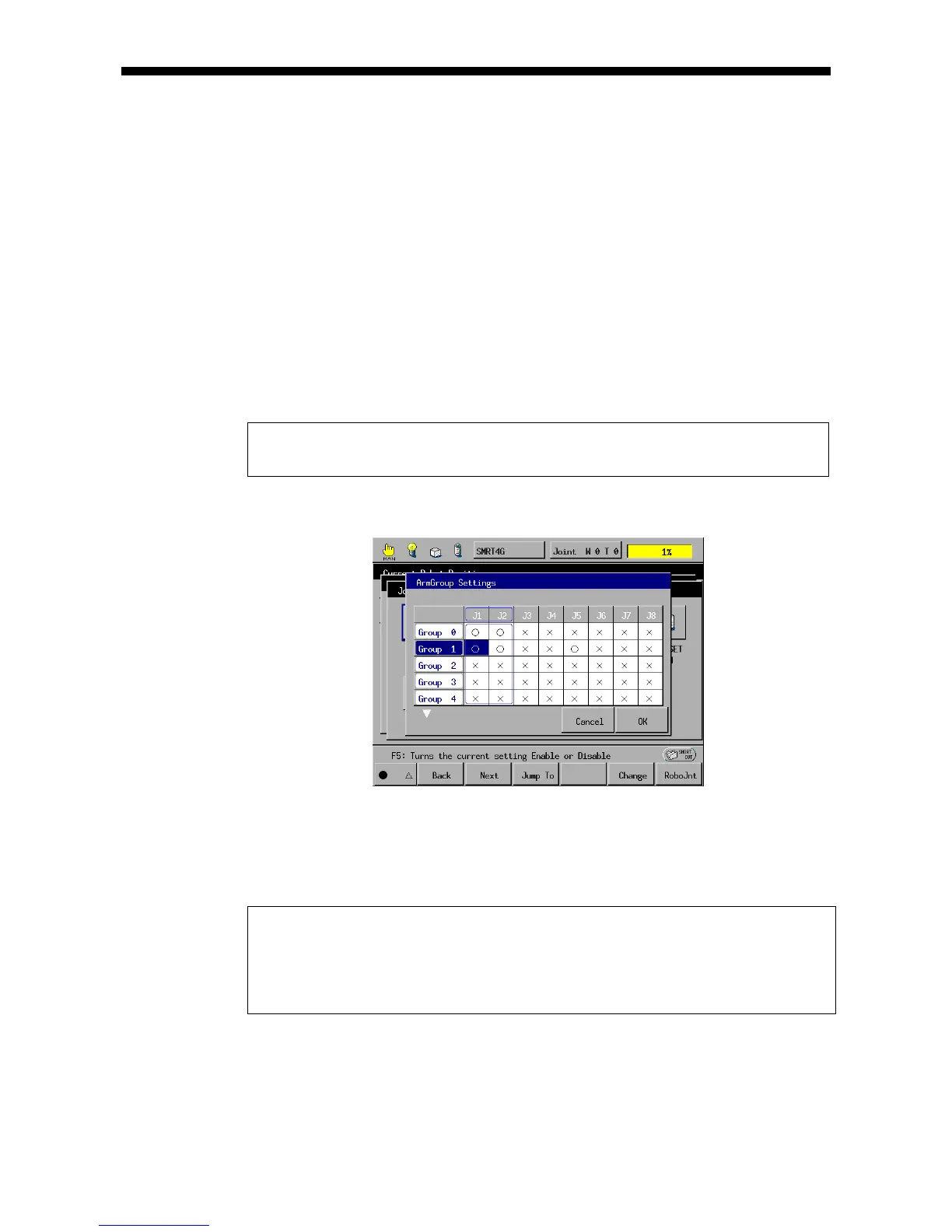
semaphores and the individual settings constitute an arm group.
Up to 32 arm groups are available.
Example: When an extended-joint motion is specified, a task holding Group 1
obtains permissions to drive joints 1 and 2 (robot joints) and joint 5.
Extended-joint motion setting
■ Getting an arm group
To make tasks get an arm group, give a TAKEARM command an arm group number
as an argument as shown below.
PROGRAM PRO1
TAKEARM 1
٠
٠
END
PRO1 gets Arm Group 1 by TAKEARM command with an
argument set to 1.
For the TAKEARM syntax and KEEP options, refer to the Programmer's Manual I,
Section 14.3 "Arm Semaphore."



 To Next Page