ineo+ 353/253/203 1-9
Setup items by operation
1
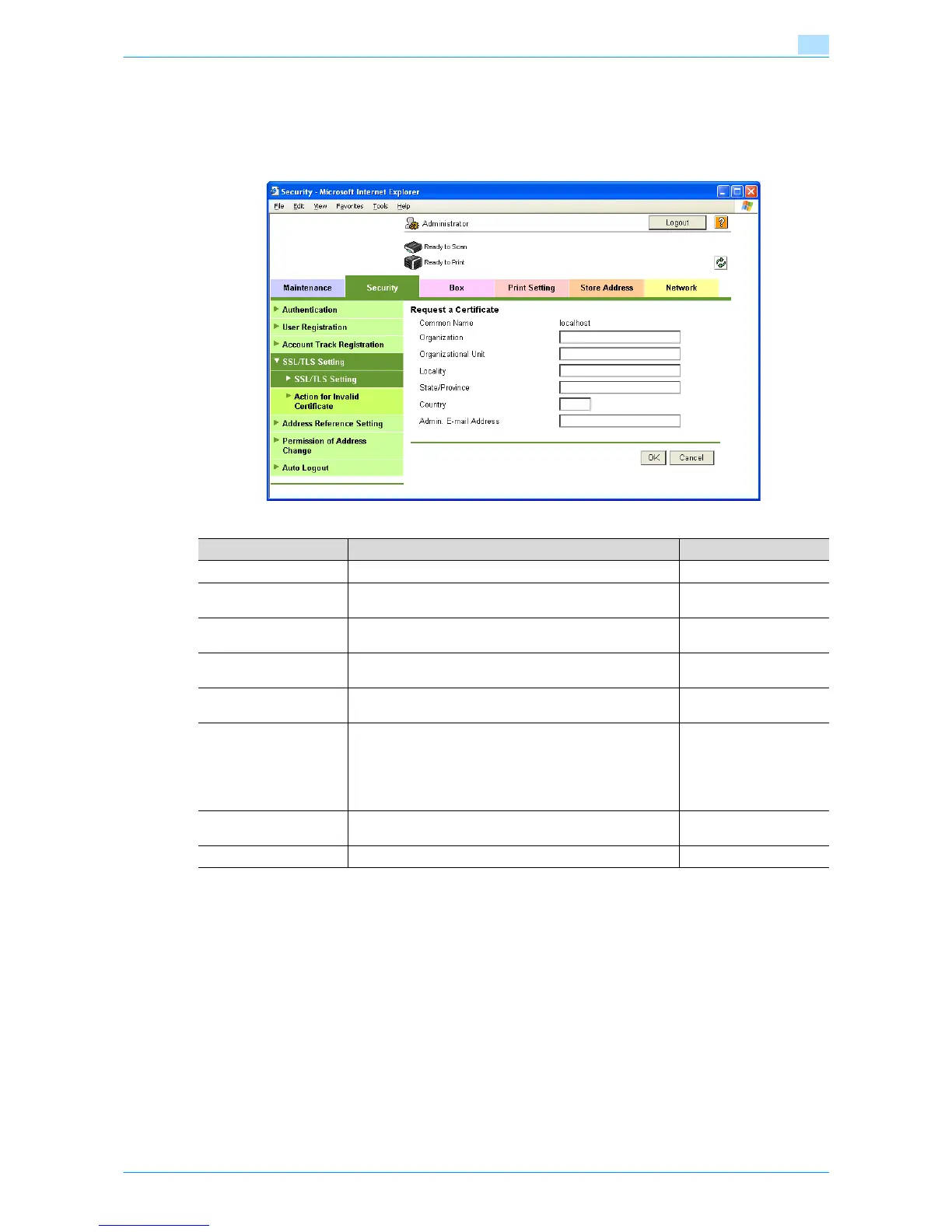
1.4.2 Request a Certificate
In Administrator mode of Web Connection, select the Security tab - "SSL/TLS Setting" - "SSL / TLS Setting"
- [Setup] - "Request a Certificate".
Specify the following settings.
Item Definition Prior confirmation
Common Name Displays the IP address or domain name of the machine.
Organization Enter the name of the organization or group used for creating
an organization certificate (up to 63 characters).
Organizational Unit Enter the name of the account used for creating an account
certificate (up to 63 characters).
Locality Enter the name of the locality used for creating a locality cer-
tificate (up to 127 characters).
State/Province Enter the name of the state or province used for creating a
state/province certificate (up to 127 characters).
Country When creating a country certificate, enter a two-character
country code regulated by ISO 3166.
United States: US, Great Britain: GB, Italy: IT, Australia: AU,
The Netherlands: NL, Canada: CA, Spain: ES, Czech Repub-
lic: CZ, China: CN, Denmark: DK, Germany: DE, Japan: JP,
France: FR, Belgium: BE, Russia: RU
Admin. E-mail Address Specify the address for the administrator (up to 127 charac-
ters).
Address for the adminis-
trator
[OK] Creates certificate signing request data.









 To Next Page