ineo+ 353/253/203 1-40
Setup items by operation
1
1.13 Sending scan data by FTP
Specify settings for sending scan data to the FTP server.
In a network environment with an FTP server, scan data can be sent to a specified folder in the FTP server
on the network. The data sent to the FTP server can be downloaded from a computer on the network. This
function is suitable for transmitting large-sized data, such as high-resolution data.
If a proxy server is available in the network environment, an FTP server on the Internet can be accessed
through the proxy server.
Specify the settings according to the following flowchart.
2
Note
For details on registering FTP, refer to "Registering or editing an address book destination" on
page 1-155.
For details on the FTP-based file transmission, refer to the User’s Guide [Network Scan/Fax/Network
Fax Operations].
1.13.1 TCP/IP Settings
Specify settings to use this machine in a TCP/IP network environment.
For details, refer to "Specifying general settings for TCP/IP-based communication" on page 1-2.
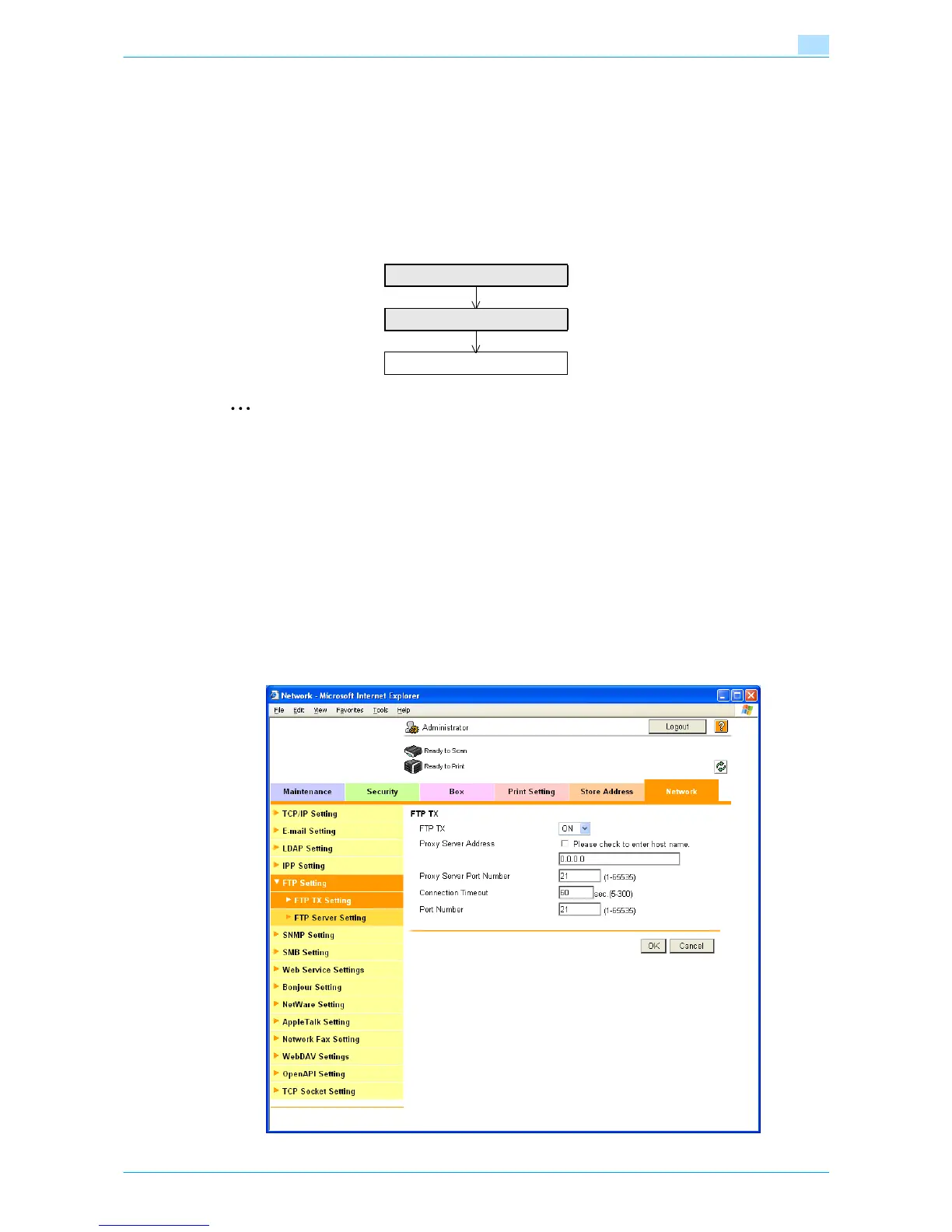
1.13.2 FTP TX Setting
In Administrator mode of Web Connection, select the Network tab - "FTP Setting" - "FTP TX Settings".
Specify the following settings.
TCP/IP Settings
FTP TX Setting
Finish









 To Next Page