ineo+ 353/253/203 1-32
Setup items by operation
1
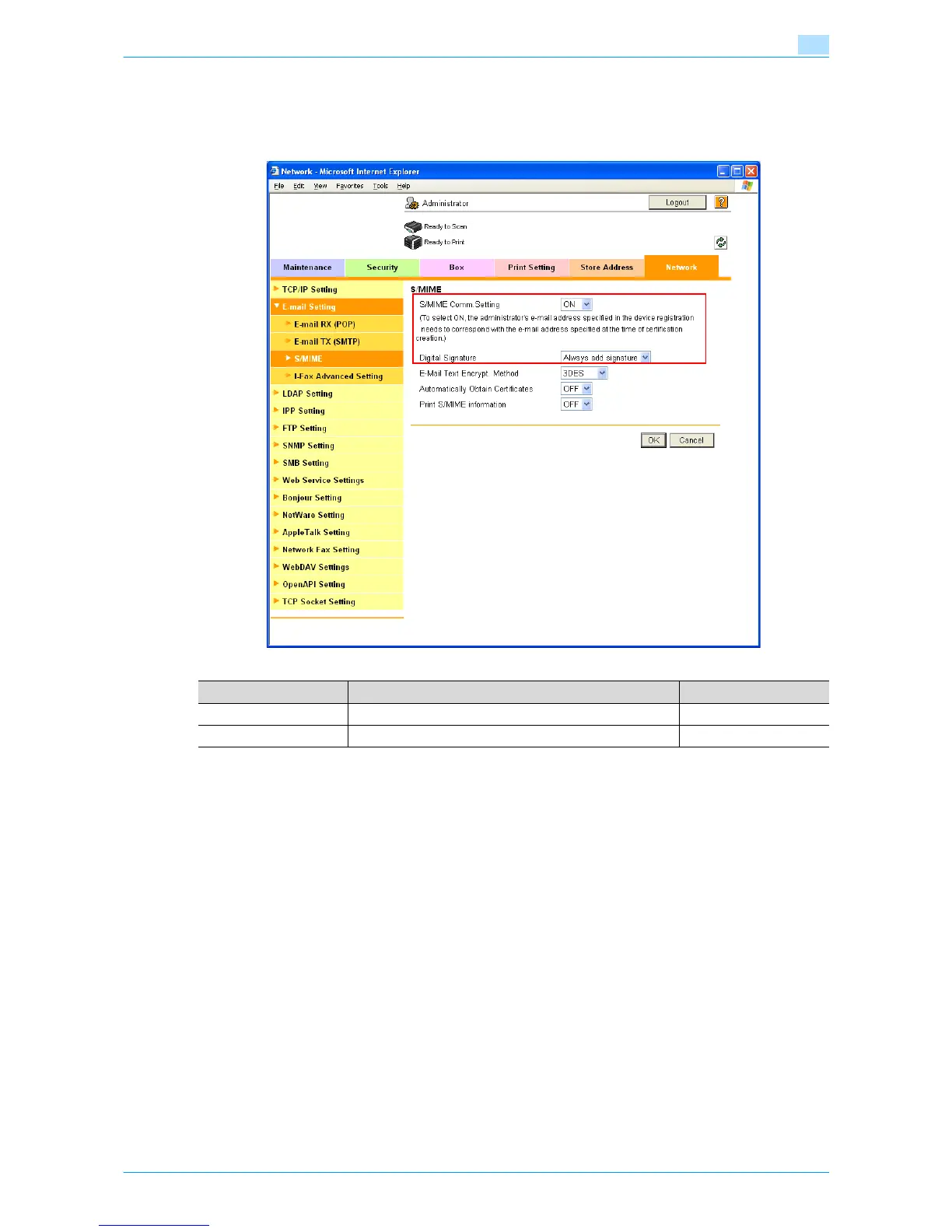
1.10.4 S/MIME
In Administrator mode of Web Connection, select the Network tab - "E-mail Setting" - "S/MIME".
Specify the following settings.
1.10.5 SMTP over SSL/Start TLS
Specify the settings for SMTP over SSL/Start TLS.
For details, refer to "SMTP over SSL/Start TLS" on page 1-26.
1.10.6 SMTP Authentication
Specify the settings for SMTP authentication.
For details, refer to "SMTP Authentication" on page 1-27.
1.10.7 POP before SMTP
Specify the settings for POP before SMTP.
For details, refer to "POP before SMTP" on page 1-27.
1.10.8 POP over SSL
Specify the settings for POP over SSL.
For details, refer to "POP over SSL" on page 1-29.
1.10.9 APOP Authentication
Specify the settings for APOP authentication.
For details, refer to "APOP Authentication" on page 1-30.
Item Definition Prior confirmation
S/MIME Comm. Setting Select "ON".
Digital Signature Select "Always add signature" or "Select when sending".









 To Next Page