EasyManua.ls Logo

Dexcom G5 Mobile - Page 139

Dexcom G5 Mobile
392 pages
Print Icon
To Next Page IconTo Next Page
To Previous Page IconTo Previous Page
Loading...
Dexcom G5 Mobile System User Guide
137Ending Your Sensor Session and Transmitter Session
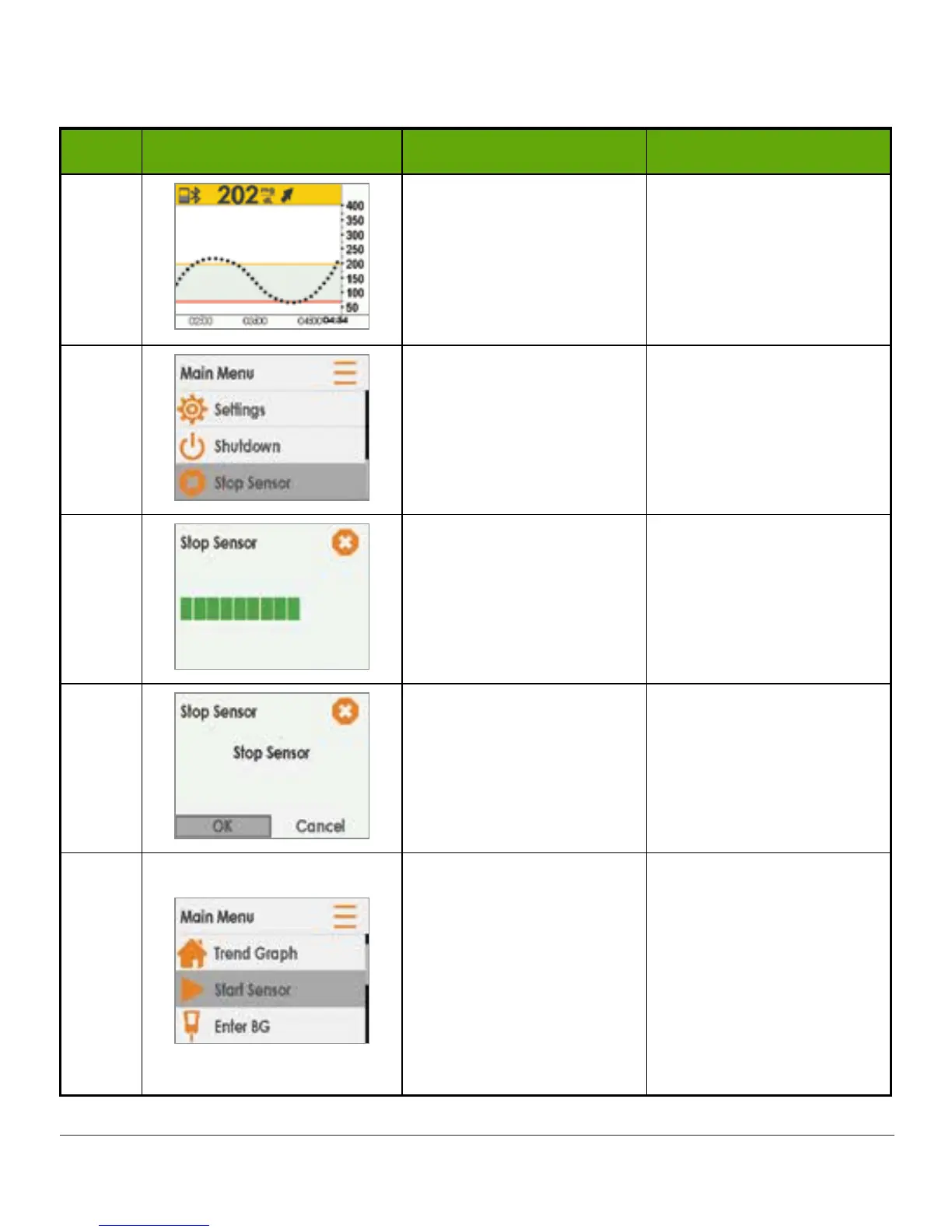
Receiver: Ending a Sensor Session Early
Step What you see What it means What you do
1
Go to Main Menu. Press select button.
2
Ends sensor session.
During session:
Stop Sensor option
appears.
Press down arrow to
highlight Stop Sensor.
Press select button.
3
Thinking screen. Wait.
4
Confirms you want to
stop sensor.
Return to Main Menu.
Press select button.
5
Ready to start a new
session.
Start Sensor option
appears when not in an
active session.
Remove sensor.
Insert new sensor.
Press Start Sensor
when ready for new
session.

Table of Contents

Other manuals for Dexcom G5 Mobile

Related product manuals