Dexcom G6
®
System User Guide
194Chapter 12: Share Information with Your Support Team
Set Up Share
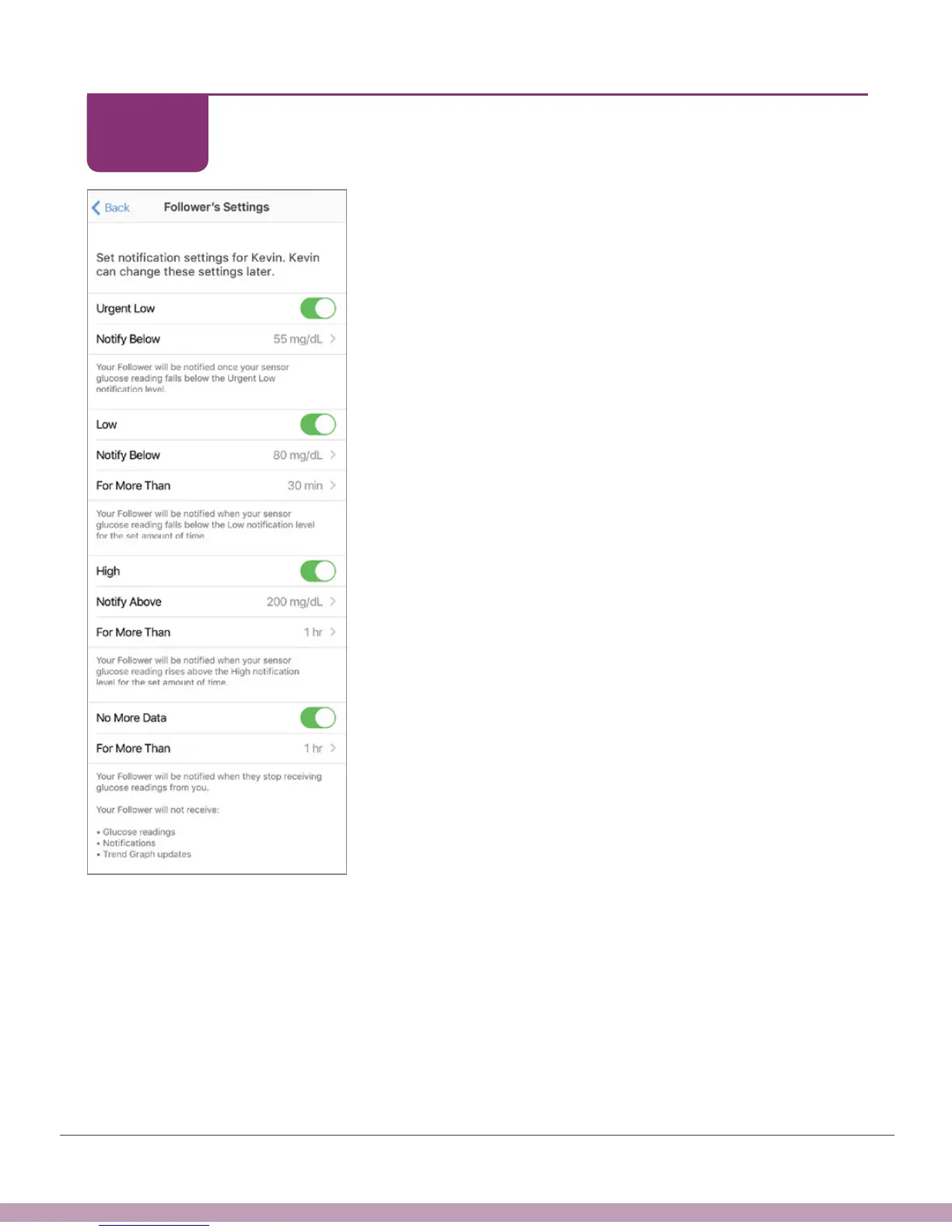
Your Follower gets your Urgent Low Alarm when your
G6 reading is at or below 55 mg/dL. Don’t want to
share this? Tap Urgent Low switch to off. All other
alerts are off by default.
If you want your Follower to get notified, turn the
alerts on in the Follower’s Settings menu. Their alert
notifications are separate from your own Low and High
Alerts.
If you’re sharing with a Follower, the Follower has
access to your G6 readings and can also set up their
own notifications.
You pick what your Follower can see in the Follower
Settings screen, however, they can change their
settings. For example, you set up Share to notify your
Follower when your G6 readings go below 90 mg/dL for
more than half an hour. Your Follower can change it to
notify themselves when your G6 reading goes below 75
mg/dL for 45 minutes.
If your Follower doesn’t get any data for an hour,
they’ll be notified there is some type of communication
problem. Tap the No More Data switch or the For
More Than to customize these settings.
Tap Next.
STEP
10 of 11



 To Next Page