Operating instructions, SM-110/-111
Putting the machine into operation
23
6
angle position. The markings on the angle pyramid surfaces correspond
approximately to the following overall grinding angles (A): I = 36°, II = 32°,
III = 28°, IIII = 24°. The desired grinding angle surface of the angle pyramid
must point in the direction of the grinding surface of the grinding wheel.
4. Fold back the contact surface [5-3] and snap in the angle pyramid.
➾ For a symmetrical overall grinding angle (A), the grinding angle must
be identical for both knife guides. To this end, repeat the setting on
the opposite side.
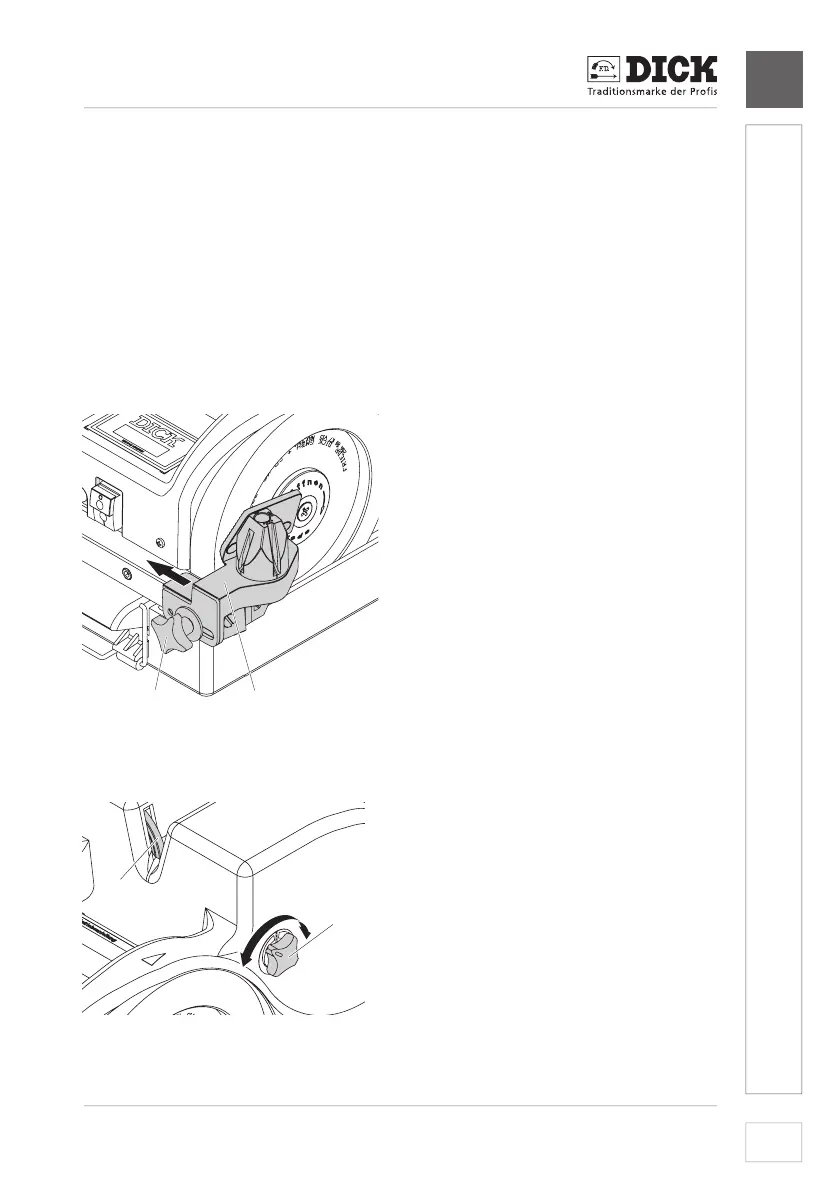
5. For good and safe knife guidance during grinding, place the knife guides
[6-1] as close as possible to the grinding wheels without touching them.
To this end, loosen the star handle screw [6-2] and tighten it again after
adjustment. The grinding angle setting does not change here.
2
1
[6-1] Knife guide
[6-2] Star handle screw
Image 6 – Setting the knife guide
6.4.2 Setting the honing wheels (only SM-111)
2
1
[7-1] Star handle
[7-2] Honing wheels
Image 7 – Adjusting the honing wheels


 To Next Page