DIESTRO 103APV4R ELECTROLYTE ANALYZER
64 JS Medicina Electrónica
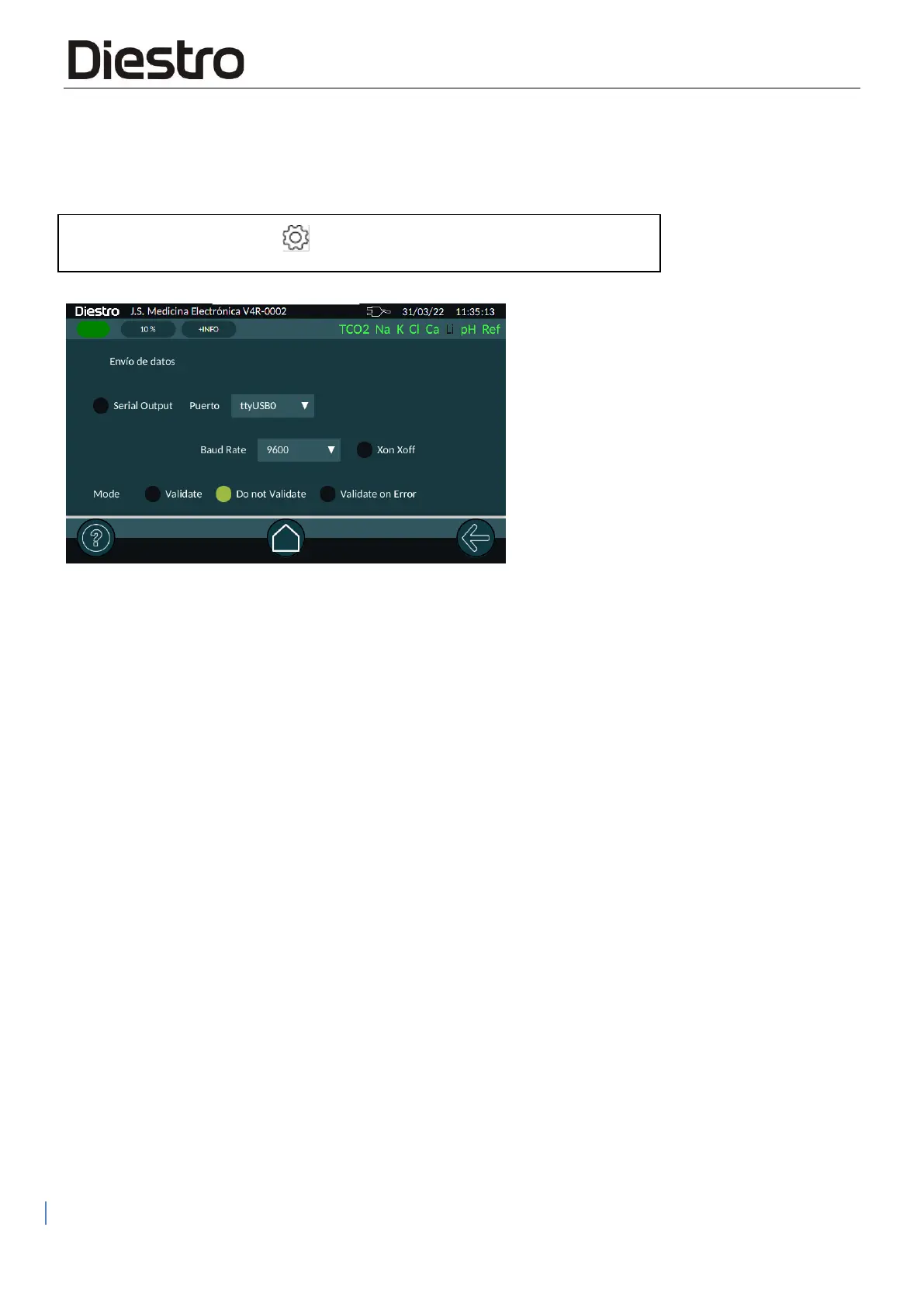
Serial output configuration:
To configure serial output, navigate to the menu:
Press "Serial Output" to enable it. Select the port from the drop-down menu.
Here you can choose the communication speed and enable/disable the Xon/Xoff protocol.
"Mode" will allow you to configure the Analyzer to validate the data before sending it over the
network:
This parameter includes the following options:
● Validate: Each time a measurement is completed, the operator must press the send data
icon to send the data or press the back arrow to exit without sending it.
● Do Not Validate: Each time a measurement is completed, it will be sent automatically.
● Validate on Error: Each time the measurement is finished, and if there is an error, the
operator must acknowledge the transmission by pressing the send button icon or press
the back arrow to exit without sending it. Error-free measurements are automatically sent
to the network, without validation by the operator.
Note: When using the Sampler, as long as the LIS output is enabled, all measurements will be
sent without operator validation.


 To Next Page