UTM-00339 | Rev 19
Page 102 of 253
DetNet South Africa Copyright © 2021
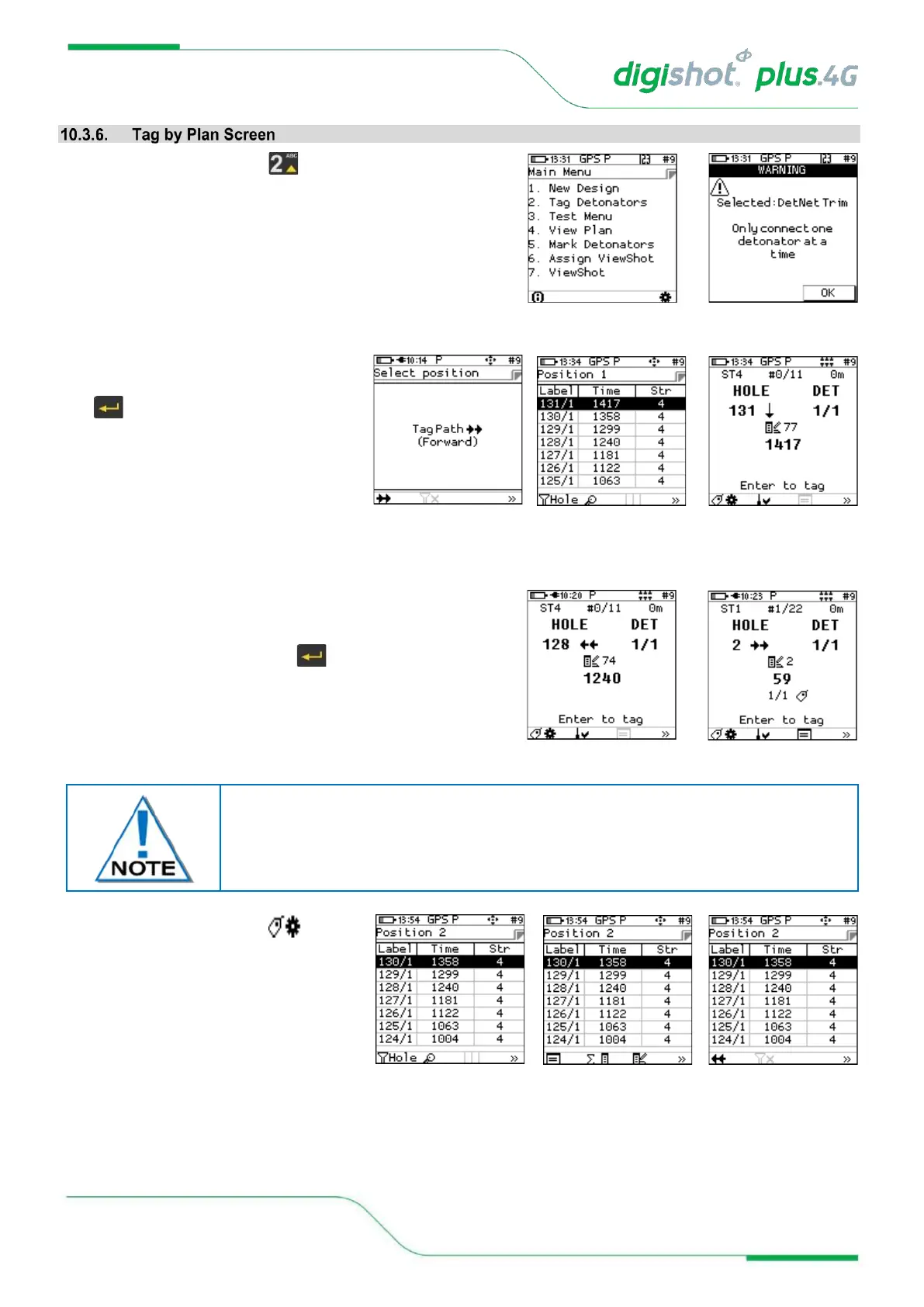
1. From main menu, select to Tag detonators
2. Acknowledge warning for selected plan and to connect one
detonator at a time
3. Select tagging starting position
4. Connect the detonator and press the
key to tag
5. The screen will confirm the tagged detonator and display
details as tagged.
• Observe Autotag status
• Screen Instruction: Enter to tag next “detonator”
• From this screen, the user will have two options:
• Return to the list, or
• Stay in the current screen (Waiting for user to connect
the next detonator).
6. Press “tag configuration” SoftKey
from the tagging screen to return to the
list.
Observe that the current implementation remains in the tagging screen and adjusts
the parameters according to the next position in the list which can be verified by
pressing on “tag configuration” SoftKey.



 To Next Page