UTM-00339 | Rev 19
Page 103 of 253
DetNet South Africa Copyright © 2021
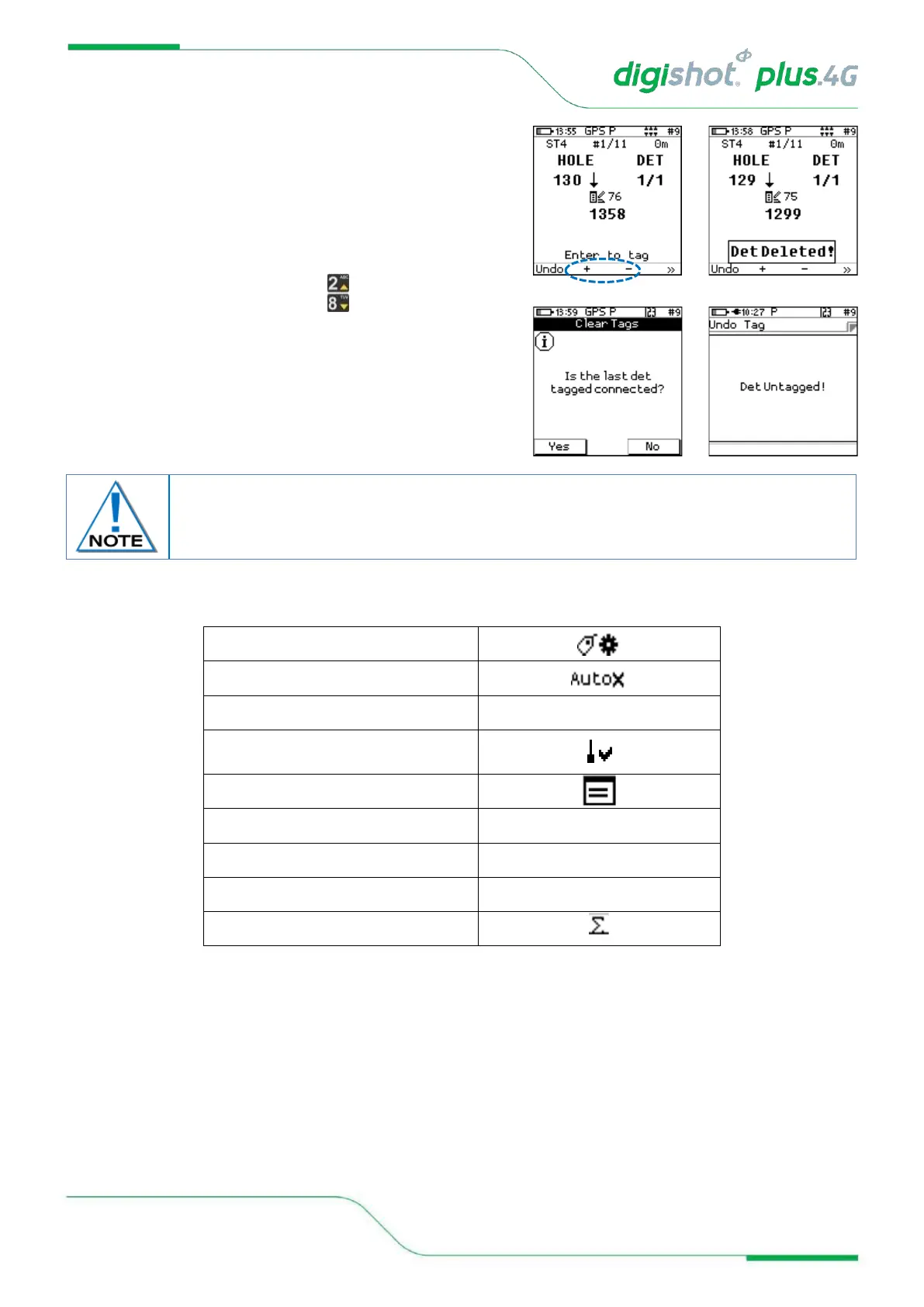
7. To skip a position (mark as deleted) while tagging, the user
must navigate to the panel of SoftKeys that contains the
Add/Delete + and - Icons.
8. Press the indicated SoftKey to mark the current location as
deleted in the tagging list, the tagging screen will be updated
with the next location as illustrated in this example
9. To skip over the current location without deleting it, scroll up or
down the lagging list by using the buttons
10. To untag the last detonator that was tagged, connect the
detonator and select undo
11. Confirm to clear tag of last det tagged by selecting yes
Table 7: CE4 Tagger SoftKey Icons – Tag By Plan” Option
Inserting a detonator while tagging by plan and using the + softkey, will not be identified
as an unplanned detonator and will become part of the plan. There will thus be no need to
merge it with the plan later.



 To Next Page