UTM-00339 | Rev 19
Page 56 of 253
DetNet South Africa Copyright © 2021
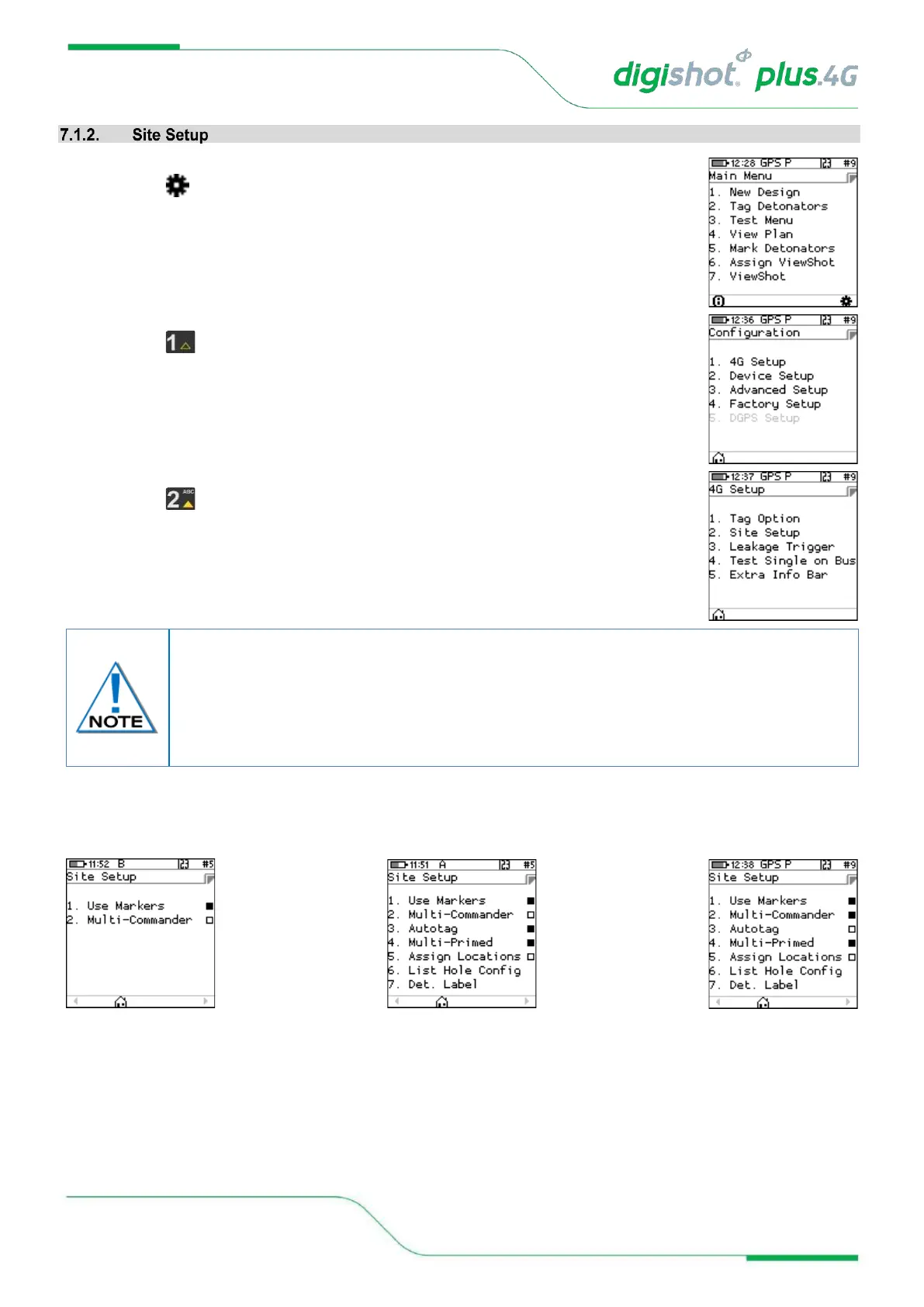
1. Main Menu
• Press SoftKey to select Configuration Settings.
2. Configuration Settings Menu
• Press to select 4G Setup
3. 4G Setup
• Press to select Site Setup
4. Site Setup
Site Setup screen for each (Basic, Advanced and Planned) tagging mode are depicted below.
• Use Markers: When the Use Markers option is enabled (Black filled rectangle) the tagging screen will
contain a SoftKey to allow the simultaneous marking and tagging of a detonator. “Mark detonators” menu
includes more types of markers besides “End of Line” which typically is assigned to the detonator
connected last on a wire harness.
The Site Setup is dependent on the Tagging Option and in this menu, the user may allow
certain functions to be active when tagging.
Advanced mode has more advanced features and can be used with multi-primed or decked
holes. Detail about decking and hole configuration can be found further in this document
where Advanced mode is detailed



 To Next Page