UTM-00339 | Rev 19
Page 86 of 253
DetNet South Africa Copyright © 2021
With the BASIC tagging option, the user needs to only concentrate on the Delay value assigned to the detonator.
The BASIC option is best suited for single primed hole blasts.
It is advised to use only one Tagger per Commander when the Basic Tagging Option is
used. Dets tagged in Basic mode have no location allocated and cannot be merged with a
plan.
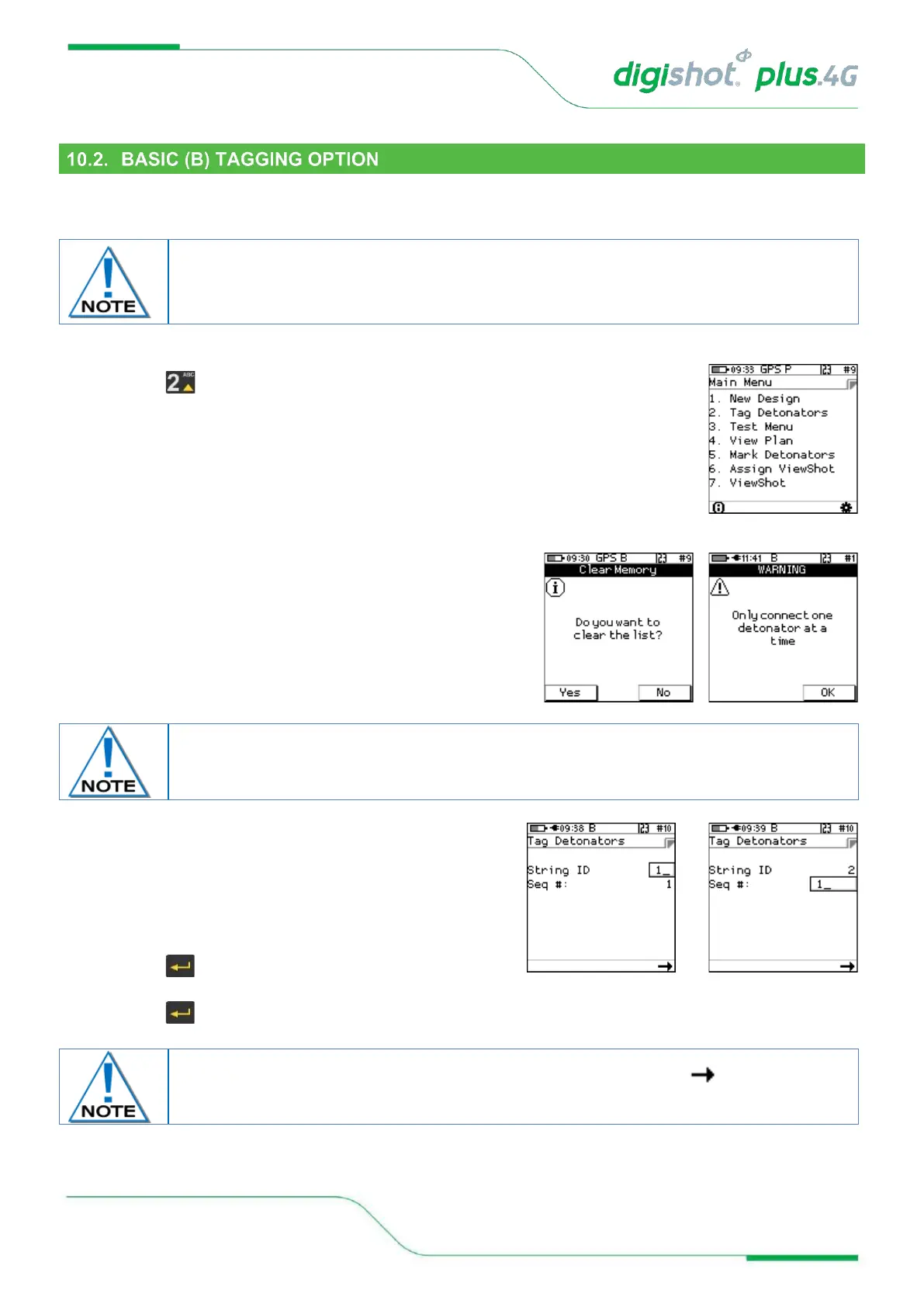
1. From the Main Menu
• Press to select Tag Detonators
• Clear the list acknowledgement. Select yes to clear and No
to continue from previous list
• Tag Detonators Warning
• Press OK SoftKey to acknowledge warning
This detonator warning message will only be displayed when the user opens the tagging
screen on the initial start-up of the device.
2. From the Tag Detonators Option
The user will be prompted to configure the Tagger with the
desired String ID and new starting Sequence Number when
tagging
• Observe String ID (1 depicted on screen)
• Enter new String ID (2 depicted on next screen)
• Press to save new String ID
• Enter new starting Sequence # as required
• Press to save new starting Sequence #
The User may bypass the above procedure if required and Press the SoftKey to
display the following Enter Delay screen.



 To Next Page