UTM-00339 | Rev 19
Page 92 of 253
DetNet South Africa Copyright © 2021
Users can download 10 different plans into the CE4 Tagger. Before downloading a ViewShot design, the user
must select the Plan into which the plan will be downloaded to. The previous plans can be deleted, and the plan
names may be renamed or cleared.
Main Menu
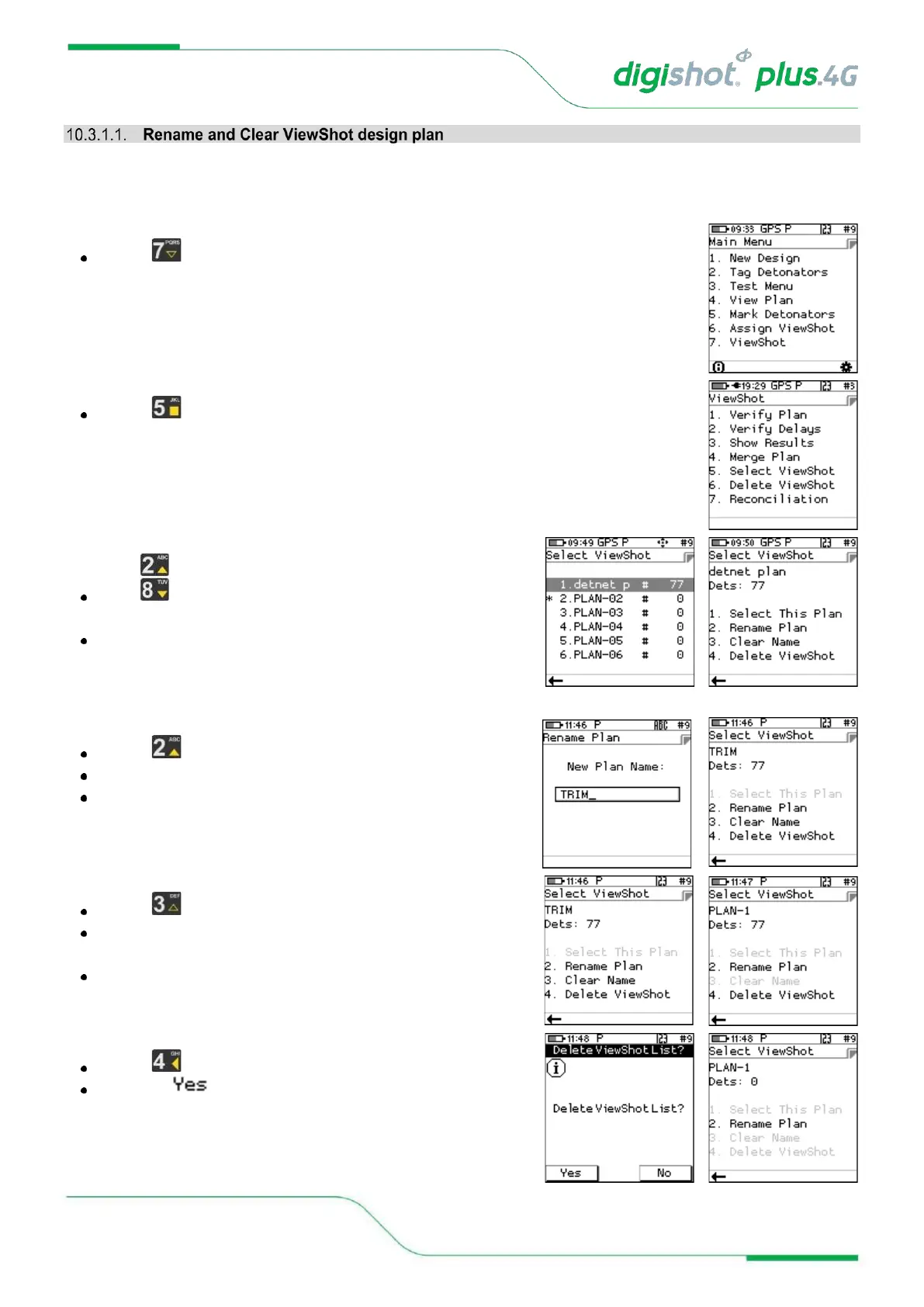
Press SoftKey to select ViewShot
1. ViewShot Menu
Press to select Select ViewShot
2. Select ViewShot
Use navigational keys to move to the desired PLAN and
press Enter to select
The selected PLAN will be indicated by the asterisk
3. Rename Plan
Press to Rename Plan
Type the new name and press Enter to accept
Plan will be renamed to TRIM1 as shown
4. Clear Name
Press to Clear Name
The name will revert to the previous plan number (PLAN-1)
as indicated
Clear Name will be greyed-out
5. Delete ViewShot
Press to Delete ViewShot
Select SoftKey to delete



 To Next Page