The information contained here are property of DIGITAX Automotive Electronics Italy, and extremely confi dential. Any disclosure, copying, distribution to third
party is strictly prohibited.
26
Test Connector
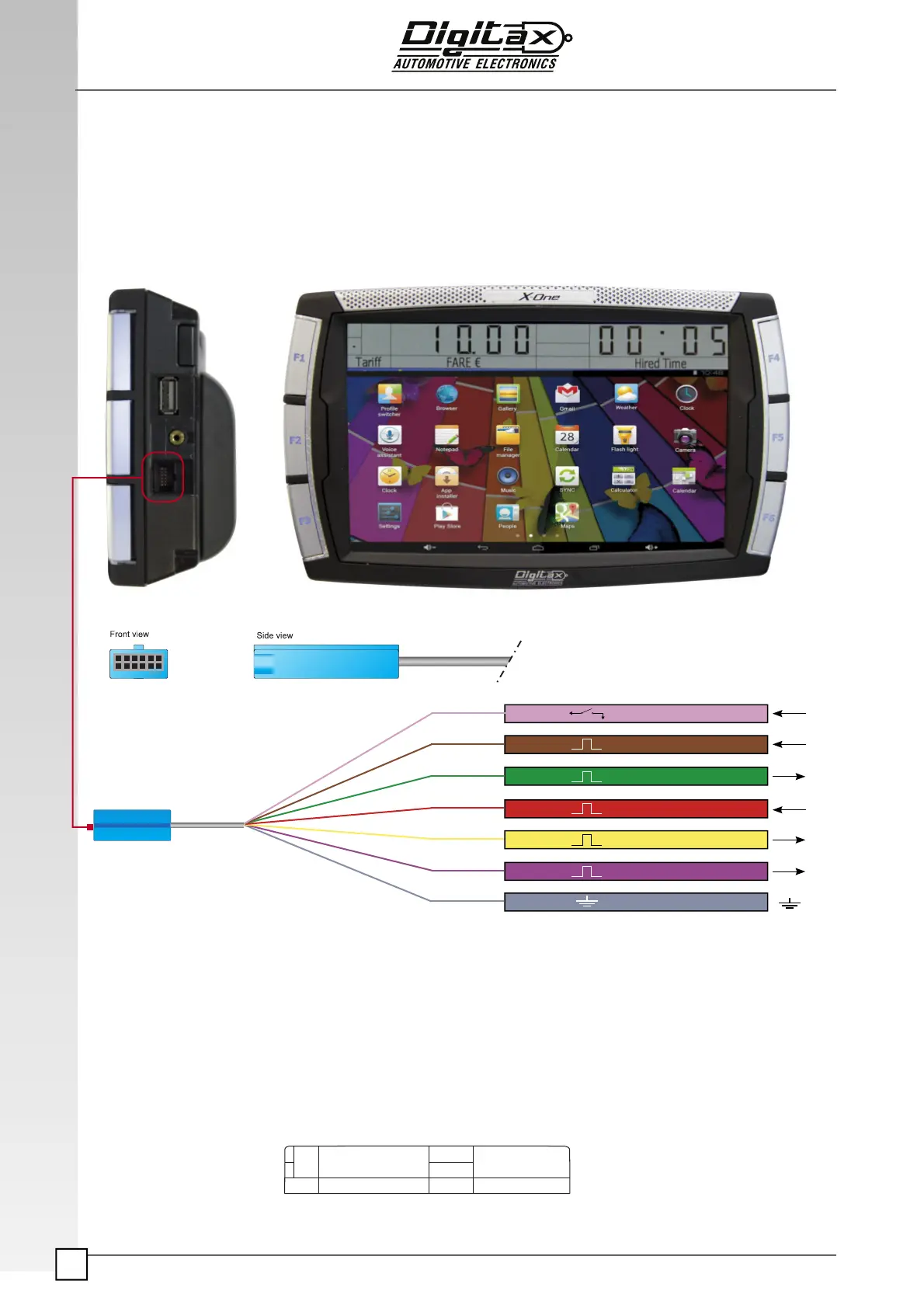
The Test Connector for X-ONE Android taximeter is a mini USB connector that must be inserted
in its dedicated slot as shown in this draw. Please use this slot only to connect the test
connector cable. Any other device with the same plug must not be connected as it can
damage the device.
Test Connector
VIOLET
YELLOW
RED
GREEN
BROWN
PINK
GREY
GROUND
FARE INCREMENT PULSE OUTPUT
DISTANCE PULSE INPUT
TIME PULSES OUTPUT
TIME PULSES INPUT
TIME BLOCK INPUT
DISTANCE PULSES OUTPUT
NOTE: In order to use with property the test connector functionality the connector must be
connected to a power battery suply with almost 12v. Once the test connector is powered
and plugged in the
X-One Android slot, the main display will show “teston”.
If the text “teston” doesn’t appear in the
X-One Android main display even with the test
connector plugged in, please review the test connector connection.
tEStOn
Time
FARE Rs


 To Next Page