The information contained here are property of DIGITAX Automotive Electronics Italy, and extremely confi dential. Any disclosure, copying, distribution to third
party is strictly prohibited.
31
The K-Constant
(Car Transmission Ratio)
The “K Constant” is the number of pulses per Kilometer emitted by a transducer and received by a taximeter.
K Constant = Pulses/Kilometer
The pulses can be emitted by the car’s electronic transducer or, if the car is not provide of it, by the Digitax
mechanical one or by a third part interface. This constant can be known or be tested on road.
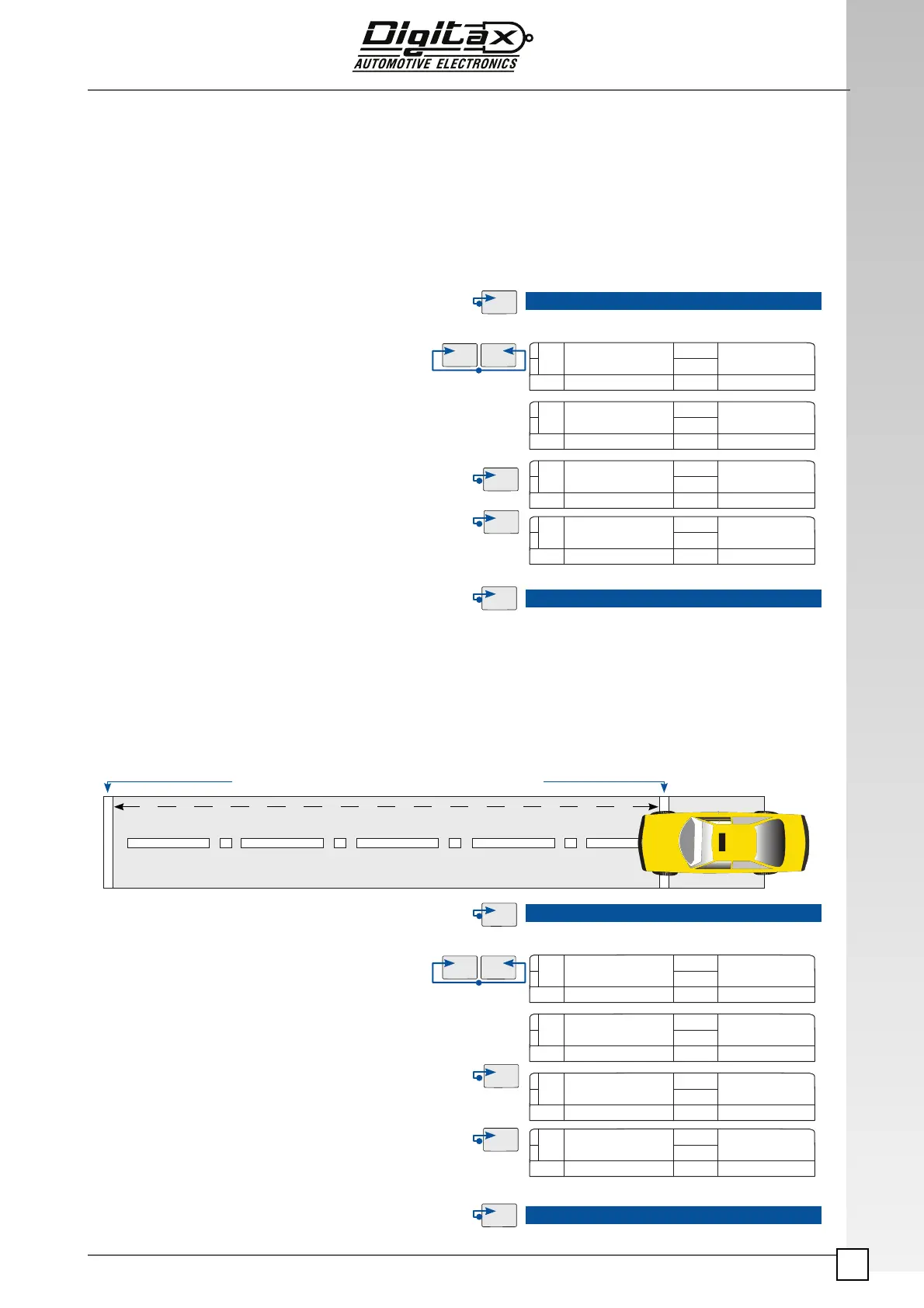
How to ! nd out the K-Constant value (Autotest)
If you don’t know the K-Constant it is possible to self calculate and save the K-Constant by autocalibration pro-
cedure
For a right procedure it is required to select and sign a straight test road of 1.000 meters
1) Align carefully the car’s front wheels with the test distance‘s start point (0 meters).
1) Select For Hire position by OP button
2) Remove the taximeter programming cover
3) Insert the Black
Service Programming Key in its slot.
4) Press
K2 and K3 buttons at the same time.
The ATTEST text appears on main display for few senconds
ThereafterThe main display with shows the programmed K-Constant
value.
The extras display shows the meters to be covered for the Autotest
If you know the K-Constant:
5) Press
K2 button to increase the K-Constant number.
Press
K1 button to decrease the K-Constant number.
By pressing
K1+K2 at the same time the programmed K-
Constant it set to default value 1000
6) Press
K4 to save the programmed value
7) Press OP button to end the procedure and go back to For Hire position
8)Remove the Black Service Programming Key from the taxime-
ter. End
2) Remove the programming cover
3) Select
For Hire position by OP button.
4) Insert the Black
Service Programming Key
in its slot.
5) Press
K2 and K3 buttons at the same time.
The main display shows “Attest” for a few seconds.
6) Press
K3 button to reset all meter’s counters, The secondary dis-
play will show the value 0.
7) Start driving straight at 30 km / hours maximum.
Drive to the Autotest Finishing Point (1 Km). And completely stop the car
8) Once stop the car at 1.000 mt Finishing Point Press K4 button to
calculate and save the proper K-Constant, the main display will show
the new K-Constant value. The secondary display will show the num-
ber of pulses generated during the Autotest.
9) Press the OP button in order to fi nish the Autotest procedure, save
and return back to For Hire position.
Remove the Black
Service Programming Key f
rom the taximeter.
End
How to program a known K-constant value (autotest)
ATTEST
AutoTest
K constant
1000 1000
100 1000
900 1000
ATTEST
1000 1000
995 0
680 680
1 Kilometer at Max 30 Km/Hour
Autotest Finishing Point (1.000 meters) Autotest Starting Point (0 meters)
pulse/dist.
K constant
pulse/dist.
AutoTest



 To Next Page