The information contained here are property of DIGITAX Automotive Electronics Italy, and extremely confi dential. Any disclosure, copying, distribution to third
party is strictly prohibited.
36
Statistical Memory
How to Print Locations Memory Content
The taximeter records and keeps data in 2 Memory Blocks, each one divided in 45 loca! ons.
The content of both BlocF2 and BlocF3 can be printed out.
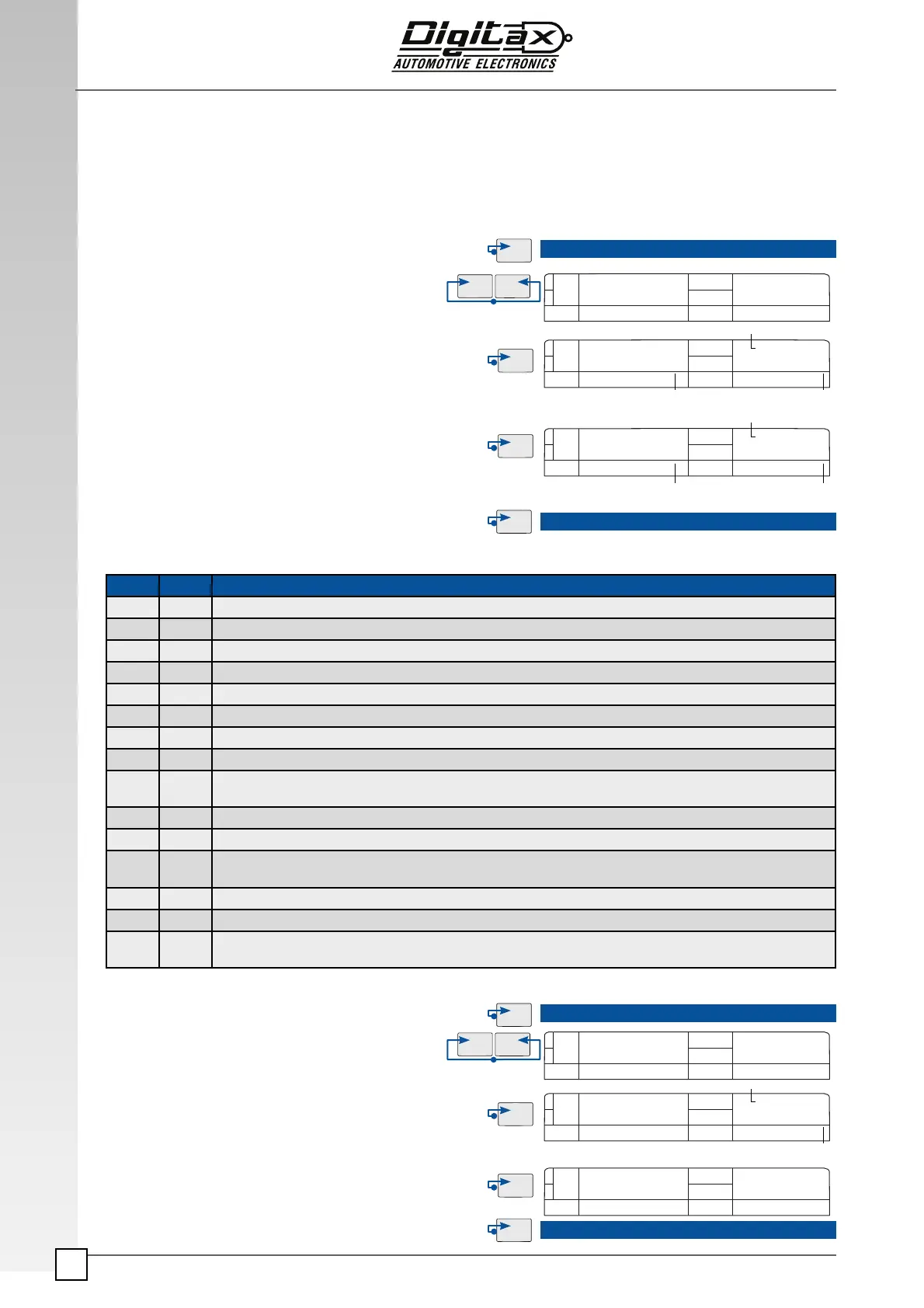
How to print the memory blocks information
Example: How to print out the Over Speed Report
Print Out Reports by pressing F5
STATIS
3 1 5
0 1 5
FOR HIRE
FOR HIRE
Memory Data
Memory Block
Memory Location
Number
Select For Hire position.
Press
F2 and F3 at the same time to enter in the “Statistical
Reading “ mode.
The main display (
3)will show “Statis” for a few seconds.
Reach the memory
location n. 8 by pressing F3 button.
Reaching location n. 8, press F5 button to print out the
contents of both
Block 1 and Block 2.
The printer will start printing
Press
F1 button to end the printing procedure and go back to
For Hire position.
Select For Hire position.
Press
F2 and F3 at the same time to enter in the “Statis-
tical Reading “ mode.
The main display (
3) will show “Statis” for a few sec-
onds.
The secondary display (5) shows in the right digits the
location n. 1 (relative to the
Over Speed memory loca-
tion) and in its left digits the Block number.
Press
F5 button to print out the Over Speed events.
Press F1 button to end the printing procedure and go
back to For Hire position.
Memory Data
Memory Block
Memory Location
Number
Loc. Block Memory Content
1 1 Overspeed report
2 1 “Trip by Trip” report of all stored events
3 1 “Trip by Trip” report star! ng from the last printed events
4 1 “Trip by Trip” report of last 50 events
5 1 ----------
6 1 ----------
8 1 Sta! s! cal Memories - Blocks 1-2
9 1 Monthly report (by pressing F5 it goes to a submenu to select the month desired and print it by pressing again F5)
16 1 “Driver by Driver” report (by pressing F5 it goes to a submenu to select the driver number desired or all drivers and print
the report of the driver selected by pressing again F5)
18 1 Print Blocks 1&2 and reset Block 2 (The reset of Block 2 will be done only with the service programming key 1 inserted)
19 1 Print Blocks 1&2 and reset Block 1 (The reset will be done if allowed by tari" setup)
20 1 Print Blocks 1&2 and reset Block 1&2 (The reset of Block 1 will be done if allowed by tari" setup and the reset of Block 2
will be done only with the Service Programming Key 1 inserted)
28 1 Reset Block 2 (Only with the Service Programming Key 1 inserted)
29 1 Reset Block 1 (If allowed by tari" setup)
30 1 Reset Blocks 1&2 (The reset of Block 1 will be done if allowed by tari" setup and the reset of Block 2 will be done only
with the Service Programming Key 1 inserted)
STATIS
3 1 1
1 1 1
FOR HIRE
FOR HIRE
Memory Block
One Spread Location
Number
Counters
Counters
Counters
Counters
Counters
Counters



 To Next Page