The information contained here are property of DIGITAX Automotive Electronics Italy, and extremely confi dential. Any disclosure, copying, distribution to third
party is strictly prohibited.
42
For Hire
The Tariff
How to Manually Program the Tariff
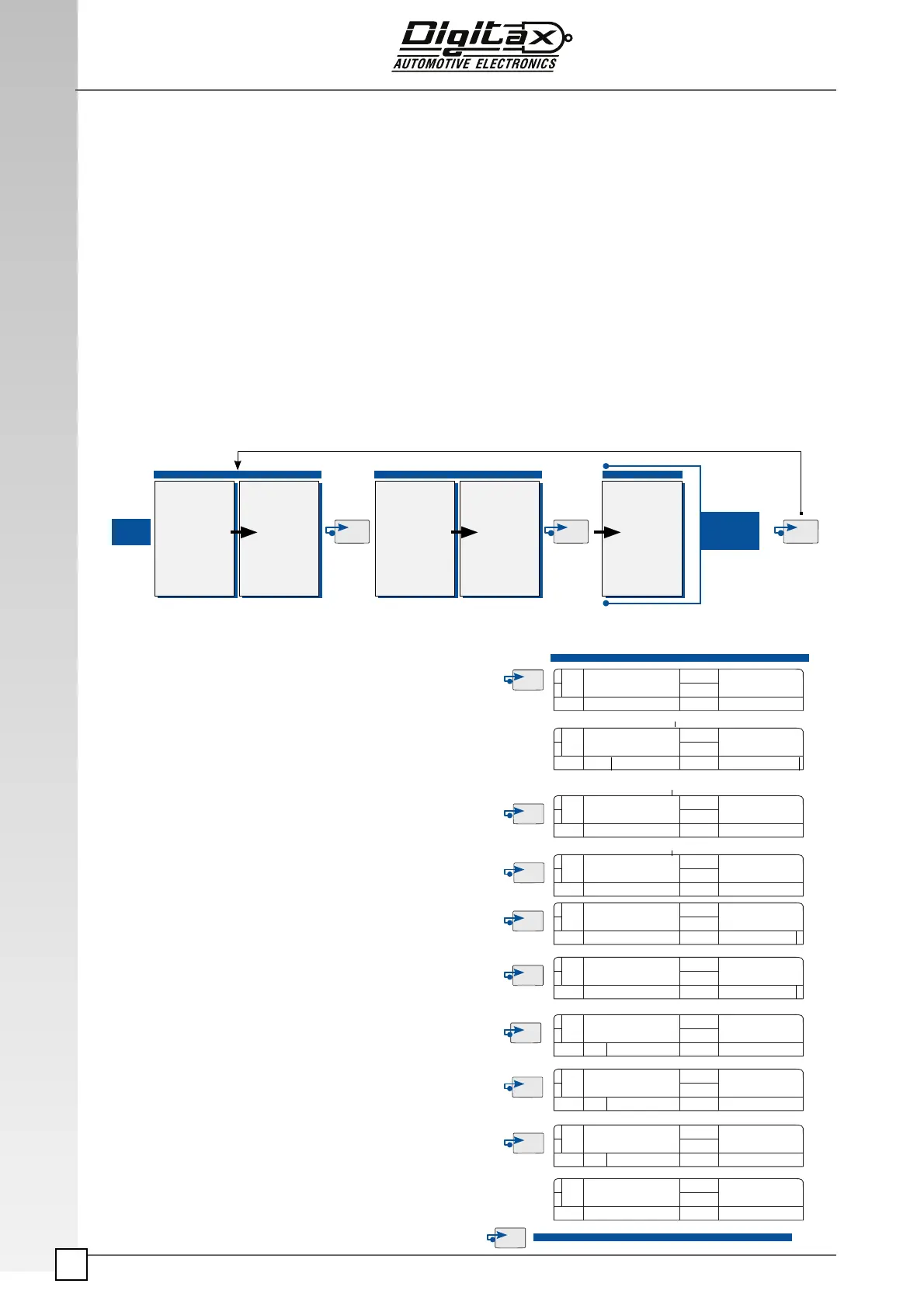
With this procedure it’s intended to explain in detail the F1’s Tariff Programming.
It is possible to use up to 429 parameters to program a tariff. These parameters are located into a single memory Block.
The blocks available in the taximeter are 63 and each one has its set of 429 programmable parameters. Program a tariff
in the X-One Android taximeter is like to fi ll a chart made of 63 columns (63 Blocks) and 429 lines ( Parameters). For a
simple tariff is suffi cient a single Block to compute the fi nal amount. For a complex tariff the user must program other
parameters in more blocks to generate complex fi nal amounts. Their content replace, at the programmed event (Prog.Date,
Key press, etc..) the relevant parameters of the Working Block. Every new modifi ed parameter value in a Block will replace
the old one in the Working Block updating the tariff. Note that only the changed parameters going to substitute the old
ones, the unchanged parameters value remain active. The taximeter’s internal software read the blocks in chain and com-
pute them in a so called “Working Block”: this is the one that makes the fi nal amount calculation. The blocks chain starts
with the Block 0 (It’s the fi rst Block that the taximeter loads when it’s being started up) and ends with the Block 62.
For a simple tariff, that use at least only the Block 0, the taximeter behavior is as follow:
Starts up (Block 0 loads its content of 429 parameters value in the Working Block) > Pressing F1 it passes from For
Hire to Hired state ( The programmed parameters now are active to generate the tariff ) > Trip ended, stF1 the taximeter
HOW TO PROGRAMM THE TARIFF
Power
On
Final
Tariff
Amount
Block 0
P.001.
.
.
.
Param.429
Wk.Block
P.001.
.
.
.
Param.429
Block 1/62
P.001.
.
.
.
Param.429
Wk.Block
P.001.
.
.
.
Param.429
Wk.Block
P.001.
.
.
.
Param.429
1
PR6 TA
00 62 1
Parameter Number
00 61
Block Number
Parameter Number
Parameter Value
00 61 1
Parameter Number
00 62 2
Parameter Value
00 62 1
Parameter Value
STOP
00 62 2
Block Number
0 1 61 1
Block Number
00 61 1
Blinking Block Number
Select For Hire position
Insert the Service Programming Key 2 in its slot.
Press
F4 button.
The main display (3) will show in the left digits the Block num-
ber and in the right digits the Parameter number. The second-
ary Display (
5) will show in the right digits the Parameter value.
To increase the parameter number press
F3 button.
To decrease the parameter number press
F2 button.
To increase the parameter value press
F5 button.
To decrease the parameter value press
F4 button.
Press
F1 button to change the current Block.
The left digits of the main display (
3) start blinking.
Press
F3 button to increase the Block number .
Press
F2 button to decrease the Block number.
Press
F1 button once to go back in the Tariff Programming
mode.
Keep pressing F1 button for few seconds.
The left display will show “Stop” for few seconds after go back
to For Hire position.
Hired Stopped
Prog.Tar
Prog.Tar
Prog.Tar
Prog.Tar
Prog.Tar
Prog.Tar
Prog.Tar
Prog.Tar
Prog.Tar
Prog.Tar



 To Next Page